Yoga benefits WordPress Theme


Four Wellness Cards as Stable WordPress Page Content
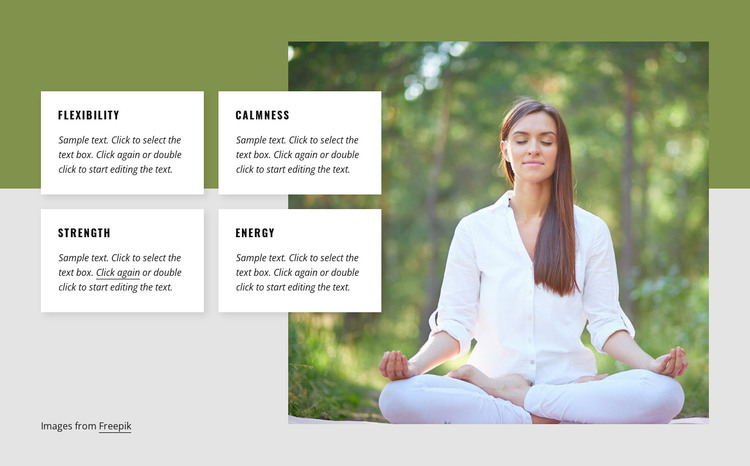
The four labeled cards give the section a clear page-content role: flexibility, calmness, strength, and energy are presented as separate but related wellness qualities. Each card carries a short supporting paragraph, so the content can remain organized as four comparable information units rather than a single undifferentiated text area. The two-by-two grouping also makes the section easy to identify when it appears among other content on a WordPress-managed page.
The large outdoor meditation photograph changes how that information is read. It provides the visual context for the qualities, while the white cards overlap the image-side composition and create readable surfaces for the labels and copy. Dark uppercase typography supports quick scanning, compact italic text keeps the explanations visually subordinate, and soft shadows distinguish each card without introducing interaction. Together, these relationships preserve a stable visual section that can be reused with edited page content.
In a WordPress-oriented project, the block can suit permanent wellness or services-page content while the wider site manages its other page areas separately. Its structure is especially useful when the editor needs four concise descriptions beside one strong image, rather than a stream of unrelated paragraphs. The surrounding project can determine how the section is placed and maintained, while this block continues to provide one focused, static content region with a recognizable card pattern.
Customize with Nicepage
Open this ready-made template in the WordPress Website Builder and customize it visually in the Nicepage editor. Replace demo content, edit page sections, and adapt the design to your project without rebuilding the template from scratch.
Edit Template Offline
2. Create a new page or select existing
3. Click Add new block, search for id 364741 and click enter
Edit Template Online
Create Awesome Websites


Free Nicepage Builder
Keywords
Manage and Edit This Theme in WordPress
Customize and Install the WordPress Theme
Start with this ready-made theme instead of building the WordPress design from scratch. Customize its layout, content, typography, images, sections, and other design elements visually in Nicepage editor, then export and install the WordPress Theme, Plugin, and Pages on your WordPress site. The Nicepage WordPress Plugin lets you continue working with the site after installation.
Edit the Theme Directly in WordPress
After installation, you can edit the WordPress Theme directly in WordPress with the Nicepage WordPress Plugin. Use Site Style to customize site Colors, Fonts, Header, Footer, Blog, and Post Page Templates while working within your WordPress website.
Edit WordPress Pages Visually
Use the Nicepage WordPress Plugin to edit page content directly from the WordPress admin area. Open a WordPress Page with Nicepage and visually change its text, images, sections, and other page elements while continuing to manage the Page through WordPress.
WordPress Content and Theme Integration
Use the customized theme with WordPress Pages, Posts, Blog and Post Templates, menus, widgets, and other CMS-managed content. Shared theme elements such as Colors, Fonts, Header, Footer, Blog, and Post Page Templates can be managed as part of the overall site design, while WordPress provides the CMS environment for managing site content.
This workflow combines a ready-made WordPress Theme with visual customization, direct theme editing in WordPress, and continued content management through the Nicepage WordPress Plugin.