Experience WordPress Theme


Year-based cards turn permanent history content into a scannable page section
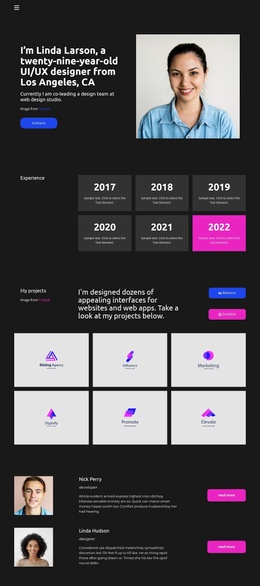
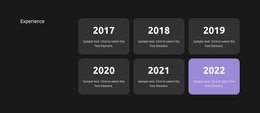
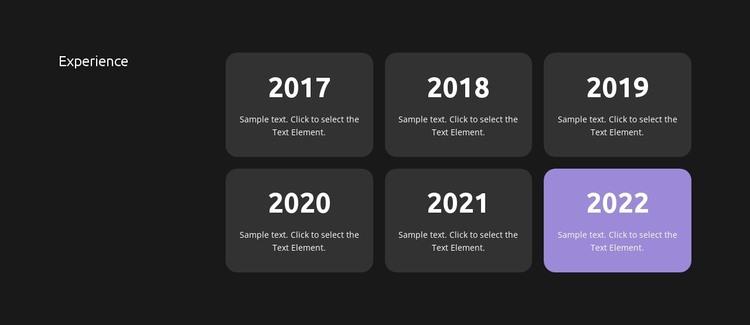
The Experience heading and six year-labeled cards give this block a clear role as stable page content. Rather than presenting the history as one continuous paragraph, the design separates it into six related units, each with a year from 2017 through 2022 and supporting text beneath. The two-row, three-column grid keeps the sequence visible at a glance, while the left-side label explains what the repeated cards represent. This structure suits a WordPress-managed page when an experience or career-history area needs to remain distinct from other publishable content.
The card treatment supports that page role without relying on CMS-specific components inside the section. A dark charcoal background frames the content, darker rounded cards create consistent containers, and white typography differentiates the prominent years from the smaller descriptions. The purple accent on the 2022 card provides a local point of emphasis, potentially marking the latest visible milestone while preserving the same card relationship. Because the content model is repeated and clearly labeled, the section can sit alongside other page areas such as an introduction, portfolio, services, or contact information.
Within a WordPress-oriented project, the block can function as a reusable visual content region while the wider site manages its surrounding pages and editorial material. Its value is the separation of chronological information into readable, repeatable units, not the creation of a standalone theme. The heading, year sequence, grid, and supporting descriptions give permanent page content a defined presentation that can be placed where the broader page journey requires it.
Customize with Nicepage
Open this ready-made template in the WordPress Website Builder and customize it visually in the Nicepage editor. Replace demo content, edit page sections, and adapt the design to your project without rebuilding the template from scratch.
Edit Template Offline
2. Create a new page or select existing
3. Click Add new block, search for id 3434439 and click enter
Edit Template Online
Create Awesome Websites


Free Nicepage Builder
Keywords
Manage and Edit This Theme in WordPress
Customize and Install the WordPress Theme
Start with this ready-made theme instead of building the WordPress design from scratch. Customize its layout, content, typography, images, sections, and other design elements visually in Nicepage editor, then export and install the WordPress Theme, Plugin, and Pages on your WordPress site. The Nicepage WordPress Plugin lets you continue working with the site after installation.
Edit the Theme Directly in WordPress
After installation, you can edit the WordPress Theme directly in WordPress with the Nicepage WordPress Plugin. Use Site Style to customize site Colors, Fonts, Header, Footer, Blog, and Post Page Templates while working within your WordPress website.
Edit WordPress Pages Visually
Use the Nicepage WordPress Plugin to edit page content directly from the WordPress admin area. Open a WordPress Page with Nicepage and visually change its text, images, sections, and other page elements while continuing to manage the Page through WordPress.
WordPress Content and Theme Integration
Use the customized theme with WordPress Pages, Posts, Blog and Post Templates, menus, widgets, and other CMS-managed content. Shared theme elements such as Colors, Fonts, Header, Footer, Blog, and Post Page Templates can be managed as part of the overall site design, while WordPress provides the CMS environment for managing site content.
This workflow combines a ready-made WordPress Theme with visual customization, direct theme editing in WordPress, and continued content management through the Nicepage WordPress Plugin.