Cyber monday block WordPress Theme



A WordPress Page Section Built Around One Seasonal Offer
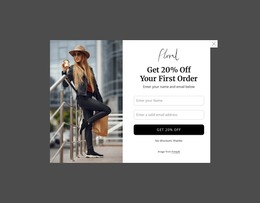
The left side of the block reads as stable promotional content rather than a collection of unrelated elements. “Super offer” introduces the message, the large “Cyber Monday” heading identifies the campaign, and the orange badge isolates the discount-code wording. “Only Today” adds a time-sensitive cue before the rounded “Shop Now” button supplies the visible shopping action. This sequence gives a WordPress-managed page a self-contained offer area that can be placed alongside other content without losing its internal logic.
The photograph on the right creates a second content region and balances the denser text panel. The person’s orange shirt echoes the badge, linking the campaign image to the promotional message while keeping the image visually separate from the offer details. That relationship is useful when seasonal content needs a strong visual marker but should still leave the heading, code, urgency, and action readable as the primary information.
Within a broader WordPress project, the block can serve as promotional content on a retail or shopping-focused page while other sections handle product information, navigation, or supporting details. The section does not need to become a complete theme to be useful: its value lies in providing a defined campaign region with a clear content sequence and a recognizable visual treatment. The block can therefore remain a consistent page section while surrounding WordPress-managed content changes around it.
Customize with Nicepage
Open this ready-made template in the WordPress Website Builder and customize it visually in the Nicepage editor. Replace demo content, edit page sections, and adapt the design to your project without rebuilding the template from scratch.
Edit Template Offline
2. Create a new page or select existing
3. Click Add new block, search for id 3391575 and click enter
Edit Template Online
Create Awesome Websites


Free Nicepage Builder
Keywords
Manage and Edit This Theme in WordPress
Customize and Install the WordPress Theme
Start with this ready-made theme instead of building the WordPress design from scratch. Customize its layout, content, typography, images, sections, and other design elements visually in Nicepage editor, then export and install the WordPress Theme, Plugin, and Pages on your WordPress site. The Nicepage WordPress Plugin lets you continue working with the site after installation.
Edit the Theme Directly in WordPress
After installation, you can edit the WordPress Theme directly in WordPress with the Nicepage WordPress Plugin. Use Site Style to customize site Colors, Fonts, Header, Footer, Blog, and Post Page Templates while working within your WordPress website.
Edit WordPress Pages Visually
Use the Nicepage WordPress Plugin to edit page content directly from the WordPress admin area. Open a WordPress Page with Nicepage and visually change its text, images, sections, and other page elements while continuing to manage the Page through WordPress.
WordPress Content and Theme Integration
Use the customized theme with WordPress Pages, Posts, Blog and Post Templates, menus, widgets, and other CMS-managed content. Shared theme elements such as Colors, Fonts, Header, Footer, Blog, and Post Page Templates can be managed as part of the overall site design, while WordPress provides the CMS environment for managing site content.
This workflow combines a ready-made WordPress Theme with visual customization, direct theme editing in WordPress, and continued content management through the Nicepage WordPress Plugin.