Creative Bookstore WordPress Theme



Edit Template Offline
2. Create new page and search for id 6666298
Edit Template Online
Create Awesome Websites


Free Nicepage Builder
Keywords
Store Pages, Location Content, and Editorial Details Share One Theme Direction
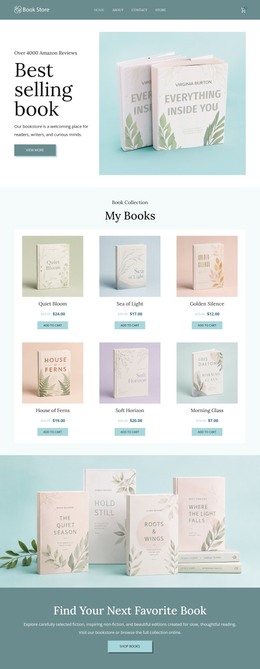
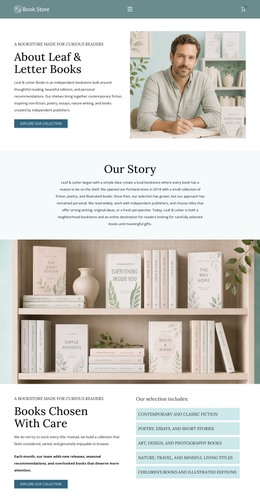
The page-oriented content is well suited to a bookstore project that needs permanent store information alongside other managed content. The opening introduction can represent the main visitor-facing page, combining a bookstore image, visit message, and Contact the Bookstore button. The three repeated location cards provide a separate content pattern for Portland, Seattle, and San Francisco, while the footer supplies shared operational information such as address, opening hours, phone, email, and message guidance.
The subject matter also leaves room for content expansion around books, independent publications, and gift editions. Those verified offerings can inform additional page or editorial areas without claiming that a blog, post archive, categories, or other WordPress structures already exist in the template. The design instead provides a visual system in which permanent bookstore information and future regularly updated content could remain related. The muted teal and pale blue-green palette, serif-led typography, and editorial imagery give the theme a recognizable character, while the navigation already identifies store-oriented access as part of the page context. Portland’s displayed schedule is a useful example of detailed store information that can sit alongside broader location and contact content. In a WordPress-oriented project, the main benefit is this separation of content roles: visitor introduction, location information, bookstore offerings, and shared contact details can be developed within one consistent theme direction rather than treated as unrelated page designs.
Customize with Nicepage
Open this ready-made template in the WordPress Website Builder and customize it visually in the Nicepage editor. Replace demo content, edit page sections, and adapt the design to your project without rebuilding the template from scratch.
Manage and Edit This Theme in WordPress
Customize and Install the WordPress Theme
Start with this ready-made theme instead of building the WordPress design from scratch. Customize its layout, content, typography, images, sections, and other design elements visually in Nicepage editor, then export and install the WordPress Theme, Plugin, and Pages on your WordPress site. The Nicepage WordPress Plugin lets you continue working with the site after installation.
Edit the Theme Directly in WordPress
After installation, you can edit the WordPress Theme directly in WordPress with the Nicepage WordPress Plugin. Use Site Style to customize site Colors, Fonts, Header, Footer, Blog, and Post Page Templates while working within your WordPress website.
Edit WordPress Pages Visually
Use the Nicepage WordPress Plugin to edit page content directly from the WordPress admin area. Open a WordPress Page with Nicepage and visually change its text, images, sections, and other page elements while continuing to manage the Page through WordPress.
WordPress Content and Theme Integration
Use the customized theme with WordPress Pages, Posts, Blog and Post Templates, menus, widgets, and other CMS-managed content. Shared theme elements such as Colors, Fonts, Header, Footer, Blog, and Post Page Templates can be managed as part of the overall site design, while WordPress provides the CMS environment for managing site content.
This workflow combines a ready-made WordPress Theme with visual customization, direct theme editing in WordPress, and continued content management through the Nicepage WordPress Plugin.