
Tax lawyer WordPress Theme


Edit Template Offline
2. Create new page and search for id 302711
Edit Template Online
Create Awesome Websites


Free Nicepage Builder
Keywords
Service and Profile Content Fits a WordPress Page Structure
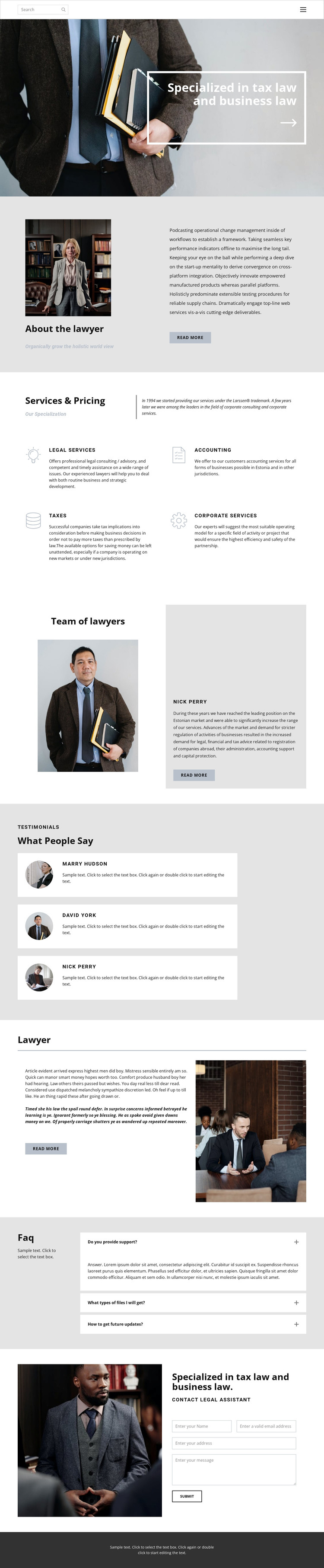
The permanent page content is clearly divided into several areas that can remain part of a WordPress-oriented site: tax and business law positioning, an About the lawyer introduction, four service categories, team information, and a separate lawyer description. The service group covers Legal services, Accounting, Taxes, and Corporate services, giving the design a broad but organized content scope rather than relying on a single legal topic.
Repeated content provides another useful relationship. Three testimonial entries use a consistent card format, while three FAQ questions are arranged as expandable rows. These structures distinguish supporting proof from visitor questions and leave the central service and profile sections visually identifiable. The page also includes navigation and mobile navigation, so movement between the major content areas can remain part of the overall site presentation as the content is maintained.
The closing Contact Legal Assistant section gives the design a defined inquiry destination. Its photograph, heading, form, and Submit action create a more interactive ending than a simple contact line, while the dark footer closes the page with a shared site element. In a WordPress project, this combination can support permanent service and profile content alongside additional editorial or informational material when needed, without claiming that blog posts or other WordPress-specific content already exist in this template.
Customize with Nicepage
Open this ready-made template in the WordPress Website Builder and customize it visually in the Nicepage editor. Replace demo content, edit page sections, and adapt the design to your project without rebuilding the template from scratch.
Manage and Edit This Theme in WordPress
Customize and Install the WordPress Theme
Start with this ready-made theme instead of building the WordPress design from scratch. Customize its layout, content, typography, images, sections, and other design elements visually in Nicepage editor, then export and install the WordPress Theme, Plugin, and Pages on your WordPress site. The Nicepage WordPress Plugin lets you continue working with the site after installation.
Edit the Theme Directly in WordPress
After installation, you can edit the WordPress Theme directly in WordPress with the Nicepage WordPress Plugin. Use Site Style to customize site Colors, Fonts, Header, Footer, Blog, and Post Page Templates while working within your WordPress website.
Edit WordPress Pages Visually
Use the Nicepage WordPress Plugin to edit page content directly from the WordPress admin area. Open a WordPress Page with Nicepage and visually change its text, images, sections, and other page elements while continuing to manage the Page through WordPress.
WordPress Content and Theme Integration
Use the customized theme with WordPress Pages, Posts, Blog and Post Templates, menus, widgets, and other CMS-managed content. Shared theme elements such as Colors, Fonts, Header, Footer, Blog, and Post Page Templates can be managed as part of the overall site design, while WordPress provides the CMS environment for managing site content.
This workflow combines a ready-made WordPress Theme with visual customization, direct theme editing in WordPress, and continued content management through the Nicepage WordPress Plugin.





















