
Hyper-realistic drawings WordPress Theme


Edit Template Offline
2. Create new page and search for id 24662
Edit Template Online
Create Awesome Websites


Free Nicepage Builder
Keywords
Permanent Artist Pages and Project Narratives Share One Visual System
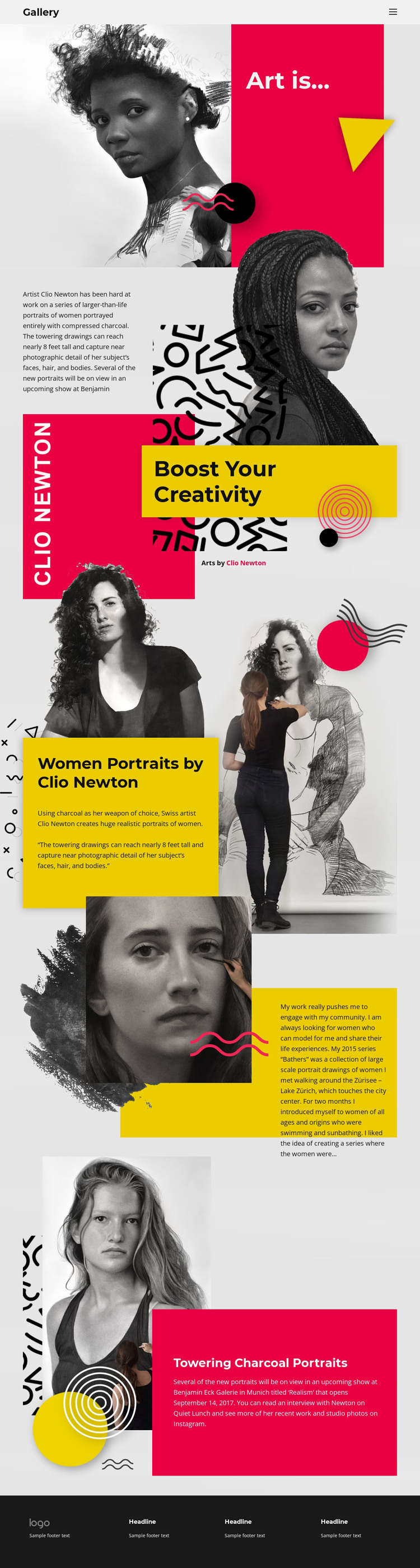
The page divides the artist’s presentation into content areas that can be interpreted naturally within a WordPress-managed site. The Gallery header gives the site a stable navigation frame, while the opening statement and artist introduction provide permanent page-oriented context for Clio Newton’s work. The Women Portraits section then supplies a focused subject area, explaining realistic portraits of women made with compressed charcoal rather than leaving the imagery without interpretation.
The Bathers content offers a different publishing relationship. Its reference to a 2015 portrait series, community engagement, and Lake Zürich creates a project narrative that could be developed as additional artist content if the wider site requires it. The Towering Charcoal Portraits section similarly supports an exhibition and recent-work context, connecting the nearly eight-foot drawings with Benjamin Eck Galerie in Munich. These areas can remain related through the same visual system while their content develops independently.
The theme’s value lies in the combination of stable site elements and varied artwork information. Navigation, vivid panels, layered portrait compositions, editorial typography, and the dark footer give permanent pages a shared design character. The verified analysis does not establish existing WordPress Posts, categories, or blog structures, so the interpretation remains focused on how the actual artist, series, research, and exhibition areas could fit a WordPress content environment rather than claiming that CMS content types are already present.
Customize with Nicepage
Open this ready-made template in the WordPress Website Builder and customize it visually in the Nicepage editor. Replace demo content, edit page sections, and adapt the design to your project without rebuilding the template from scratch.
Manage and Edit This Theme in WordPress
Customize and Install the WordPress Theme
Start with this ready-made theme instead of building the WordPress design from scratch. Customize its layout, content, typography, images, sections, and other design elements visually in Nicepage editor, then export and install the WordPress Theme, Plugin, and Pages on your WordPress site. The Nicepage WordPress Plugin lets you continue working with the site after installation.
Edit the Theme Directly in WordPress
After installation, you can edit the WordPress Theme directly in WordPress with the Nicepage WordPress Plugin. Use Site Style to customize site Colors, Fonts, Header, Footer, Blog, and Post Page Templates while working within your WordPress website.
Edit WordPress Pages Visually
Use the Nicepage WordPress Plugin to edit page content directly from the WordPress admin area. Open a WordPress Page with Nicepage and visually change its text, images, sections, and other page elements while continuing to manage the Page through WordPress.
WordPress Content and Theme Integration
Use the customized theme with WordPress Pages, Posts, Blog and Post Templates, menus, widgets, and other CMS-managed content. Shared theme elements such as Colors, Fonts, Header, Footer, Blog, and Post Page Templates can be managed as part of the overall site design, while WordPress provides the CMS environment for managing site content.
This workflow combines a ready-made WordPress Theme with visual customization, direct theme editing in WordPress, and continued content management through the Nicepage WordPress Plugin.





















