Surf Lessons WordPress Theme


Edit Template Offline
2. Create new page and search for id 24338
Edit Template Online
Create Awesome Websites


Free Nicepage Builder
Keywords
Service Content and Repeated Program Areas Suit WordPress Pages
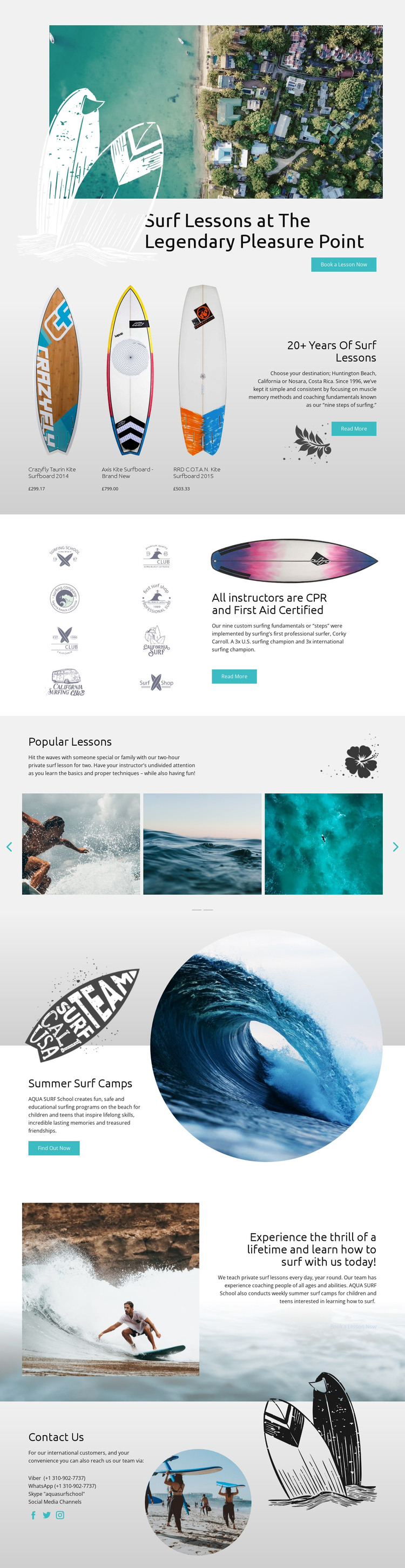
The page-oriented content is divided into clear permanent areas: the Pleasure Point lesson introduction, the 20+ years instruction panel, instructor certification, Summer Surf Camps, and Contact Us. These sections give a WordPress-oriented project recognizable page content rather than one undifferentiated promotional message. The camp block is particularly useful as a separate audience emphasis because it speaks to children and teens, while the private lesson material supplies a different program focus.
The three kite surfboard displays add a product-facing layer to the service presentation. Their names and displayed prices are visible as template content, so they can be treated as a structured equipment area while remaining distinct from the lesson information. The Popular Lessons slider then groups lesson copy with surf photographs, creating a visual content section that can sit alongside more permanent informational material without changing the page’s ocean-inspired identity.
The design also leaves a clear communication endpoint through Viber, WhatsApp, Skype, social links, and direct contact content. In a WordPress project, those areas can remain part of the theme’s shared visual direction while page content is maintained in the site’s content environment. The turquoise, blue, white, and soft gray palette, rounded headings, circular images, and repeated surf graphics provide continuity between these content roles, so future editorial or program updates can be presented as part of one recognizable surf brand.
Customize with Nicepage
Open this ready-made template in the WordPress Website Builder and customize it visually in the Nicepage editor. Replace demo content, edit page sections, and adapt the design to your project without rebuilding the template from scratch.
Manage and Edit This Theme in WordPress
Customize and Install the WordPress Theme
Start with this ready-made theme instead of building the WordPress design from scratch. Customize its layout, content, typography, images, sections, and other design elements visually in Nicepage editor, then export and install the WordPress Theme, Plugin, and Pages on your WordPress site. The Nicepage WordPress Plugin lets you continue working with the site after installation.
Edit the Theme Directly in WordPress
After installation, you can edit the WordPress Theme directly in WordPress with the Nicepage WordPress Plugin. Use Site Style to customize site Colors, Fonts, Header, Footer, Blog, and Post Page Templates while working within your WordPress website.
Edit WordPress Pages Visually
Use the Nicepage WordPress Plugin to edit page content directly from the WordPress admin area. Open a WordPress Page with Nicepage and visually change its text, images, sections, and other page elements while continuing to manage the Page through WordPress.
WordPress Content and Theme Integration
Use the customized theme with WordPress Pages, Posts, Blog and Post Templates, menus, widgets, and other CMS-managed content. Shared theme elements such as Colors, Fonts, Header, Footer, Blog, and Post Page Templates can be managed as part of the overall site design, while WordPress provides the CMS environment for managing site content.
This workflow combines a ready-made WordPress Theme with visual customization, direct theme editing in WordPress, and continued content management through the Nicepage WordPress Plugin.