
Stand out from others WordPress Theme


Edit Template Offline
2. Create new page and search for id 183979
Edit Template Online
Create Awesome Websites


Free Nicepage Builder
Keywords
The My Work gallery gives WordPress content a strong visual center
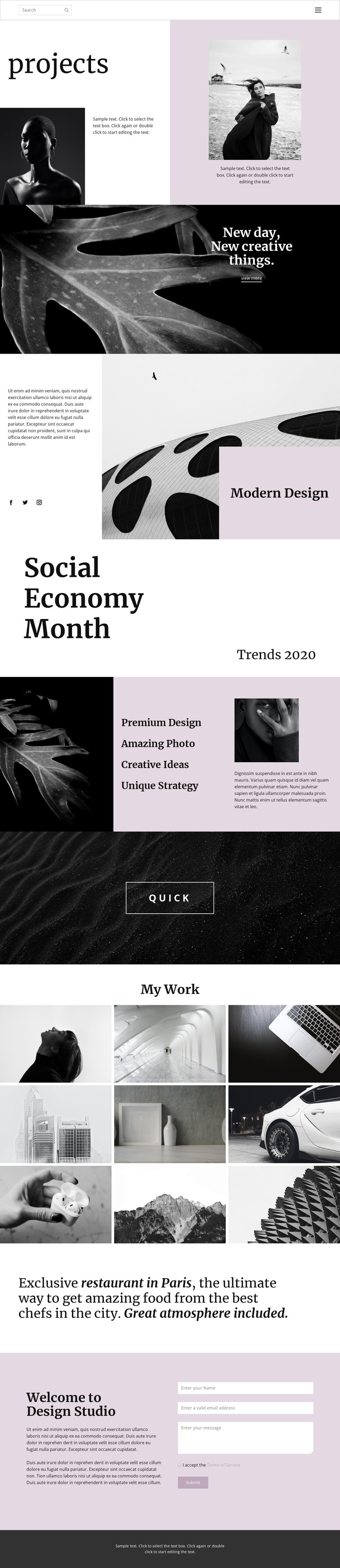
The nine-image My Work gallery provides the clearest page-oriented content area in this design. It can serve as a permanent portfolio section whose imagery and surrounding text are replaced with the studio’s own projects, while the opening projects block establishes context through an asymmetrical heading, photographic areas, and supporting copy. This relationship places visual examples after an editorial introduction instead of presenting isolated images without a recognizable point of view.
The Modern Design section adds a different kind of content: descriptive text and social links sit beside a large photographic panel, giving the site a compact area for studio positioning and public connections. Nearby capability labels—Premium Design, Amazing Photo, Creative Ideas, and Unique Strategy—create additional content units that can be adapted to the studio’s actual services or project categories. Their repeated, concise format is suited to content that may need regular refinement without changing the page’s visual character.
The closing Design Studio section combines an introduction with a form requesting a name, email address, and message. This gives permanent page content a direct inquiry endpoint after visitors have reviewed the work. In a WordPress project, the design can also sit alongside future editorial updates or portfolio additions, but the analysis does not verify existing posts, blog structures, or categories. Its value as a theme comes from keeping these distinct content areas—projects, capabilities, social presence, gallery, and contact—within one coordinated visual system.
Customize with Nicepage
Open this ready-made template in the WordPress Website Builder and customize it visually in the Nicepage editor. Replace demo content, edit page sections, and adapt the design to your project without rebuilding the template from scratch.
Manage and Edit This Theme in WordPress
Customize and Install the WordPress Theme
Start with this ready-made theme instead of building the WordPress design from scratch. Customize its layout, content, typography, images, sections, and other design elements visually in Nicepage editor, then export and install the WordPress Theme, Plugin, and Pages on your WordPress site. The Nicepage WordPress Plugin lets you continue working with the site after installation.
Edit the Theme Directly in WordPress
After installation, you can edit the WordPress Theme directly in WordPress with the Nicepage WordPress Plugin. Use Site Style to customize site Colors, Fonts, Header, Footer, Blog, and Post Page Templates while working within your WordPress website.
Edit WordPress Pages Visually
Use the Nicepage WordPress Plugin to edit page content directly from the WordPress admin area. Open a WordPress Page with Nicepage and visually change its text, images, sections, and other page elements while continuing to manage the Page through WordPress.
WordPress Content and Theme Integration
Use the customized theme with WordPress Pages, Posts, Blog and Post Templates, menus, widgets, and other CMS-managed content. Shared theme elements such as Colors, Fonts, Header, Footer, Blog, and Post Page Templates can be managed as part of the overall site design, while WordPress provides the CMS environment for managing site content.
This workflow combines a ready-made WordPress Theme with visual customization, direct theme editing in WordPress, and continued content management through the Nicepage WordPress Plugin.





















