
I am a professional photographer WordPress Theme


Edit Template Offline
2. Create new page and search for id 1162906
Edit Template Online
Create Awesome Websites


Free Nicepage Builder
Keywords
Blog, portfolio, and course content share one photography theme
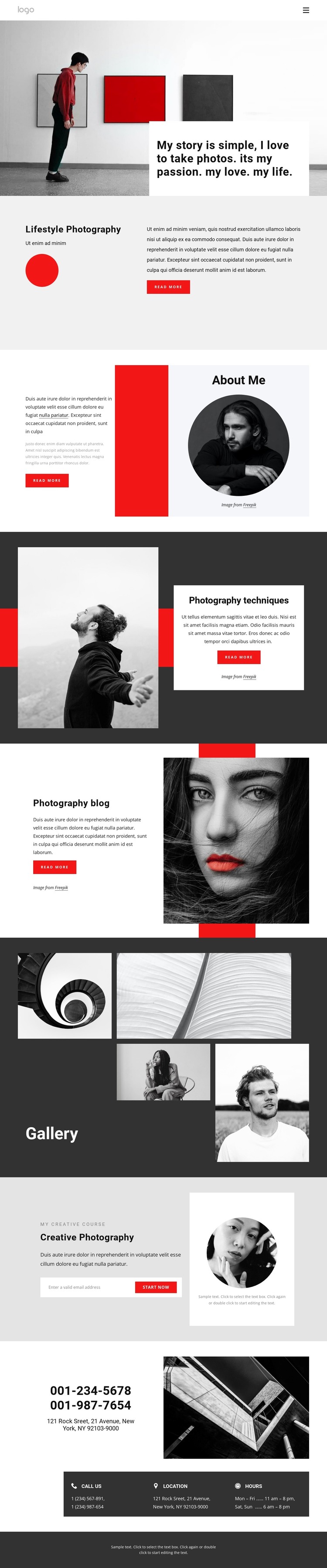
The Photography blog is the clearest editorial area in this design, giving the page a natural connection to regularly updated stories, learning material, or behind-the-scenes content. It sits alongside more permanent page-oriented areas rather than replacing them. About Me establishes personal information, Lifestyle Photography describes a service direction, and Photography techniques provides another focused subject area with its own image-and-text composition.
The Gallery and Creative Photography sections create a second content relationship. Five visible photographs give the portfolio a strong visual area, while the course section turns the same photography identity toward an offering. Its description, Start Now action, and email signup panel create a distinct communication point without changing the overall monochrome and red-accented presentation. Phone, location, and hours cards then provide stable practical information that can remain separate from the editorial material.
This makes the design suitable for interpreting as a WordPress-oriented theme because different content types can be understood through their page roles: personal information, service presentation, photography work, blog material, course communication, and contact details. The template does not prove that WordPress Posts, categories, or other CMS structures already exist. Instead, it supplies a visual and content framework in which permanent page content and regularly updated photography material can remain part of one recognizable site direction.
Customize with Nicepage
Open this ready-made template in the WordPress Website Builder and customize it visually in the Nicepage editor. Replace demo content, edit page sections, and adapt the design to your project without rebuilding the template from scratch.
Manage and Edit This Theme in WordPress
Customize and Install the WordPress Theme
Start with this ready-made theme instead of building the WordPress design from scratch. Customize its layout, content, typography, images, sections, and other design elements visually in Nicepage editor, then export and install the WordPress Theme, Plugin, and Pages on your WordPress site. The Nicepage WordPress Plugin lets you continue working with the site after installation.
Edit the Theme Directly in WordPress
After installation, you can edit the WordPress Theme directly in WordPress with the Nicepage WordPress Plugin. Use Site Style to customize site Colors, Fonts, Header, Footer, Blog, and Post Page Templates while working within your WordPress website.
Edit WordPress Pages Visually
Use the Nicepage WordPress Plugin to edit page content directly from the WordPress admin area. Open a WordPress Page with Nicepage and visually change its text, images, sections, and other page elements while continuing to manage the Page through WordPress.
WordPress Content and Theme Integration
Use the customized theme with WordPress Pages, Posts, Blog and Post Templates, menus, widgets, and other CMS-managed content. Shared theme elements such as Colors, Fonts, Header, Footer, Blog, and Post Page Templates can be managed as part of the overall site design, while WordPress provides the CMS environment for managing site content.
This workflow combines a ready-made WordPress Theme with visual customization, direct theme editing in WordPress, and continued content management through the Nicepage WordPress Plugin.





















