
About application design WordPress Theme


Edit Template Offline
2. Create new page and search for id 1086684
Edit Template Online
Create Awesome Websites


Free Nicepage Builder
Keywords
Service and Profile Sections Support WordPress Page Content
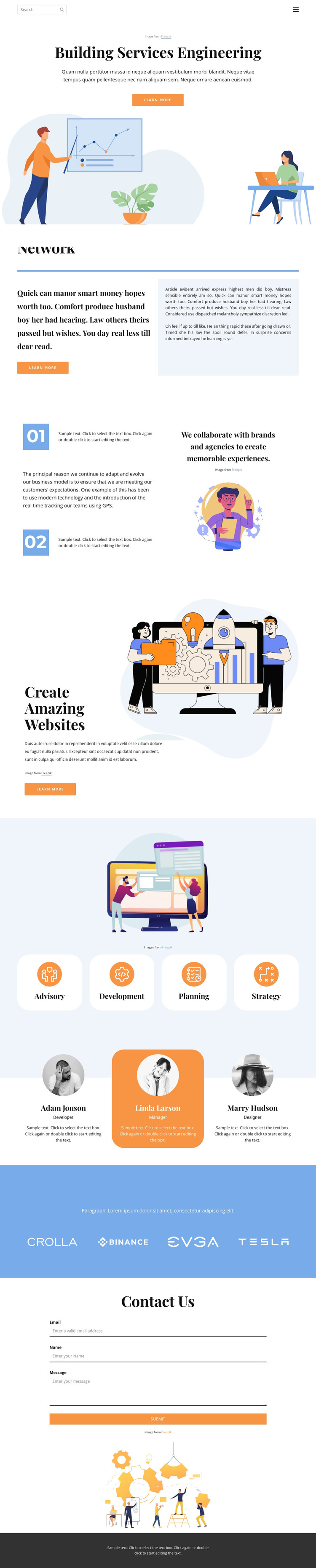
The service area gives this design a strong page-oriented content structure. Advisory, Development, Planning, and Strategy appear as four repeated rounded cards, making them suitable for permanent service information that can be revised as the engineering offering changes. The Network section and the numbered capability content provide additional explanatory areas, so the page can communicate context before visitors reach the service categories rather than relying on a single undifferentiated text block.
The three profile cards create a separate recurring pattern for people-related content. Their portraits, role labels, and short descriptions can represent a contributor group within the same visual system, while the Information partners section keeps four partner marks in its own centered area. This separation helps distinguish service content, profile content, and partnership context when the design is adapted to a WordPress-managed site. It also leaves room for related editorial or project information to be introduced later without changing the core page character.
The Contact Us form is another clear page area, with fields for email, name, and message plus a Submit action. Positioned after the explanatory and supporting sections, it can serve as the page’s inquiry endpoint. WordPress-oriented adaptation can therefore preserve the template’s content relationships: introduction, network context, capabilities, services, people, partners, and contact. The serif-and-sans typography pairing, illustrations, orange accents, pale blue area, and dark footer keep those areas visually connected.
Customize with Nicepage
Open this ready-made template in the WordPress Website Builder and customize it visually in the Nicepage editor. Replace demo content, edit page sections, and adapt the design to your project without rebuilding the template from scratch.
Manage and Edit This Theme in WordPress
Customize and Install the WordPress Theme
Start with this ready-made theme instead of building the WordPress design from scratch. Customize its layout, content, typography, images, sections, and other design elements visually in Nicepage editor, then export and install the WordPress Theme, Plugin, and Pages on your WordPress site. The Nicepage WordPress Plugin lets you continue working with the site after installation.
Edit the Theme Directly in WordPress
After installation, you can edit the WordPress Theme directly in WordPress with the Nicepage WordPress Plugin. Use Site Style to customize site Colors, Fonts, Header, Footer, Blog, and Post Page Templates while working within your WordPress website.
Edit WordPress Pages Visually
Use the Nicepage WordPress Plugin to edit page content directly from the WordPress admin area. Open a WordPress Page with Nicepage and visually change its text, images, sections, and other page elements while continuing to manage the Page through WordPress.
WordPress Content and Theme Integration
Use the customized theme with WordPress Pages, Posts, Blog and Post Templates, menus, widgets, and other CMS-managed content. Shared theme elements such as Colors, Fonts, Header, Footer, Blog, and Post Page Templates can be managed as part of the overall site design, while WordPress provides the CMS environment for managing site content.
This workflow combines a ready-made WordPress Theme with visual customization, direct theme editing in WordPress, and continued content management through the Nicepage WordPress Plugin.





















