Deals and Discounts Template


Edit Template Offline
2. Create new page and search for id 6633092
Edit Template Online
Create Awesome Websites


Free Nicepage Builder
Keywords
Retail Offers and Redemption Guidance Make This Design Easy to Choose
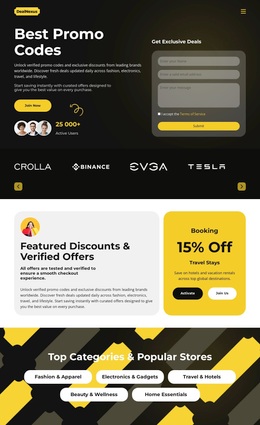
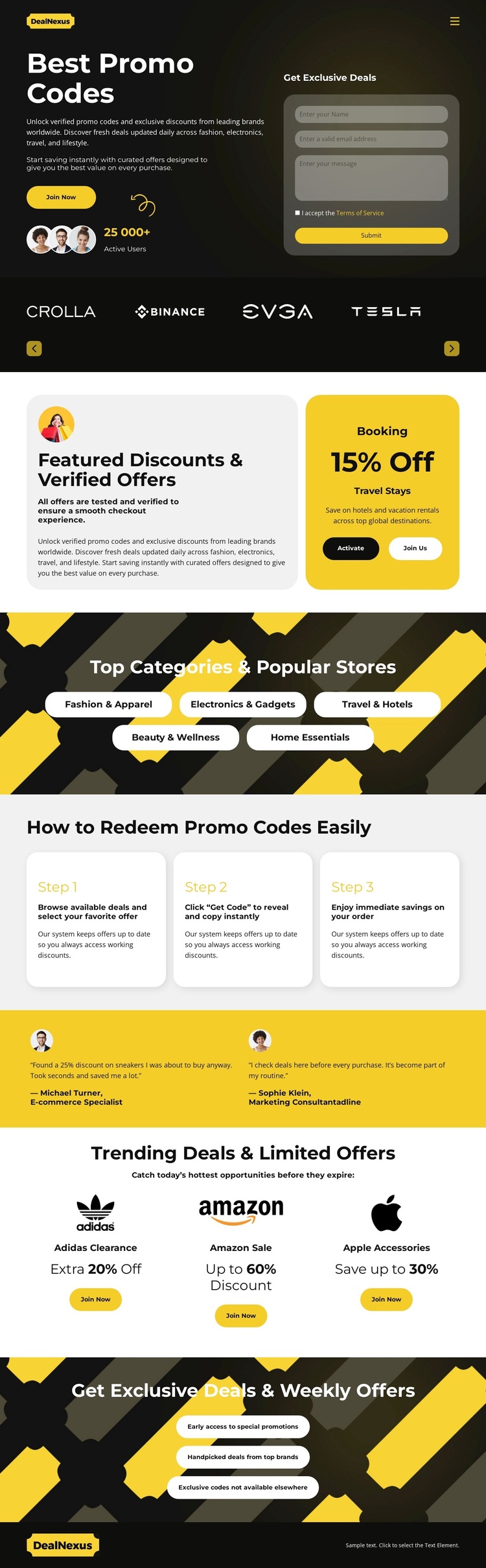
The strongest reason to choose this design is its coverage of the deal-discovery experience. It does not rely on a single promotional card: the Best Promo Codes hero introduces the subject, the brand strip establishes a retail setting, and Featured Discounts & Verified Offers gives the page two dedicated offer units with activation actions. This creates a clear visual direction for projects centered on promotional content rather than long editorial explanations.
The five category pills add useful breadth. Fashion & Apparel, Electronics & Gadgets, Travel & Hotels, Beauty & Wellness, and Home Essentials show how the layout can organize several shopping interests within one visual system. The three redemption cards then explain the practical path from browsing a deal to clicking Get Code and using the saving, giving the page more content coverage than a simple collection of advertisements.
Testimonials, three trending retailer cards, and the closing exclusive-offers panel extend the design into reassurance, additional discovery, and recurring signup interest. The combination of dark surfaces, bright yellow graphic bands, rounded cards, and compact labels makes the option recognizable at a glance. It is particularly suited to a project that needs promotional variety, category orientation, and clear actions within one energetic retail presentation.
Customize with Nicepage
Open this ready-made template in the Template Builder and customize it visually in the Nicepage editor. Replace demo content, edit page sections, and adapt the design to your project without rebuilding the template from scratch.
Start With a Ready-Made Template
Choose a Design for a New Page
Use a ready-made template as a starting point instead of creating every page from a blank canvas. When adding a new page in Nicepage, browse available designs, compare different layouts, and choose an option that already fits the general purpose and visual direction of your project.
Browse Different Page Designs
Explore Page Designs using search, thematic categories, Design Sets, and full-page previews. The collection includes layouts for different subjects and page purposes, making it easier to compare alternatives before selecting a design to customize.
Customize the Selected Template
After choosing a design, create the page and continue editing it visually in Nicepage. Replace the demo content, adjust images, typography, colors, sections, and other elements, and adapt the ready-made layout to your own content instead of rebuilding the design from the beginning.
Explore More Design Directions
If the first option does not match your project closely enough, return to the design collection and compare other templates before committing to a layout. This makes the template library useful not only for faster page creation, but also for exploring different visual approaches and finding a suitable starting point for a new project.
This workflow gives you access to a broad collection of ready-made designs that can be selected, compared, and customized according to the needs of each new page or project.