Independent Bookshop Online Store Template


Edit Template Offline
2. Create new page and search for id 6666297
Edit Template Online
Create Awesome Websites


Free Nicepage Builder
Keywords
Book Discovery, Product Choice, and Editorial Atmosphere Work Together
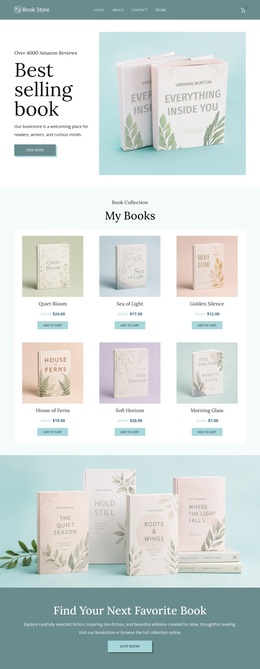
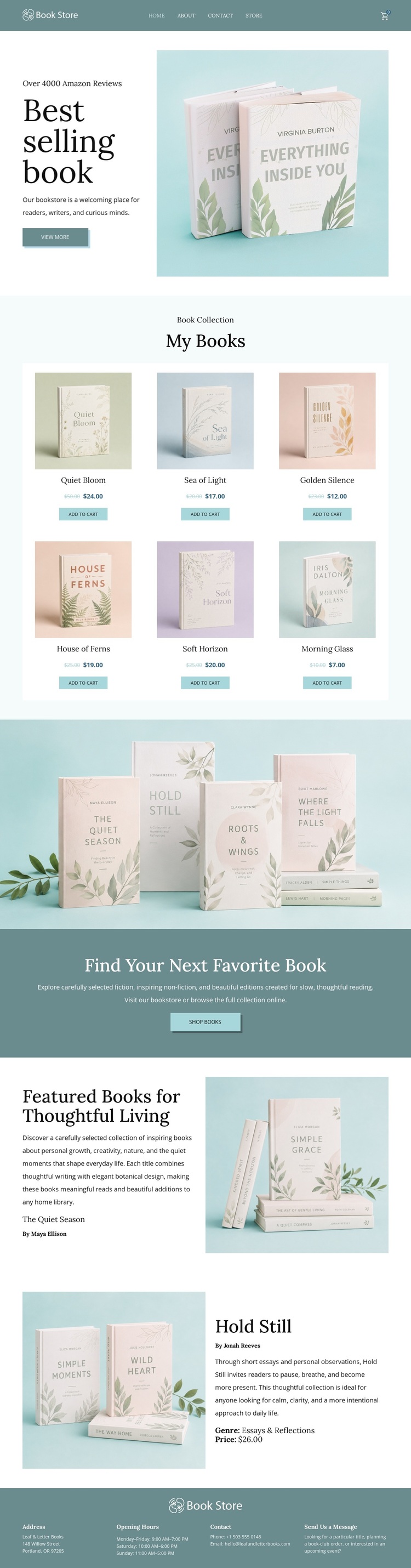
Book photography carries much of the page's identity from the first section onward. The Best selling books hero places a large product image beside bookstore messaging, establishing a literary atmosphere before visitors reach the catalog. That opening makes the design a useful choice for a shop that wants product presentation to feel considered rather than reduced to a dense list of items.
The six-card My Books collection gives the design practical coverage. Prices and Add to cart actions make the retail purpose visible, while the three-column arrangement across two rows provides enough repeated content for browsing and comparison. The full-width photograph then broadens the experience beyond individual products, and the teal Find Your Next Favorite Book band supplies a strong visual reminder to continue shopping. These sections create a balance between discovery and direct purchase behavior.
The featured rows for The Quiet Season and Hold Still add a more reflective layer to the assortment. Their alternating image-and-text treatment supports longer descriptions and selected recommendations without breaking the page's spacious rhythm. The footer contributes bookstore identity, address, opening hours, and contact information, so the design covers both atmospheric presentation and practical context. Among ready-made bookstore options, this direction is especially suited to projects where calm editorial styling, visible product choice, and a sense of thoughtful reading should appear together.
Customize with Nicepage
Open this ready-made template in the Template Builder and customize it visually in the Nicepage editor. Replace demo content, edit page sections, and adapt the design to your project without rebuilding the template from scratch.
Start With a Ready-Made Template
Choose a Design for a New Page
Use a ready-made template as a starting point instead of creating every page from a blank canvas. When adding a new page in Nicepage, browse available designs, compare different layouts, and choose an option that already fits the general purpose and visual direction of your project.
Browse Different Page Designs
Explore Page Designs using search, thematic categories, Design Sets, and full-page previews. The collection includes layouts for different subjects and page purposes, making it easier to compare alternatives before selecting a design to customize.
Customize the Selected Template
After choosing a design, create the page and continue editing it visually in Nicepage. Replace the demo content, adjust images, typography, colors, sections, and other elements, and adapt the ready-made layout to your own content instead of rebuilding the design from the beginning.
Explore More Design Directions
If the first option does not match your project closely enough, return to the design collection and compare other templates before committing to a layout. This makes the template library useful not only for faster page creation, but also for exploring different visual approaches and finding a suitable starting point for a new project.
This workflow gives you access to a broad collection of ready-made designs that can be selected, compared, and customized according to the needs of each new page or project.