Leak Detection and Repair Template


Edit Template Offline
2. Create new page and search for id 6475661
Edit Template Online
Create Awesome Websites


Free Nicepage Builder
Keywords
Five Plumbing Categories Give the Design a Clear Service Focus
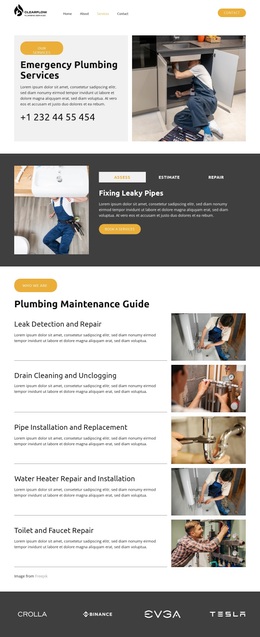
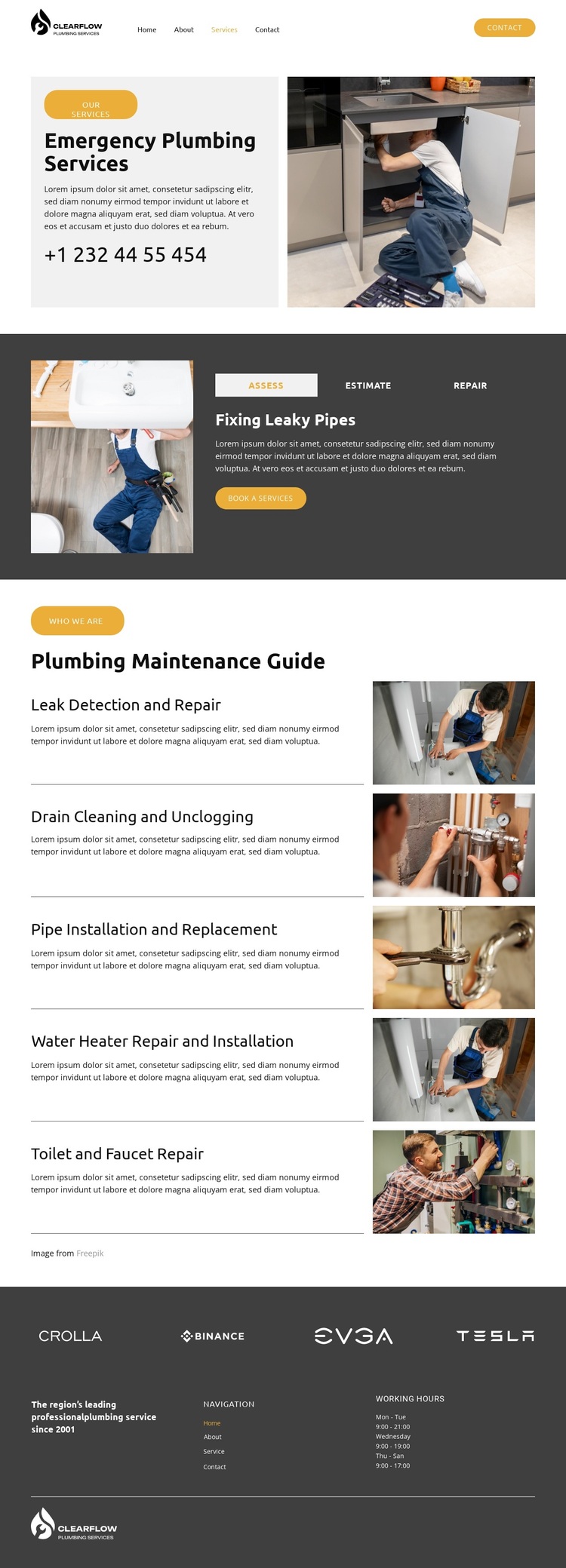
Emergency messaging, selectable service tabs, and five maintenance categories make this design a focused option for plumbing projects rather than a generic business layout. The opening section immediately identifies the subject through Emergency Plumbing Services, a phone contact, and a large plumbing photograph. That combination gives the page a strong first content signal before visitors reach the more detailed service presentation.
The tabs add a distinctive layer by grouping the actions Assess, Estimate, and Repair. Their service choices include Fixing Leaky Pipes, Water Heater Fix, and Toilet Leak Repair, while booking buttons connect the information to a practical next step. The lower Plumbing Maintenance Guide expands the coverage without changing the central theme: Leak Detection and Repair, Drain Cleaning and Unclogging, Pipe Installation and Replacement, Water Heater Repair and Installation, and Toilet and Faucet Repair appear as five repeated service rows with photographs.
The visual treatment reinforces the choice. White and charcoal sections create strong contrast, yellow labels and buttons mark emphasis, and bold sans-serif type keeps the page direct. A repeated brand-logo strip and dark footer add supporting credibility and operating information through navigation, a company statement, working hours, and branding. This combination suits a project that needs to explain both urgent response and broader maintenance services while keeping booking and contact access visible.
Customize with Nicepage
Open this ready-made template in the Template Builder and customize it visually in the Nicepage editor. Replace demo content, edit page sections, and adapt the design to your project without rebuilding the template from scratch.
Start With a Ready-Made Template
Choose a Design for a New Page
Use a ready-made template as a starting point instead of creating every page from a blank canvas. When adding a new page in Nicepage, browse available designs, compare different layouts, and choose an option that already fits the general purpose and visual direction of your project.
Browse Different Page Designs
Explore Page Designs using search, thematic categories, Design Sets, and full-page previews. The collection includes layouts for different subjects and page purposes, making it easier to compare alternatives before selecting a design to customize.
Customize the Selected Template
After choosing a design, create the page and continue editing it visually in Nicepage. Replace the demo content, adjust images, typography, colors, sections, and other elements, and adapt the ready-made layout to your own content instead of rebuilding the design from the beginning.
Explore More Design Directions
If the first option does not match your project closely enough, return to the design collection and compare other templates before committing to a layout. This makes the template library useful not only for faster page creation, but also for exploring different visual approaches and finding a suitable starting point for a new project.
This workflow gives you access to a broad collection of ready-made designs that can be selected, compared, and customized according to the needs of each new page or project.