Travel Blog Template


Edit Template Offline
2. Create new page and search for id 21070
Edit Template Online
Create Awesome Websites


Free Nicepage Builder
Keywords
Regional Stories Give This Travel Design a Distinctive Editorial Focus
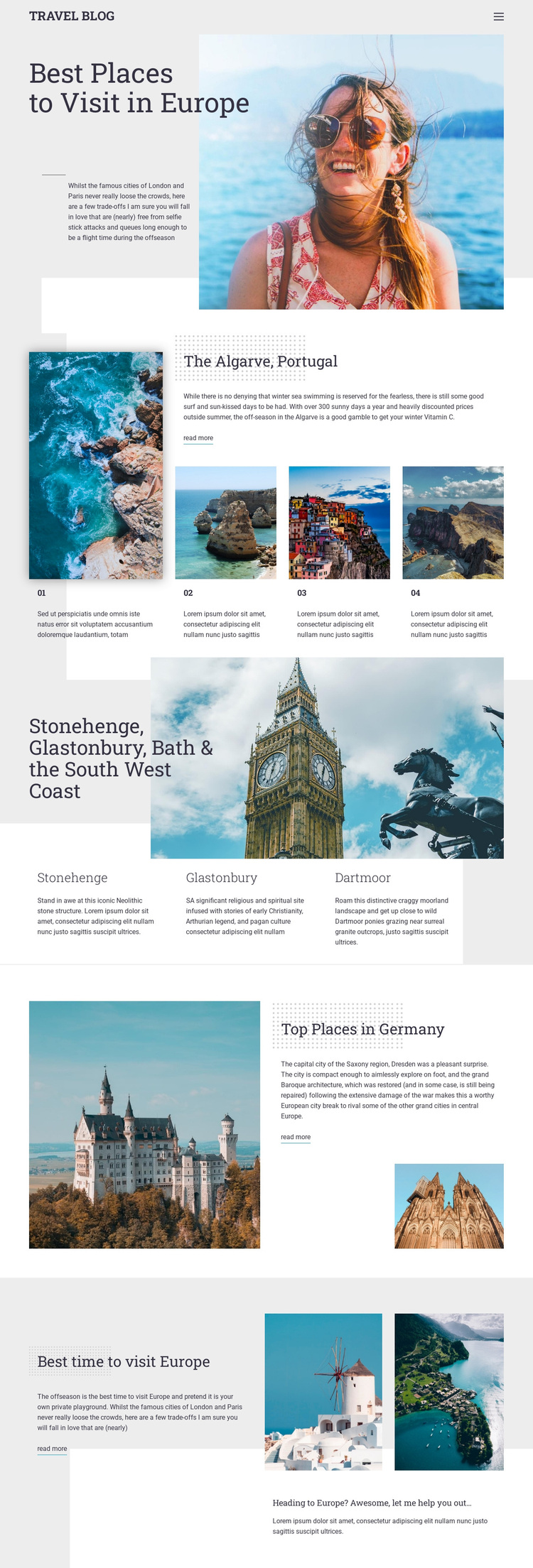
Large destination photography is paired with specific European travel subjects rather than generic service content. The opening “Best Places to Visit in Europe” section establishes a magazine-like direction immediately, using an overlapping text panel to place the main idea beside an atmospheric image. That visual introduction makes the design suitable for projects where destinations and visual discovery should carry as much meaning as explanatory copy.
The content coverage is another reason to choose this option. Portugal appears through the Algarve feature and three numbered destination items, while South West England is represented by Stonehenge, Glastonbury, Dartmoor, and the surrounding coast. Germany then receives a separate article treatment with landscape imagery and Dresden-related text. This range gives the page more editorial variation than a layout built around one location or a single repeated card type.
Seasonal advice adds practical value to the inspirational material. “Best time to visit Europe” shifts the page from where to go toward when to plan, with two supporting images and a closing prompt. Three read-more links create a consistent route into deeper travel articles, although their demonstration destination should not be treated as verified commercial content. The combination of broad European coverage, image-led storytelling, regional contrast, and planning guidance makes this a useful design choice for a travel blog, destination guide, or tourism editorial page.
Customize with Nicepage
Open this ready-made template in the Template Builder and customize it visually in the Nicepage editor. Replace demo content, edit page sections, and adapt the design to your project without rebuilding the template from scratch.
Start With a Ready-Made Template
Choose a Design for a New Page
Use a ready-made template as a starting point instead of creating every page from a blank canvas. When adding a new page in Nicepage, browse available designs, compare different layouts, and choose an option that already fits the general purpose and visual direction of your project.
Browse Different Page Designs
Explore Page Designs using search, thematic categories, Design Sets, and full-page previews. The collection includes layouts for different subjects and page purposes, making it easier to compare alternatives before selecting a design to customize.
Customize the Selected Template
After choosing a design, create the page and continue editing it visually in Nicepage. Replace the demo content, adjust images, typography, colors, sections, and other elements, and adapt the ready-made layout to your own content instead of rebuilding the design from the beginning.
Explore More Design Directions
If the first option does not match your project closely enough, return to the design collection and compare other templates before committing to a layout. This makes the template library useful not only for faster page creation, but also for exploring different visual approaches and finding a suitable starting point for a new project.
This workflow gives you access to a broad collection of ready-made designs that can be selected, compared, and customized according to the needs of each new page or project.