Premium Helmets Template


Edit Template Offline
2. Create new page and search for id 19500
Edit Template Online
Create Awesome Websites


Free Nicepage Builder
Keywords
Four Named Models Framed by Review and Riding Context
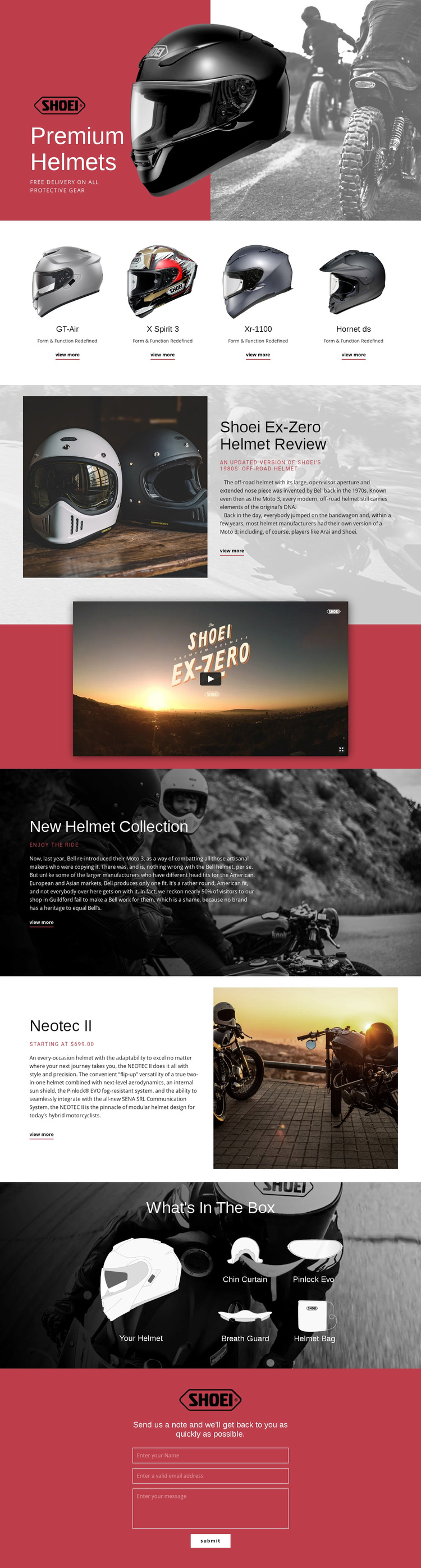
The four-card product row gives this design an immediately recognizable reason to choose it for a helmet-focused project. GT-Air, X Spirit 3, Xr-1100, and Hornet ds appear as a coherent collection rather than as isolated products, making the page suitable for projects that need to present several models within one visual direction. The red, white, and black palette reinforces that product-led identity without relying on dense text.
The design also goes beyond a basic catalog arrangement. The Shoei Ex-Zero Helmet Review introduces an editorial voice beside a large helmet image, and the promotional video adds another way to present the featured product. The New Helmet Collection section expands the subject into a broader riding image, while the Neotec II block supplies a more detailed product focus through its modular construction, flip-up functionality, internal sun shield, and starting price.
The What's In The Box gallery is another distinctive choice because it explains the relationship between a helmet and its included accessories: Chin Curtain, Pinlock Evo, Breath Guard, and Helmet Bag. A final contact form preserves a direct path for questions or product exploration. Together, these elements suit a project that wants to combine collection browsing, editorial storytelling, package detail, and inquiry in one visually assertive helmet presentation.
Customize with Nicepage
Open this ready-made template in the Template Builder and customize it visually in the Nicepage editor. Replace demo content, edit page sections, and adapt the design to your project without rebuilding the template from scratch.
Start With a Ready-Made Template
Choose a Design for a New Page
Use a ready-made template as a starting point instead of creating every page from a blank canvas. When adding a new page in Nicepage, browse available designs, compare different layouts, and choose an option that already fits the general purpose and visual direction of your project.
Browse Different Page Designs
Explore Page Designs using search, thematic categories, Design Sets, and full-page previews. The collection includes layouts for different subjects and page purposes, making it easier to compare alternatives before selecting a design to customize.
Customize the Selected Template
After choosing a design, create the page and continue editing it visually in Nicepage. Replace the demo content, adjust images, typography, colors, sections, and other elements, and adapt the ready-made layout to your own content instead of rebuilding the design from the beginning.
Explore More Design Directions
If the first option does not match your project closely enough, return to the design collection and compare other templates before committing to a layout. This makes the template library useful not only for faster page creation, but also for exploring different visual approaches and finding a suitable starting point for a new project.
This workflow gives you access to a broad collection of ready-made designs that can be selected, compared, and customized according to the needs of each new page or project.