World Cup Template


Edit Template Offline
2. Create new page and search for id 14097
Edit Template Online
Create Awesome Websites


Free Nicepage Builder
Keywords
Player Data, Match News, and Audio Share One Editorial Direction
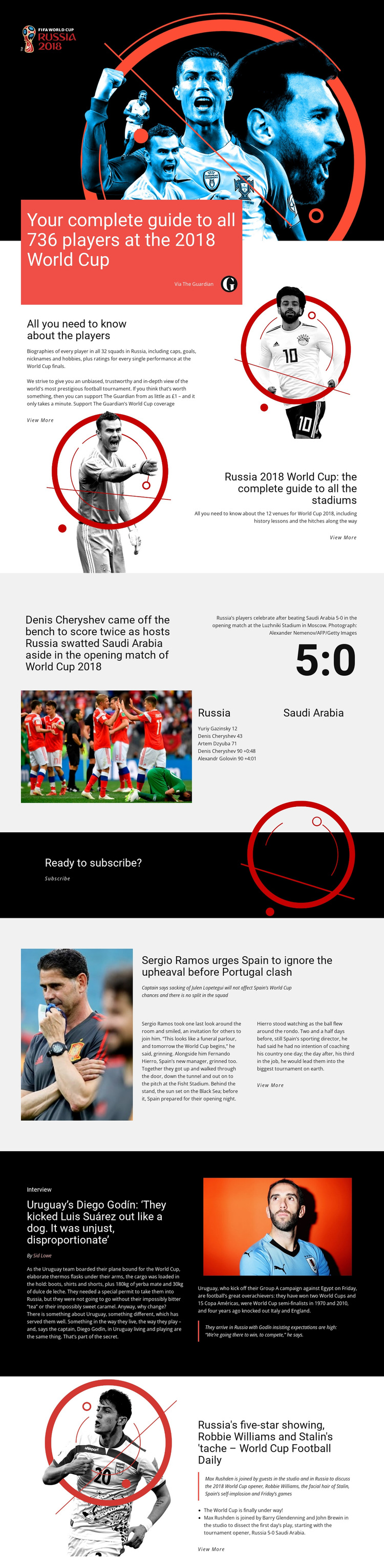
The strongest reason to choose this design is its range of football content within one consistent presentation. The 736-player guide gives the page a reference-oriented opening, while the stadium section adds a second guide built around 12 venues. These subjects make the layout useful for tournament coverage that needs both individual-player information and broader event context rather than a single story format.
The page also demonstrates how timely reporting can sit beside reference material. The Russia–Saudi Arabia 5:0 match feature uses a photograph, score, scorers, and stadium caption to create a compact news package. Later sections broaden the editorial voice through Spain and Portugal reporting, a Diego Godín interview with a featured quotation, and a Football Daily item with episode highlights. The result feels closer to a sports coverage hub than to a generic team or club homepage.
The black, white, red, and orange palette supports that choice by giving guides, reports, interviews, and audio content a shared visual identity while allowing each section to change density. A separate Subscribe block adds a clear audience-support moment without replacing the editorial focus. Projects that need tournament guides, match storytelling, and varied media features can therefore select this template for its content coverage and recognizable football-news direction.
Customize with Nicepage
Open this ready-made template in the Template Builder and customize it visually in the Nicepage editor. Replace demo content, edit page sections, and adapt the design to your project without rebuilding the template from scratch.
Start With a Ready-Made Template
Choose a Design for a New Page
Use a ready-made template as a starting point instead of creating every page from a blank canvas. When adding a new page in Nicepage, browse available designs, compare different layouts, and choose an option that already fits the general purpose and visual direction of your project.
Browse Different Page Designs
Explore Page Designs using search, thematic categories, Design Sets, and full-page previews. The collection includes layouts for different subjects and page purposes, making it easier to compare alternatives before selecting a design to customize.
Customize the Selected Template
After choosing a design, create the page and continue editing it visually in Nicepage. Replace the demo content, adjust images, typography, colors, sections, and other elements, and adapt the ready-made layout to your own content instead of rebuilding the design from the beginning.
Explore More Design Directions
If the first option does not match your project closely enough, return to the design collection and compare other templates before committing to a layout. This makes the template library useful not only for faster page creation, but also for exploring different visual approaches and finding a suitable starting point for a new project.
This workflow gives you access to a broad collection of ready-made designs that can be selected, compared, and customized according to the needs of each new page or project.