Weekly Class Timetable Joomla Template


Edit Template Offline
2. Create new page and search for id 6678178
Edit Template Online
Create Awesome Websites


Free Nicepage Builder
Keywords
Class Categories and Studio Regions Fit Structured CMS Content
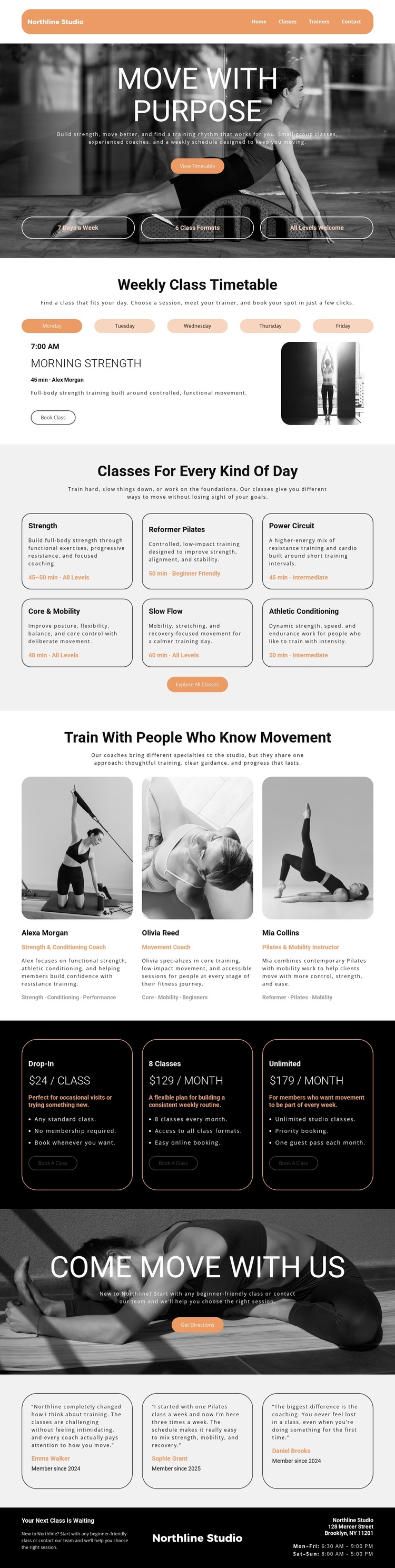
The six class-category cards divide the studio’s offering into recognizable information areas: Strength, Reformer Pilates, Power Circuit, Core & Mobility, Slow Flow, and Athletic Conditioning. Their repeated format includes descriptions, durations, and level labels, making them suitable for structured content that may need to remain visually coordinated as individual class information changes. The weekly timetable adds a more time-oriented region, with weekday navigation connected to a class entry, trainer, description, image, and booking action.
The navigation links for Home, Classes, Trainers, and Contact give the page a straightforward site framework, while the three trainer profiles create a separate people-focused content group. Their names, specialties, biographies, and focus labels can be understood as recurring studio information rather than isolated decorative cards. The three pricing cards provide another structured region, distinguishing Drop-In, 8 Classes, and Unlimited plans with prices, benefits, and booking buttons.
The dark footer completes the reusable site context by carrying the Northline Studio identity, Brooklyn address, and weekday and weekend hours. Together, these regions offer a logical basis for a Joomla-managed presentation: navigation, timetable information, class categories, trainer content, memberships, testimonials, and contact details each have a visible place in the design. A Joomla project could preserve the shared visual language while organizing updates around these distinct content areas, without implying that specific Joomla article or module structures already exist in the template.
Customize with Nicepage
Open this ready-made template in the Joomla Page Builder and customize it visually in the Nicepage editor. Replace demo content, edit page sections, and adapt the design to your project without rebuilding the template from scratch.
Work With This Template in Joomla
Customize and Install the Joomla Template
Start with this ready-made template instead of building the Joomla design from scratch. Customize its layout, content, typography, images, sections, and other design elements visually in the Nicepage application, then export and install the Joomla Template, Nicepage Extension, and supported content on your Joomla website.
Edit the Template Directly in Joomla
After installation, you can edit the Joomla Template directly in Joomla with the Nicepage Joomla Extension. Customize the Header, Footer, Colors, Fonts, typography, and Page Templates from the Joomla workflow while keeping the site design connected with your CMS content.
Edit Joomla Articles Visually
Use the Nicepage Joomla Extension to open and edit Joomla Articles visually from the Joomla Administrator. Change text, images, sections, layouts, and other page content in the Nicepage editor while continuing to manage the Articles through Joomla.
Joomla Content and Template Integration
Use the customized template together with Joomla Articles, module Positions, menus, forms, Blog Pages, and other supported CMS elements. With the Nicepage Extension used as the Site Style Source, shared design settings can be applied across Joomla Articles while Joomla continues to provide the CMS environment for managing site content.
This workflow combines a ready-made Joomla Template with visual customization, direct template editing in Joomla, and continued content management through the Nicepage Joomla Extension.