
Modern Digital Bank Joomla Template


Edit Template Offline
2. Create new page and search for id 6657274
Edit Template Online
Create Awesome Websites


Free Nicepage Builder
Keywords
Security, Plans, and Contact Regions Form Structured CMS Content
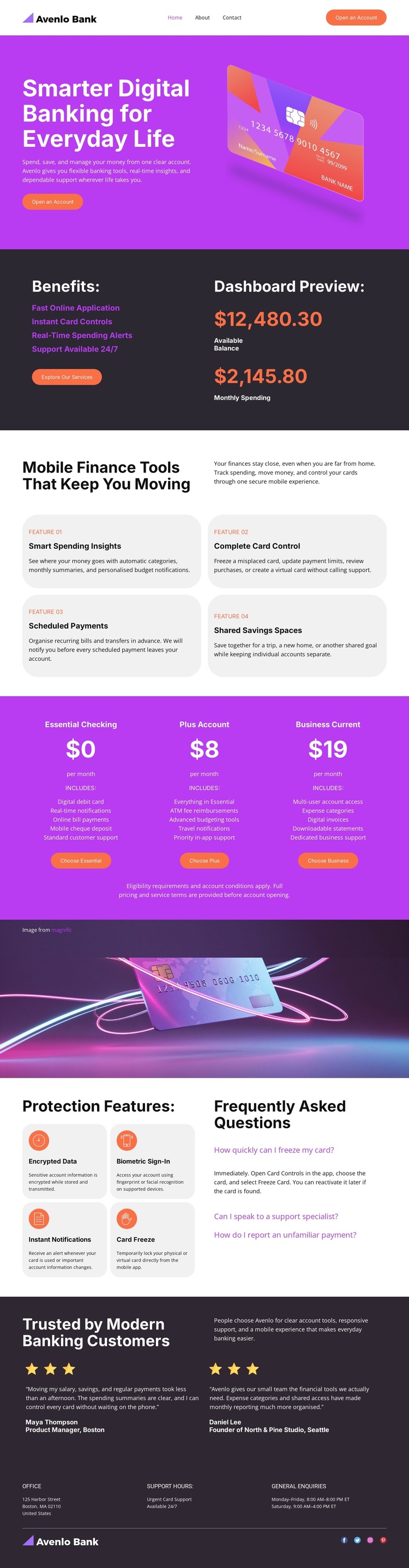
The service areas are divided into recognizable content groups that suit a structured CMS presentation. The opening navigation and hero establish the banking proposition and account-opening route, while the benefits section groups fast online application, card controls, spending alerts, and dashboard information. These areas can remain distinct as the site’s primary service content instead of being treated as one undifferentiated block.
The four finance-tool cards provide another repeatable region, covering spending insights, complete card control, scheduled payments, and shared savings spaces. Beside them, the three displayed account offerings create a separate plan-comparison area. The protection section adds four security topics—encrypted data, biometric sign-in, instant notifications, and card freeze—alongside FAQ content. Together, these regions give a banking site clear places for structured information, recurring items, and visitor questions.
The footer extends that organization through grouped office information, support hours, general inquiries, and social links. In a Joomla project, this separation can help maintain a coordinated visual presentation while content is organized through the CMS. The design is therefore useful not because the page claims to contain particular Joomla objects, but because its navigation, recurring cards, security information, FAQ area, and contact regions already suggest meaningful content boundaries for a Joomla-managed banking site.
Customize with Nicepage
Open this ready-made template in the Joomla Page Builder and customize it visually in the Nicepage editor. Replace demo content, edit page sections, and adapt the design to your project without rebuilding the template from scratch.
Work With This Template in Joomla
Customize and Install the Joomla Template
Start with this ready-made template instead of building the Joomla design from scratch. Customize its layout, content, typography, images, sections, and other design elements visually in the Nicepage application, then export and install the Joomla Template, Nicepage Extension, and supported content on your Joomla website.
Edit the Template Directly in Joomla
After installation, you can edit the Joomla Template directly in Joomla with the Nicepage Joomla Extension. Customize the Header, Footer, Colors, Fonts, typography, and Page Templates from the Joomla workflow while keeping the site design connected with your CMS content.
Edit Joomla Articles Visually
Use the Nicepage Joomla Extension to open and edit Joomla Articles visually from the Joomla Administrator. Change text, images, sections, layouts, and other page content in the Nicepage editor while continuing to manage the Articles through Joomla.
Joomla Content and Template Integration
Use the customized template together with Joomla Articles, module Positions, menus, forms, Blog Pages, and other supported CMS elements. With the Nicepage Extension used as the Site Style Source, shared design settings can be applied across Joomla Articles while Joomla continues to provide the CMS environment for managing site content.
This workflow combines a ready-made Joomla Template with visual customization, direct template editing in Joomla, and continued content management through the Nicepage Joomla Extension.





















