Industrial Mining Company Joomla Template


Edit Template Offline
2. Create new page and search for id 6624416
Edit Template Online
Create Awesome Websites


Free Nicepage Builder
Keywords
Service Regions and Project Locations Support Managed Mining Content
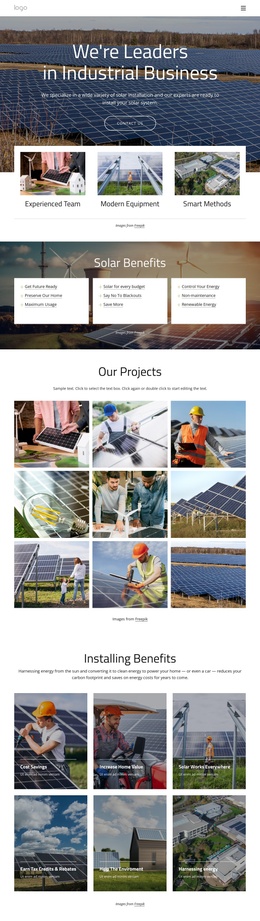
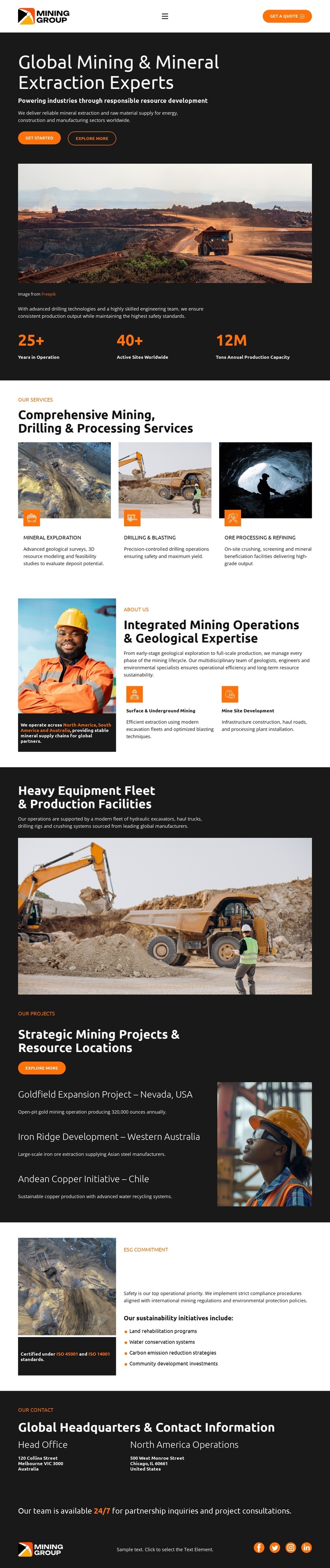
The three service cards divide the page into clear informational areas for mineral exploration, drilling and blasting, and ore processing and refining. Their repeated format is useful for a CMS-managed mining site because each service category can retain a consistent presentation while its description and supporting image are maintained as separate content. The following operations section adds a second level of information, connecting mining operations and geological expertise with surface and underground mining and mine site development.
The project area provides a different kind of structured content. Goldfield Expansion Project in Nevada, Iron Ridge Development in Western Australia, and Andean Copper Initiative in Chile are presented as three project-location items beside a mining image. This arrangement gives the page a natural way to organize geographically distinct work without breaking the common visual direction. The fleet and production section supplies a shared operational region between capabilities and projects, while the ESG block gathers safety, water, emissions, and community topics into a focused responsibility section.
At the bottom, Head Office and North America Operations form two office regions followed by a partnership and consultation message. In a Joomla project, these service, project, responsibility, and contact areas can be treated as organized CMS content while the navigation and shared page presentation remain coordinated. The interpretation concerns the design’s content regions, not an assertion that Joomla Articles or modules already exist in the template.
Customize with Nicepage
Open this ready-made template in the Joomla Page Builder and customize it visually in the Nicepage editor. Replace demo content, edit page sections, and adapt the design to your project without rebuilding the template from scratch.
Work With This Template in Joomla
Customize and Install the Joomla Template
Start with this ready-made template instead of building the Joomla design from scratch. Customize its layout, content, typography, images, sections, and other design elements visually in the Nicepage application, then export and install the Joomla Template, Nicepage Extension, and supported content on your Joomla website.
Edit the Template Directly in Joomla
After installation, you can edit the Joomla Template directly in Joomla with the Nicepage Joomla Extension. Customize the Header, Footer, Colors, Fonts, typography, and Page Templates from the Joomla workflow while keeping the site design connected with your CMS content.
Edit Joomla Articles Visually
Use the Nicepage Joomla Extension to open and edit Joomla Articles visually from the Joomla Administrator. Change text, images, sections, layouts, and other page content in the Nicepage editor while continuing to manage the Articles through Joomla.
Joomla Content and Template Integration
Use the customized template together with Joomla Articles, module Positions, menus, forms, Blog Pages, and other supported CMS elements. With the Nicepage Extension used as the Site Style Source, shared design settings can be applied across Joomla Articles while Joomla continues to provide the CMS environment for managing site content.
This workflow combines a ready-made Joomla Template with visual customization, direct template editing in Joomla, and continued content management through the Nicepage Joomla Extension.