We believe that living spaces Joomla Template


Parallel image regions organize furniture and lighting content
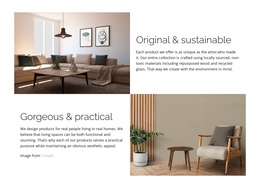
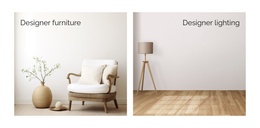
The block's internal organization is deliberately compact: two equal-width image regions sit beside one another, and each region contains one furnishing category label. The left region connects Designer furniture with a light interior showing a chair and vase. The right region connects Designer lighting with a floor lamp and wood flooring. This one-to-one relationship between image and label gives each category a distinct content unit without introducing nested product details or a more complex interaction.
In a Joomla-managed page, the arrangement can function as a structured visual content region for interior furnishings. The two categories provide a clear editorial division between furniture and lighting, while the shared image treatment keeps them related. Thin dark sans-serif labels remain visually light over the pale photographs, and the warm wood, cream, beige, and soft gray palette supports a consistent presentation across both units. The right label's alignment adds a small positional distinction without changing the underlying two-column structure.
This section can therefore sit alongside other Joomla-managed content while retaining its own recognizable organization. The block does not need to carry the surrounding site's navigation, product records, or page architecture; its role is to present two furnishing categories in a stable, scannable format. Since the interaction is static, visitors read the labels and compare the paired interior images directly rather than opening tabs or moving through a carousel.
Customize with Nicepage
Open this ready-made template in the Joomla Page Builder and customize it visually in the Nicepage editor. Replace demo content, edit page sections, and adapt the design to your project without rebuilding the template from scratch.
Edit Template Offline
2. Create a new page or select existing
3. Click Add new block, search for id 6182780 and click enter
Edit Template Online
Create Awesome Websites


Free Nicepage Builder
Keywords
Work With This Template in Joomla
Customize and Install the Joomla Template
Start with this ready-made template instead of building the Joomla design from scratch. Customize its layout, content, typography, images, sections, and other design elements visually in the Nicepage application, then export and install the Joomla Template, Nicepage Extension, and supported content on your Joomla website.
Edit the Template Directly in Joomla
After installation, you can edit the Joomla Template directly in Joomla with the Nicepage Joomla Extension. Customize the Header, Footer, Colors, Fonts, typography, and Page Templates from the Joomla workflow while keeping the site design connected with your CMS content.
Edit Joomla Articles Visually
Use the Nicepage Joomla Extension to open and edit Joomla Articles visually from the Joomla Administrator. Change text, images, sections, layouts, and other page content in the Nicepage editor while continuing to manage the Articles through Joomla.
Joomla Content and Template Integration
Use the customized template together with Joomla Articles, module Positions, menus, forms, Blog Pages, and other supported CMS elements. With the Nicepage Extension used as the Site Style Source, shared design settings can be applied across Joomla Articles while Joomla continues to provide the CMS environment for managing site content.
This workflow combines a ready-made Joomla Template with visual customization, direct template editing in Joomla, and continued content management through the Nicepage Joomla Extension.