Design during construction Joomla Template


Edit Template Offline
2. Create new page and search for id 6001703
Edit Template Online
Create Awesome Websites


Free Nicepage Builder
Keywords
Service and Project Regions Ready for CMS Content
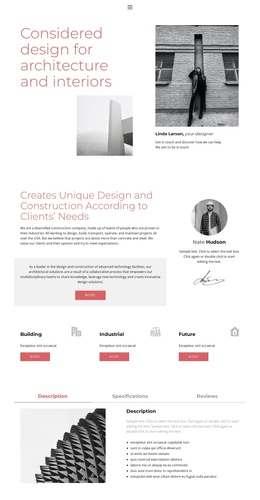
The design divides the practice into clear content regions that can be maintained as a structured Joomla site presentation. The opening introduction and About Us section provide stable areas for describing architecture, interiors, construction, and the practice’s approach. The three peer cards labeled Building, Industrial, and Future then separate the main service categories without disturbing the shared visual direction. These recurring informational areas can be adapted as organized site content while the page retains its rose, black, white, and soft gray styling.
The tabbed area adds another useful content boundary. Description, Specifications, and Reviews are presented together beside an architectural image, allowing related information to remain grouped instead of spreading across unrelated sections. The Projects accordion supplies three expandable project entries, while the second accordion presents six numbered value statements. This combination is suited to a CMS-managed page where project information, service explanations, and value-oriented content may need distinct editorial attention.
Navigation and the closing contact region complete the site-oriented structure. The page includes navigation, mobile navigation, and a compact Location panel with a displayed address and telephone contact. In a Joomla implementation, these shared regions can support consistent movement between content areas while the project and service sections remain visually coordinated. The sample names, address, and phone number should be replaced with the project’s actual editorial content.
Customize with Nicepage
Open this ready-made template in the Joomla Page Builder and customize it visually in the Nicepage editor. Replace demo content, edit page sections, and adapt the design to your project without rebuilding the template from scratch.
Work With This Template in Joomla
Customize and Install the Joomla Template
Start with this ready-made template instead of building the Joomla design from scratch. Customize its layout, content, typography, images, sections, and other design elements visually in the Nicepage application, then export and install the Joomla Template, Nicepage Extension, and supported content on your Joomla website.
Edit the Template Directly in Joomla
After installation, you can edit the Joomla Template directly in Joomla with the Nicepage Joomla Extension. Customize the Header, Footer, Colors, Fonts, typography, and Page Templates from the Joomla workflow while keeping the site design connected with your CMS content.
Edit Joomla Articles Visually
Use the Nicepage Joomla Extension to open and edit Joomla Articles visually from the Joomla Administrator. Change text, images, sections, layouts, and other page content in the Nicepage editor while continuing to manage the Articles through Joomla.
Joomla Content and Template Integration
Use the customized template together with Joomla Articles, module Positions, menus, forms, Blog Pages, and other supported CMS elements. With the Nicepage Extension used as the Site Style Source, shared design settings can be applied across Joomla Articles while Joomla continues to provide the CMS environment for managing site content.
This workflow combines a ready-made Joomla Template with visual customization, direct template editing in Joomla, and continued content management through the Nicepage Joomla Extension.