Nika's Agency Joomla Template



Edit Template Offline
2. Create new page and search for id 23743
Edit Template Online
Create Awesome Websites


Free Nicepage Builder
Keywords
Portfolio Galleries Divide the Agency Into Managed Content Areas
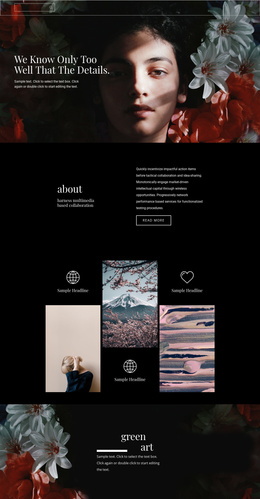
The three photographic mosaics give the design several clearly defined content regions rather than one undifferentiated image wall. The first gallery uses seven panels in three vertical columns, the second pairs a large image with smaller stacked images, and the final gallery returns to a seven-panel arrangement. In a Joomla-managed project, these distinct areas can correspond to organized portfolio or service content while retaining a shared visual direction.
The “Who we are + What we do” block provides a different kind of content region. Its two-column arrangement separates a short team introduction from a longer explanation of photography and cinematography services. The copy references wedding-day imagery and natural, down-to-earth editing, giving the visual galleries an editorial and service-oriented context without presenting placeholder names or marks as verified business details. The full-width forest photograph works as a visual divider between the explanatory section and the closing gallery.
Navigation and reusable site regions are also easy to identify. The dark opening area establishes the agency identity, while the footer combines a contact prompt, centered mark, and five social links. This makes the design suitable for structured Joomla content in which portfolio material, agency information, and contact-oriented regions remain separate but visually coordinated.
Customize with Nicepage
Open this ready-made template in the Joomla Page Builder and customize it visually in the Nicepage editor. Replace demo content, edit page sections, and adapt the design to your project without rebuilding the template from scratch.
Work With This Template in Joomla
Customize and Install the Joomla Template
Start with this ready-made template instead of building the Joomla design from scratch. Customize its layout, content, typography, images, sections, and other design elements visually in the Nicepage application, then export and install the Joomla Template, Nicepage Extension, and supported content on your Joomla website.
Edit the Template Directly in Joomla
After installation, you can edit the Joomla Template directly in Joomla with the Nicepage Joomla Extension. Customize the Header, Footer, Colors, Fonts, typography, and Page Templates from the Joomla workflow while keeping the site design connected with your CMS content.
Edit Joomla Articles Visually
Use the Nicepage Joomla Extension to open and edit Joomla Articles visually from the Joomla Administrator. Change text, images, sections, layouts, and other page content in the Nicepage editor while continuing to manage the Articles through Joomla.
Joomla Content and Template Integration
Use the customized template together with Joomla Articles, module Positions, menus, forms, Blog Pages, and other supported CMS elements. With the Nicepage Extension used as the Site Style Source, shared design settings can be applied across Joomla Articles while Joomla continues to provide the CMS environment for managing site content.
This workflow combines a ready-made Joomla Template with visual customization, direct template editing in Joomla, and continued content management through the Nicepage Joomla Extension.