Beatles opens up Joomla Template


A Structured Editorial Region for Music and Entertainment Content
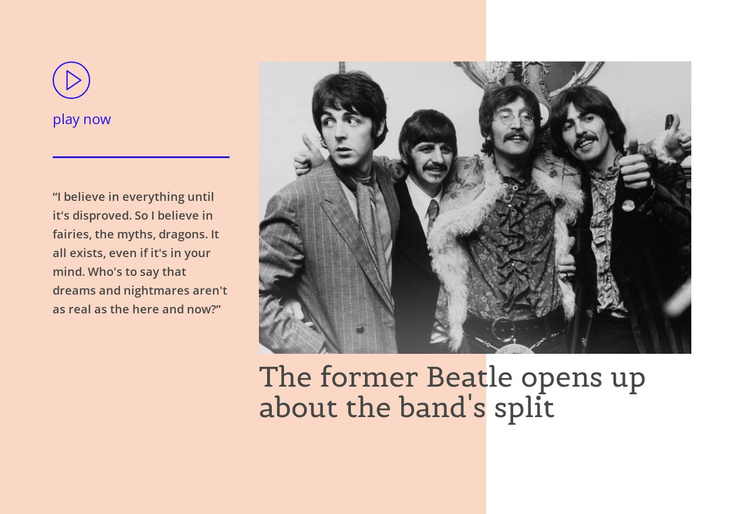
The single quotation and the headline create two complementary parts of the same editorial feature. The narrower left panel can hold the voice of the story, beginning with the circular play icon and “play now” label, then using the horizontal divider to distinguish that media cue from the quotation. The wider right panel gives priority to the large black-and-white photograph and places the headline, “The former Beatle opens up about the band's split,” directly within that visual story area.
In a Joomla-managed page, this arrangement can function as a stable content region for an article-like entertainment feature while the broader site handles its other editorial areas. The block’s structured division makes the relationship between quotation, media, and headline easy to preserve when the surrounding page changes. Its peach background and pale vertical shape unify the two panels, while blue-purple accents mark the play cue and divider without introducing another content group. Because the interaction is static, the section communicates through hierarchy and spacing rather than relying on a carousel or expandable control. The result is a focused editorial area that can sit among related music stories, introductions, or other page sections without becoming a complete CMS template itself.
Customize with Nicepage
Open this ready-made template in the Joomla Page Builder and customize it visually in the Nicepage editor. Replace demo content, edit page sections, and adapt the design to your project without rebuilding the template from scratch.
Edit Template Offline
2. Create a new page or select existing
3. Click Add new block, search for id 43724 and click enter
Edit Template Online
Create Awesome Websites


Free Nicepage Builder
Keywords
Work With This Template in Joomla
Customize and Install the Joomla Template
Start with this ready-made template instead of building the Joomla design from scratch. Customize its layout, content, typography, images, sections, and other design elements visually in the Nicepage application, then export and install the Joomla Template, Nicepage Extension, and supported content on your Joomla website.
Edit the Template Directly in Joomla
After installation, you can edit the Joomla Template directly in Joomla with the Nicepage Joomla Extension. Customize the Header, Footer, Colors, Fonts, typography, and Page Templates from the Joomla workflow while keeping the site design connected with your CMS content.
Edit Joomla Articles Visually
Use the Nicepage Joomla Extension to open and edit Joomla Articles visually from the Joomla Administrator. Change text, images, sections, layouts, and other page content in the Nicepage editor while continuing to manage the Articles through Joomla.
Joomla Content and Template Integration
Use the customized template together with Joomla Articles, module Positions, menus, forms, Blog Pages, and other supported CMS elements. With the Nicepage Extension used as the Site Style Source, shared design settings can be applied across Joomla Articles while Joomla continues to provide the CMS environment for managing site content.
This workflow combines a ready-made Joomla Template with visual customization, direct template editing in Joomla, and continued content management through the Nicepage Joomla Extension.