Eating essentials for food Joomla Template


Edit Template Offline
2. Create new page and search for id 38011
Edit Template Online
Create Awesome Websites


Free Nicepage Builder
Keywords
Green Restaurant Sections Create Structured CMS Content Regions
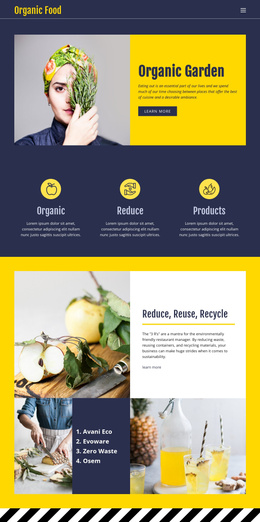
The page divides its subject into clear informational regions that can be understood as separate CMS-managed content areas. The Organic Garden opening introduces the theme with adjacent image and text panels, while the three repeated feature items establish the primary categories Organic, Reduce, and Products. This gives the navigation and content hierarchy a practical starting point without relying on dense continuous text.
The sustainability material is then grouped by subject. Reduce, Reuse, Recycle combines food imagery with a numbered list and explanatory panel, while Green restaurants places a restaurant list beside dark Eco-Friendly Practices content. The 11 Ways to Go Green section adds a mission-led center to the page, and the following Reduce Waste and Use Energy Efficiently sections provide focused guidance. These distinctions make the design suitable for structured restaurant and environmental information that may need to be maintained as separate areas.
The compact contact form supplies a dedicated inquiry region, and the footer gathers the logo with four social links. In a Joomla project, the design can therefore provide a coordinated presentation for menus, informational content, practice descriptions, and contact material. Its value lies in the relationship between shared navigation, repeatable topic regions, and a consistent visual frame, rather than in treating the page as one undifferentiated article.
Customize with Nicepage
Open this ready-made template in the Joomla Page Builder and customize it visually in the Nicepage editor. Replace demo content, edit page sections, and adapt the design to your project without rebuilding the template from scratch.
Work With This Template in Joomla
Customize and Install the Joomla Template
Start with this ready-made template instead of building the Joomla design from scratch. Customize its layout, content, typography, images, sections, and other design elements visually in the Nicepage application, then export and install the Joomla Template, Nicepage Extension, and supported content on your Joomla website.
Edit the Template Directly in Joomla
After installation, you can edit the Joomla Template directly in Joomla with the Nicepage Joomla Extension. Customize the Header, Footer, Colors, Fonts, typography, and Page Templates from the Joomla workflow while keeping the site design connected with your CMS content.
Edit Joomla Articles Visually
Use the Nicepage Joomla Extension to open and edit Joomla Articles visually from the Joomla Administrator. Change text, images, sections, layouts, and other page content in the Nicepage editor while continuing to manage the Articles through Joomla.
Joomla Content and Template Integration
Use the customized template together with Joomla Articles, module Positions, menus, forms, Blog Pages, and other supported CMS elements. With the Nicepage Extension used as the Site Style Source, shared design settings can be applied across Joomla Articles while Joomla continues to provide the CMS environment for managing site content.
This workflow combines a ready-made Joomla Template with visual customization, direct template editing in Joomla, and continued content management through the Nicepage Joomla Extension.