Start your trip almost anywhere Joomla Template



Edit Template Offline
2. Create new page and search for id 3544585
Edit Template Online
Create Awesome Websites


Free Nicepage Builder
Keywords
Vehicle Categories and Support Channels Form a Joomla-Ready Content Pattern
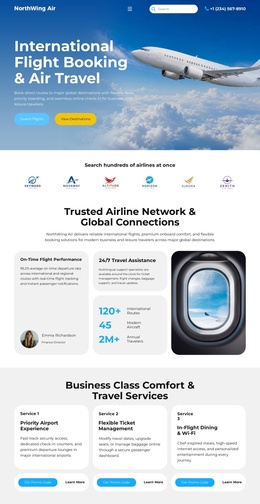
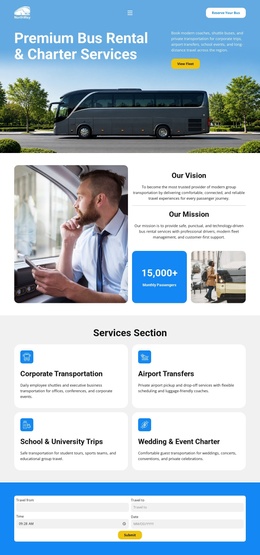
The five vehicle categories give the design a clear set of structured content areas: Economy, Luxury, Convertible, SUV, and Van/Minivan each appear as a separate image-led card with capacity details, descriptions, and a Book now action. In a Joomla project, these repeated areas can be treated as organized rental information while the shared navigation and footer keep the page visually connected. The arrangement is more specific than a generic transport layout because the vehicle choices are placed between an introductory service message and later promotional content.
The six-image travel gallery adds a second content type focused on destinations and traveler information. It can sit alongside the rental categories as supporting editorial material, while the booking-management area, contact form, displayed phone contact, WhatsApp Support, and Live Chat provide distinct service regions near the end of the page. This division suits a CMS-managed site where rental information, travel guidance, and customer assistance may need separate maintenance priorities. The blue booking callout and repeated Learn more or Book now actions also give menus and content sections recognizable destinations without changing the underlying design. Joomla capabilities can support this structured content environment, but the template analysis does not prove that Joomla Articles or modules already exist in the page.
Customize with Nicepage
Open this ready-made template in the Joomla Page Builder and customize it visually in the Nicepage editor. Replace demo content, edit page sections, and adapt the design to your project without rebuilding the template from scratch.
Work With This Template in Joomla
Customize and Install the Joomla Template
Start with this ready-made template instead of building the Joomla design from scratch. Customize its layout, content, typography, images, sections, and other design elements visually in the Nicepage application, then export and install the Joomla Template, Nicepage Extension, and supported content on your Joomla website.
Edit the Template Directly in Joomla
After installation, you can edit the Joomla Template directly in Joomla with the Nicepage Joomla Extension. Customize the Header, Footer, Colors, Fonts, typography, and Page Templates from the Joomla workflow while keeping the site design connected with your CMS content.
Edit Joomla Articles Visually
Use the Nicepage Joomla Extension to open and edit Joomla Articles visually from the Joomla Administrator. Change text, images, sections, layouts, and other page content in the Nicepage editor while continuing to manage the Articles through Joomla.
Joomla Content and Template Integration
Use the customized template together with Joomla Articles, module Positions, menus, forms, Blog Pages, and other supported CMS elements. With the Nicepage Extension used as the Site Style Source, shared design settings can be applied across Joomla Articles while Joomla continues to provide the CMS environment for managing site content.
This workflow combines a ready-made Joomla Template with visual customization, direct template editing in Joomla, and continued content management through the Nicepage Joomla Extension.