Getting started with wine Joomla Template


Structured Wine Attributes for a Joomla Content Region
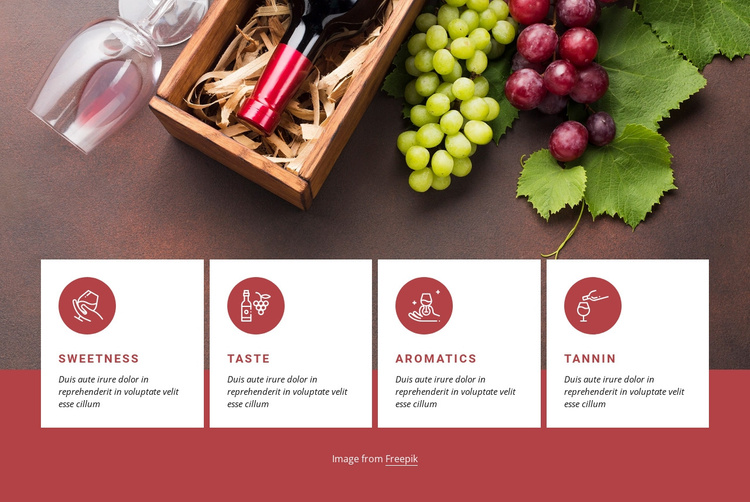
The four cards provide four stable informational units that can be placed within a Joomla-managed page: Sweetness, Taste, Aromatics, and Tannin. Their repeated structure makes the content easy to treat as one grouped subject, while the full-width wine and grape image supplies the visual context shared by all four attributes. The circular icons and uppercase red labels help distinguish the units without changing their equal status in the row.
The warm red background gives the section a defined visual boundary, and the white cards keep each description readable as separate content. This makes the block suitable for a structured site region where a visitor needs to compare related characteristics in one glance. The section can sit alongside other managed content such as broader introductions, editorial material, or contact information, while retaining its own focused role in the page composition.
The block’s static behavior keeps the interpretation straightforward: the information is presented directly rather than hidden behind tabs, accordions, or a carousel. In a Joomla-oriented project, the visual section can therefore provide a stable presentation for related wine content while the broader site handles its own editorial organization. The Nicepage Joomla workflow explains the wider CMS context without changing the block’s four-card content role.
Customize with Nicepage
Open this ready-made template in the Joomla Page Builder and customize it visually in the Nicepage editor. Replace demo content, edit page sections, and adapt the design to your project without rebuilding the template from scratch.
Edit Template Offline
2. Create a new page or select existing
3. Click Add new block, search for id 339322 and click enter
Edit Template Online
Create Awesome Websites


Free Nicepage Builder
Keywords
Work With This Template in Joomla
Customize and Install the Joomla Template
Start with this ready-made template instead of building the Joomla design from scratch. Customize its layout, content, typography, images, sections, and other design elements visually in the Nicepage application, then export and install the Joomla Template, Nicepage Extension, and supported content on your Joomla website.
Edit the Template Directly in Joomla
After installation, you can edit the Joomla Template directly in Joomla with the Nicepage Joomla Extension. Customize the Header, Footer, Colors, Fonts, typography, and Page Templates from the Joomla workflow while keeping the site design connected with your CMS content.
Edit Joomla Articles Visually
Use the Nicepage Joomla Extension to open and edit Joomla Articles visually from the Joomla Administrator. Change text, images, sections, layouts, and other page content in the Nicepage editor while continuing to manage the Articles through Joomla.
Joomla Content and Template Integration
Use the customized template together with Joomla Articles, module Positions, menus, forms, Blog Pages, and other supported CMS elements. With the Nicepage Extension used as the Site Style Source, shared design settings can be applied across Joomla Articles while Joomla continues to provide the CMS environment for managing site content.
This workflow combines a ready-made Joomla Template with visual customization, direct template editing in Joomla, and continued content management through the Nicepage Joomla Extension.