Outstanding quality of music Joomla Template


Edit Template Offline
2. Create new page and search for id 17189
Edit Template Online
Create Awesome Websites


Free Nicepage Builder
Keywords
Feature regions and variant content form reusable product areas
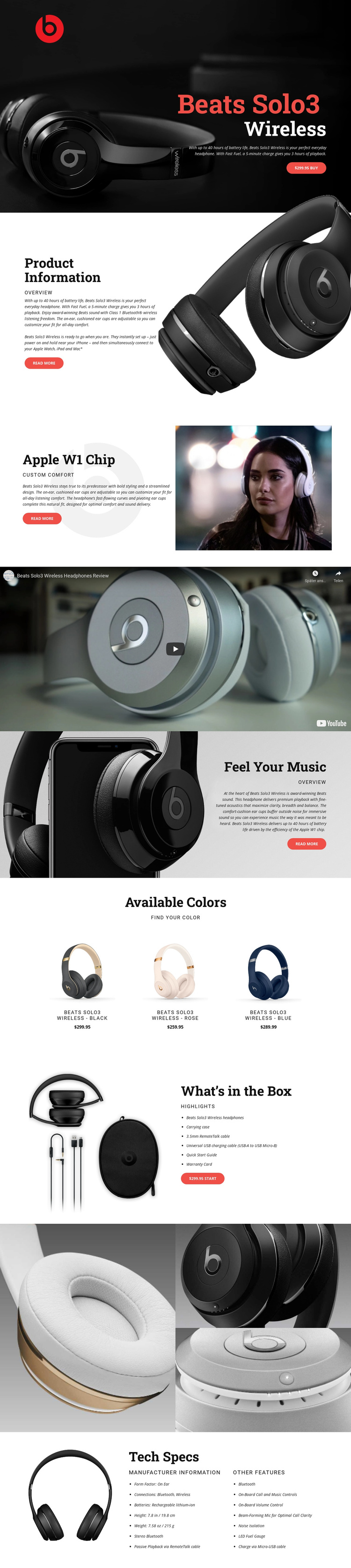
The page divides the headphone presentation into clearly defined information regions that suit structured CMS content. The opening hero can introduce the product and its primary purchase action, while the Product Information and Apple W1 Chip sections separate general description from a focused feature explanation. Their repeated split arrangement gives related content a consistent visual region without making the sections interchangeable.
The Available Colors grid has a different content relationship. Black, rose, and blue variants appear as three repeated items with product images, names, and prices. That pattern can represent recurring product information while remaining visually coordinated with the surrounding page. The What’s in the Box section similarly turns package contents into a distinct list: headphones, carrying case, charging cable, Quick Start Guide, and Warranty Card are grouped beside an accessories photograph and purchase prompt.
The gallery and Tech Specs block extend the structured content model in complementary ways. The gallery concentrates on three close-up product images, while the final specification area separates manufacturer information, form factor, Bluetooth and wireless connections, rechargeable battery details, dimensions, weight, and other features into readable columns. In a Joomla project, these regions provide a practical division between promotional content, repeated variant information, media, package details, and reference data. A Joomla Extension can support visual article design, but the page’s existing content relationships should remain the organizing principle.
Customize with Nicepage
Open this ready-made template in the Joomla Page Builder and customize it visually in the Nicepage editor. Replace demo content, edit page sections, and adapt the design to your project without rebuilding the template from scratch.
Work With This Template in Joomla
Customize and Install the Joomla Template
Start with this ready-made template instead of building the Joomla design from scratch. Customize its layout, content, typography, images, sections, and other design elements visually in the Nicepage application, then export and install the Joomla Template, Nicepage Extension, and supported content on your Joomla website.
Edit the Template Directly in Joomla
After installation, you can edit the Joomla Template directly in Joomla with the Nicepage Joomla Extension. Customize the Header, Footer, Colors, Fonts, typography, and Page Templates from the Joomla workflow while keeping the site design connected with your CMS content.
Edit Joomla Articles Visually
Use the Nicepage Joomla Extension to open and edit Joomla Articles visually from the Joomla Administrator. Change text, images, sections, layouts, and other page content in the Nicepage editor while continuing to manage the Articles through Joomla.
Joomla Content and Template Integration
Use the customized template together with Joomla Articles, module Positions, menus, forms, Blog Pages, and other supported CMS elements. With the Nicepage Extension used as the Site Style Source, shared design settings can be applied across Joomla Articles while Joomla continues to provide the CMS environment for managing site content.
This workflow combines a ready-made Joomla Template with visual customization, direct template editing in Joomla, and continued content management through the Nicepage Joomla Extension.