Mission To Mars Joomla Template


Edit Template Offline
2. Create new page and search for id 12792
Edit Template Online
Create Awesome Websites


Free Nicepage Builder
Keywords
Article Regions Link Mission Research With Public Outreach
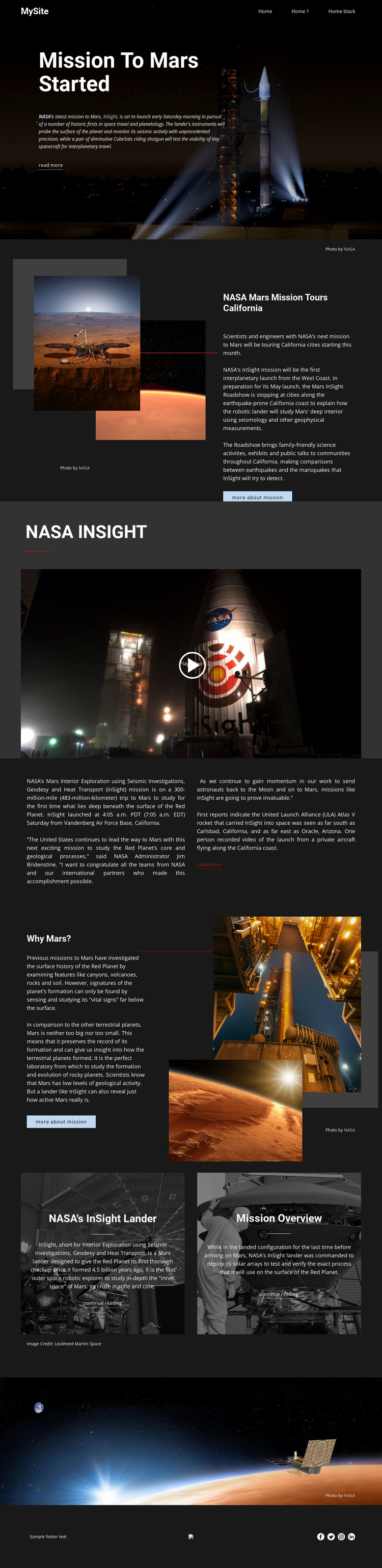
The page divides the InSight story into clearly recognizable information areas: an opening mission feature, a California roadshow article, a video introduction, launch and research details, and a “Why Mars?” explanation. That division is useful for a CMS-managed editorial site because each area has a distinct subject and presentation role. The two image-backed panels extend the structure with “NASA’s InSight lander” and “Mission Overview” reading destinations, while the shared header and social footer frame the page as part of a wider publication.
Joomla-oriented content can be organized around these relationships without treating the sample wording as permanent business copy. The roadshow section can represent public education content, the research columns can carry explanatory material, and the mission panels can point to related articles or reference pages. The existing video area remains a separate media region, while the navigation provides a consistent route between the page’s editorial subjects.
The design is therefore more than a dark image arrangement: it already distinguishes headline-led features, article text, media, related reading, and shared site access. A Joomla project could preserve those distinctions while replacing the NASA-specific material with structured content from another science or public-information subject. The result would keep the page’s visual coordination while allowing recurring editorial areas to be managed as organized site content.
Customize with Nicepage
Open this ready-made template in the Joomla Page Builder and customize it visually in the Nicepage editor. Replace demo content, edit page sections, and adapt the design to your project without rebuilding the template from scratch.
Work With This Template in Joomla
Customize and Install the Joomla Template
Start with this ready-made template instead of building the Joomla design from scratch. Customize its layout, content, typography, images, sections, and other design elements visually in the Nicepage application, then export and install the Joomla Template, Nicepage Extension, and supported content on your Joomla website.
Edit the Template Directly in Joomla
After installation, you can edit the Joomla Template directly in Joomla with the Nicepage Joomla Extension. Customize the Header, Footer, Colors, Fonts, typography, and Page Templates from the Joomla workflow while keeping the site design connected with your CMS content.
Edit Joomla Articles Visually
Use the Nicepage Joomla Extension to open and edit Joomla Articles visually from the Joomla Administrator. Change text, images, sections, layouts, and other page content in the Nicepage editor while continuing to manage the Articles through Joomla.
Joomla Content and Template Integration
Use the customized template together with Joomla Articles, module Positions, menus, forms, Blog Pages, and other supported CMS elements. With the Nicepage Extension used as the Site Style Source, shared design settings can be applied across Joomla Articles while Joomla continues to provide the CMS environment for managing site content.
This workflow combines a ready-made Joomla Template with visual customization, direct template editing in Joomla, and continued content management through the Nicepage Joomla Extension.