Travel on Seaboat Joomla Template


Edit Template Offline
2. Create new page and search for id 12435
Edit Template Online
Create Awesome Websites


Free Nicepage Builder
Keywords
Repair categories and shared contact regions suit structured Joomla content
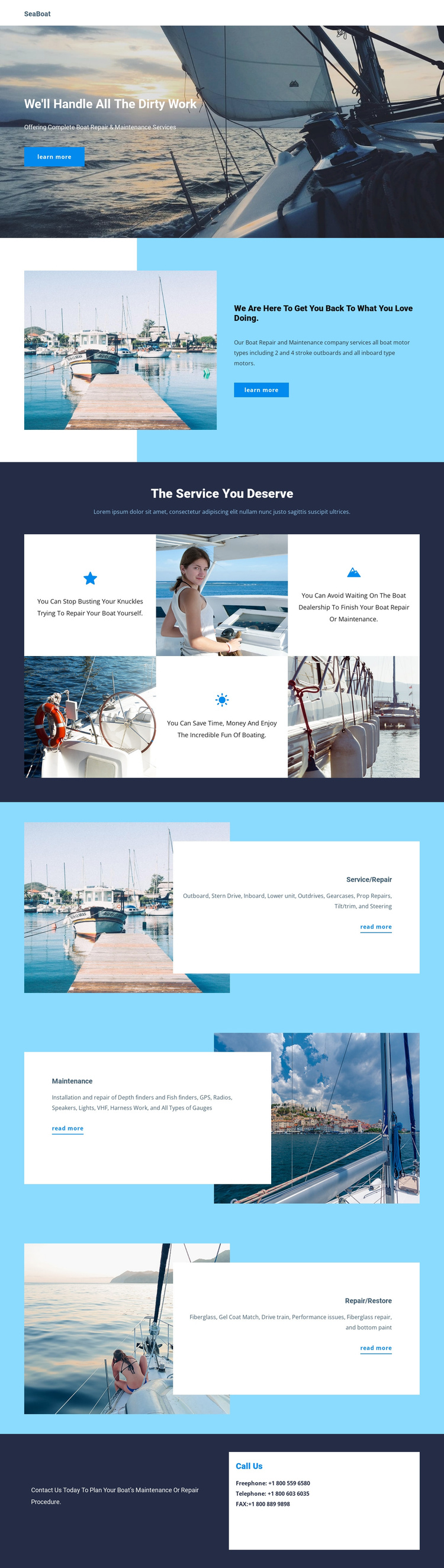
The Service/Repair, Maintenance, and Repair/Restore sections divide the page into useful editorial regions rather than presenting one undifferentiated service message. The repair content refers to 2-stroke and 4-stroke outboard motors and inboard motors, with capabilities such as propeller repairs, tilt and trim, steering, gauges, fiberglass repair, and bottom paint. Maintenance content adds equipment-oriented categories including depth and fish finders, GPS, radios, speakers, and lights. Restoration content is distinguished by fiberglass and gel coat matching. These differences give each section a clear content role.
The navigation header and dedicated Call Us area provide the shared regions needed to connect those service categories within a CMS-managed site. The four-item benefits section can introduce the service logic before visitors reach the more specific information cards, while the repeated image-and-text arrangement keeps the categories visually coordinated. In a Joomla project, the design therefore offers a practical division between navigation, overview content, structured service information, and contact content. The point is not to treat the sample wording or phone values as verified business data, but to preserve the page’s organization so the site owner can replace those placeholders with maintained service descriptions and current contact information.
Customize with Nicepage
Open this ready-made template in the Joomla Page Builder and customize it visually in the Nicepage editor. Replace demo content, edit page sections, and adapt the design to your project without rebuilding the template from scratch.
Work With This Template in Joomla
Customize and Install the Joomla Template
Start with this ready-made template instead of building the Joomla design from scratch. Customize its layout, content, typography, images, sections, and other design elements visually in the Nicepage application, then export and install the Joomla Template, Nicepage Extension, and supported content on your Joomla website.
Edit the Template Directly in Joomla
After installation, you can edit the Joomla Template directly in Joomla with the Nicepage Joomla Extension. Customize the Header, Footer, Colors, Fonts, typography, and Page Templates from the Joomla workflow while keeping the site design connected with your CMS content.
Edit Joomla Articles Visually
Use the Nicepage Joomla Extension to open and edit Joomla Articles visually from the Joomla Administrator. Change text, images, sections, layouts, and other page content in the Nicepage editor while continuing to manage the Articles through Joomla.
Joomla Content and Template Integration
Use the customized template together with Joomla Articles, module Positions, menus, forms, Blog Pages, and other supported CMS elements. With the Nicepage Extension used as the Site Style Source, shared design settings can be applied across Joomla Articles while Joomla continues to provide the CMS environment for managing site content.
This workflow combines a ready-made Joomla Template with visual customization, direct template editing in Joomla, and continued content management through the Nicepage Joomla Extension.