
The embodiment of bold ideas WordPress Theme


Edit Template Offline
2. Create new page and search for id 757945
Edit Template Online
Create Awesome Websites


Free Nicepage Builder
Keywords
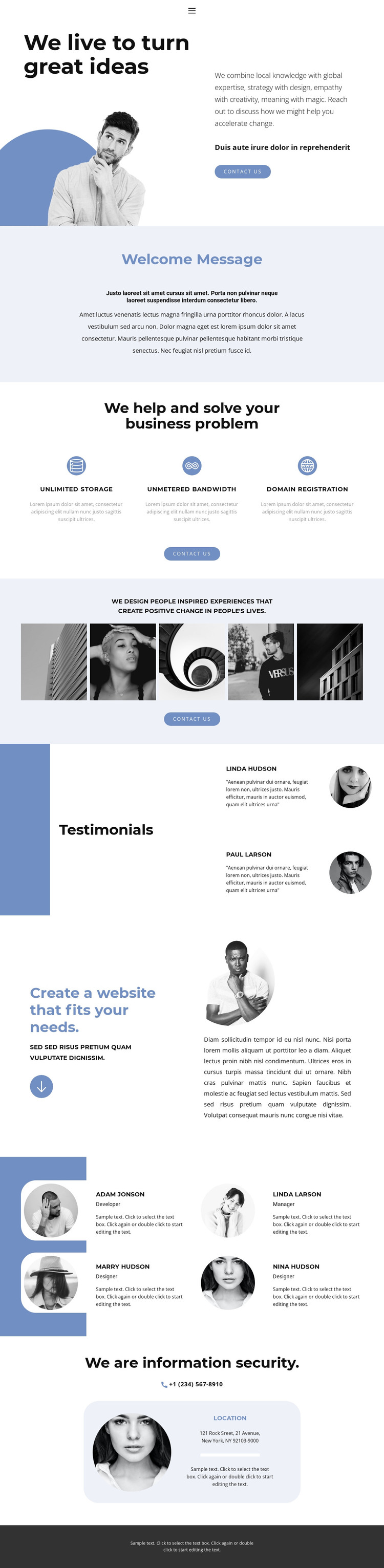
Gallery work, team profiles, and page content share one visual system
The five-image gallery gives the design a clear visual content area that can sit alongside more permanent agency information. Its experience-focused heading makes the imagery central to the page rather than a decorative detail, while the split hero supplies the introductory context and a contact action. Together, those sections create a page-oriented structure for presenting an agency message and selected visual work without claiming that the sample images represent verified projects.
The two testimonial entries and four team profile cards provide different kinds of recurring content. Testimonials use stacked text-and-portrait pairs to present statements, whereas the profile cards organize names, roles, portraits, and supporting sample copy into a repeated grid. That distinction can help separate client-oriented evidence from team information when the sample content is replaced with confirmed material. The website creation section adds explanatory content between these people-focused areas and the final contact block.
Home, About, and Contact navigation gives the design a natural page framework, while the phone link and location card identify a direct contact area. In a WordPress-managed project, these page sections can remain visually coordinated as permanent content while the site grows around them; the analysis does not verify blog posts or other editorial structures, so those should not be assumed. The bold typography, blue palette, rounded cards, and dark footer provide the shared theme character that keeps these content areas connected.
Customize with Nicepage
Open this ready-made template in the WordPress Website Builder and customize it visually in the Nicepage editor. Replace demo content, edit page sections, and adapt the design to your project without rebuilding the template from scratch.
Manage and Edit This Theme in WordPress
Customize and Install the WordPress Theme
Start with this ready-made theme instead of building the WordPress design from scratch. Customize its layout, content, typography, images, sections, and other design elements visually in Nicepage editor, then export and install the WordPress Theme, Plugin, and Pages on your WordPress site. The Nicepage WordPress Plugin lets you continue working with the site after installation.
Edit the Theme Directly in WordPress
After installation, you can edit the WordPress Theme directly in WordPress with the Nicepage WordPress Plugin. Use Site Style to customize site Colors, Fonts, Header, Footer, Blog, and Post Page Templates while working within your WordPress website.
Edit WordPress Pages Visually
Use the Nicepage WordPress Plugin to edit page content directly from the WordPress admin area. Open a WordPress Page with Nicepage and visually change its text, images, sections, and other page elements while continuing to manage the Page through WordPress.
WordPress Content and Theme Integration
Use the customized theme with WordPress Pages, Posts, Blog and Post Templates, menus, widgets, and other CMS-managed content. Shared theme elements such as Colors, Fonts, Header, Footer, Blog, and Post Page Templates can be managed as part of the overall site design, while WordPress provides the CMS environment for managing site content.
This workflow combines a ready-made WordPress Theme with visual customization, direct theme editing in WordPress, and continued content management through the Nicepage WordPress Plugin.





















