
Personal Finance Bank WordPress Theme


Edit Template Offline
2. Create new page and search for id 6657634
Edit Template Online
Create Awesome Websites


Free Nicepage Builder
Keywords
Service Pages, Plan Content, and Trust Sections Share One Theme Direction
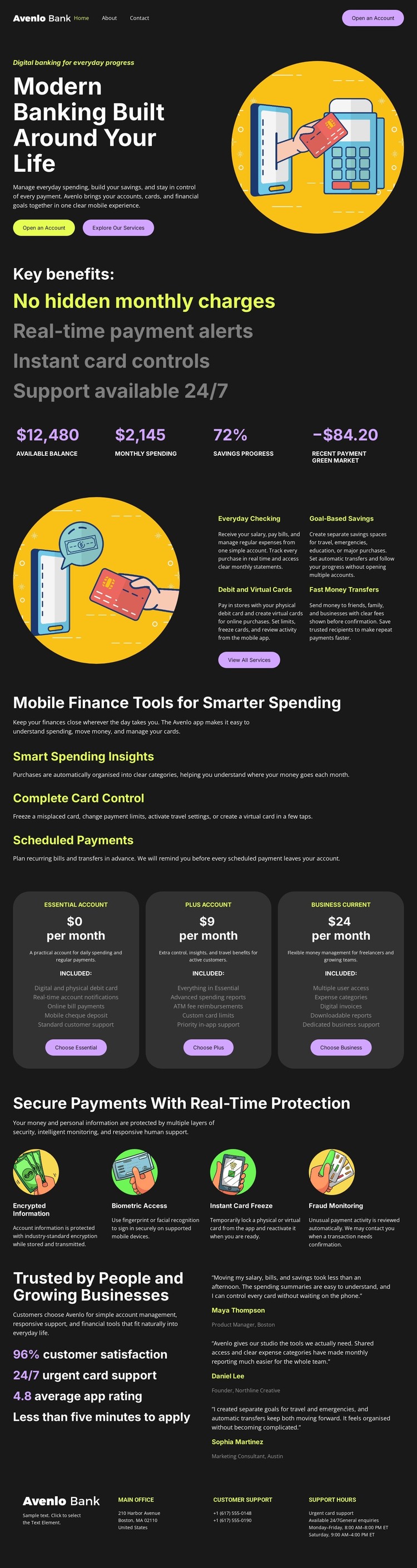
The page-oriented content is especially clear in the service and account areas. Everyday Checking, Global-Based Savings, Debit and Virtual Cards, and Fast Money Transfers can be understood as permanent banking information, while Smart Spending Insights, Completed Card Control, and Scheduled Payments add practical feature content. Together, these sections give a WordPress project more specific content relationships than a purely visual homepage description.
The three account plans form a separate decision-oriented group, with each rounded card presenting a plan label, pricing placeholder, description, and selection action. The four security cards then support the account information by explaining encrypted information, biometric access, instant card freeze, and fraud monitoring. This sequence allows plan-related content and protection-related content to remain distinct while sharing the same visual system.
The testimonial section provides a human-facing content area after the product and security explanations, and the navigation and support footer provide shared site regions. The dark palette, bold typography, circular illustrations, and bright accents can keep permanent page content visually coordinated as a WordPress project develops. The design does not prove that posts, categories, or blog structures already exist; instead, it offers a clear theme framework for banking pages and other CMS-managed content that fits the verified sections.
Customize with Nicepage
Open this ready-made template in the WordPress Website Builder and customize it visually in the Nicepage editor. Replace demo content, edit page sections, and adapt the design to your project without rebuilding the template from scratch.
Manage and Edit This Theme in WordPress
Customize and Install the WordPress Theme
Start with this ready-made theme instead of building the WordPress design from scratch. Customize its layout, content, typography, images, sections, and other design elements visually in Nicepage editor, then export and install the WordPress Theme, Plugin, and Pages on your WordPress site. The Nicepage WordPress Plugin lets you continue working with the site after installation.
Edit the Theme Directly in WordPress
After installation, you can edit the WordPress Theme directly in WordPress with the Nicepage WordPress Plugin. Use Site Style to customize site Colors, Fonts, Header, Footer, Blog, and Post Page Templates while working within your WordPress website.
Edit WordPress Pages Visually
Use the Nicepage WordPress Plugin to edit page content directly from the WordPress admin area. Open a WordPress Page with Nicepage and visually change its text, images, sections, and other page elements while continuing to manage the Page through WordPress.
WordPress Content and Theme Integration
Use the customized theme with WordPress Pages, Posts, Blog and Post Templates, menus, widgets, and other CMS-managed content. Shared theme elements such as Colors, Fonts, Header, Footer, Blog, and Post Page Templates can be managed as part of the overall site design, while WordPress provides the CMS environment for managing site content.
This workflow combines a ready-made WordPress Theme with visual customization, direct theme editing in WordPress, and continued content management through the Nicepage WordPress Plugin.





















