Quick poll WordPress Theme


Preference Questions Form a Stable Page Content Area
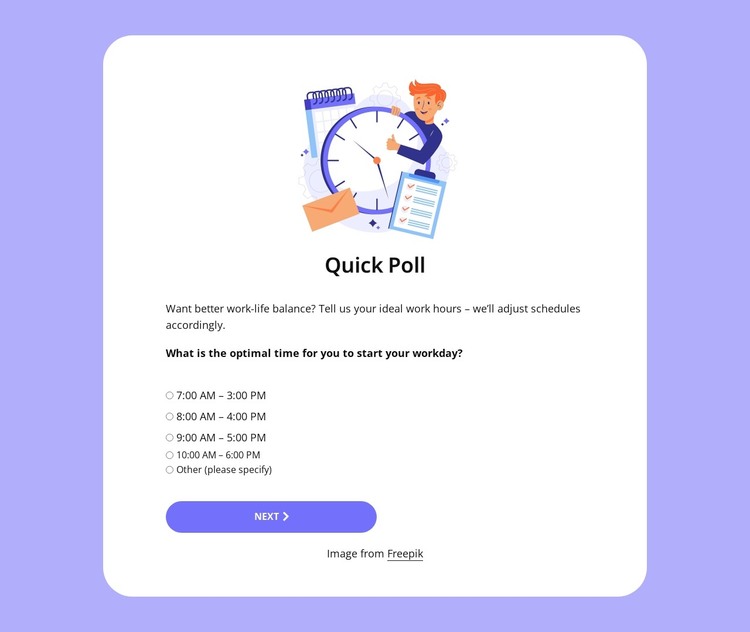
The Quick Poll section is suited to a WordPress-managed page when workplace preferences need to remain part of stable, publishable content. Its structure begins with the Quick Poll heading, illustration, and work-life balance introduction, then moves through focused question groups rather than presenting one crowded form. The first group asks about workday start time and offers five choices; later groups address work arrangement and remote productivity. This progression gives the page content a readable editorial order while retaining a practical response function.
The final name and email fields create a clear follow-up point after the preference questions have been answered. Next and Previous controls let respondents move through the sequential stages, and Submit closes the interaction. The centered white card provides a contained content region that can sit within a broader business page, while the lavender background and purple controls distinguish the survey from ordinary text sections or other page material.
For WordPress-oriented use, the block can serve as a maintained workplace survey or employee-preference section whose wording and visual treatment remain consistent with the surrounding page. The section's content model is specific enough to preserve its purpose: choice-based questions first, contact details afterward. Broader site content can provide context around the survey, while this reusable area keeps the response sequence and its focused visual hierarchy intact.
Customize with Nicepage
Open this ready-made template in the WordPress Website Builder and customize it visually in the Nicepage editor. Replace demo content, edit page sections, and adapt the design to your project without rebuilding the template from scratch.
Edit Template Offline
2. Create a new page or select existing
3. Click Add new block, search for id 6536653 and click enter
Edit Template Online
Create Awesome Websites


Free Nicepage Builder
Keywords
Use This Block in a WordPress-Managed Website
Keep the Block as Page Content
Use the block as one content/layout section inside a WordPress-oriented site rather than treating the Block ID as a complete WordPress Theme. Its verified text, images, repeated items, forms, galleries, or other elements can remain part of permanent page content while WordPress manages the wider site.
Work With Nicepage and WordPress
A Nicepage WordPress project can be installed using the WordPress Theme, Plugin, and Pages workflow. After installation, the same visual section can participate in WordPress-managed pages as part of the broader theme/site structure.
Continue Editing in WordPress
Nicepage supports editing the WordPress Theme directly in WordPress. Use WordPress Pages, Posts, Blog structures, and other CMS concepts only when they are relevant to the surrounding project; their existence must not be inferred from the analyzed block alone.
This workflow keeps the block's verified section function separate from the WordPress theme architecture while allowing it to participate in a CMS-managed website.