Post-Construction Cleaning WordPress Theme


Six Stable Category Items Fit a WordPress Page Content Region
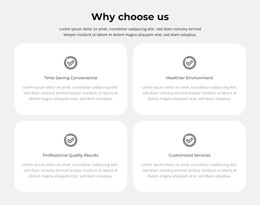
The six sector labels read as stable page content because they describe a defined coverage group rather than a time-based sequence. Mining and Resources, Retail, Hospitality and Entertainment, Commercial Property and Facilities, Municipal and Local Government, Transportation and Logistics, and Health and Aged Care are each given the same pill structure: a rounded pale blue-gray container, a circular check icon, and dark bold text. That repeated model makes the content easy to maintain as one coherent section within a WordPress-managed page.
The staggered three-row layout adds visual character without requiring a carousel, filter, or other dynamic component. All categories remain present for direct comparison, and generous whitespace keeps the longer labels from overwhelming the shorter ones. The section can therefore support a stable services or coverage area while other parts of the wider site handle navigation, editorial content, forms, or deeper explanations.
A WordPress project can use this block as a reusable visual content region while preserving its existing category relationships. Nicepage's WordPress Theme and Pages workflow provides relevant broader CMS context, but it does not change the block's scope: the analyzed section remains six checked category pills. Its contribution is a consistent, publishable presentation of structured page information rather than a standalone WordPress Theme.
Customize with Nicepage
Open this ready-made template in the WordPress Website Builder and customize it visually in the Nicepage editor. Replace demo content, edit page sections, and adapt the design to your project without rebuilding the template from scratch.
Edit Template Offline
2. Create a new page or select existing
3. Click Add new block, search for id 6400190 and click enter
Edit Template Online
Create Awesome Websites


Free Nicepage Builder
Keywords
Manage and Edit This Theme in WordPress
Customize and Install the WordPress Theme
Start with this ready-made theme instead of building the WordPress design from scratch. Customize its layout, content, typography, images, sections, and other design elements visually in Nicepage editor, then export and install the WordPress Theme, Plugin, and Pages on your WordPress site. The Nicepage WordPress Plugin lets you continue working with the site after installation.
Edit the Theme Directly in WordPress
After installation, you can edit the WordPress Theme directly in WordPress with the Nicepage WordPress Plugin. Use Site Style to customize site Colors, Fonts, Header, Footer, Blog, and Post Page Templates while working within your WordPress website.
Edit WordPress Pages Visually
Use the Nicepage WordPress Plugin to edit page content directly from the WordPress admin area. Open a WordPress Page with Nicepage and visually change its text, images, sections, and other page elements while continuing to manage the Page through WordPress.
WordPress Content and Theme Integration
Use the customized theme with WordPress Pages, Posts, Blog and Post Templates, menus, widgets, and other CMS-managed content. Shared theme elements such as Colors, Fonts, Header, Footer, Blog, and Post Page Templates can be managed as part of the overall site design, while WordPress provides the CMS environment for managing site content.
This workflow combines a ready-made WordPress Theme with visual customization, direct theme editing in WordPress, and continued content management through the Nicepage WordPress Plugin.