Free analysis WordPress Theme


Edit Template Offline
2. Create new page and search for id 6007426
Edit Template Online
Create Awesome Websites


Free Nicepage Builder
Keywords
The inquiry form and service areas give WordPress content clear roles
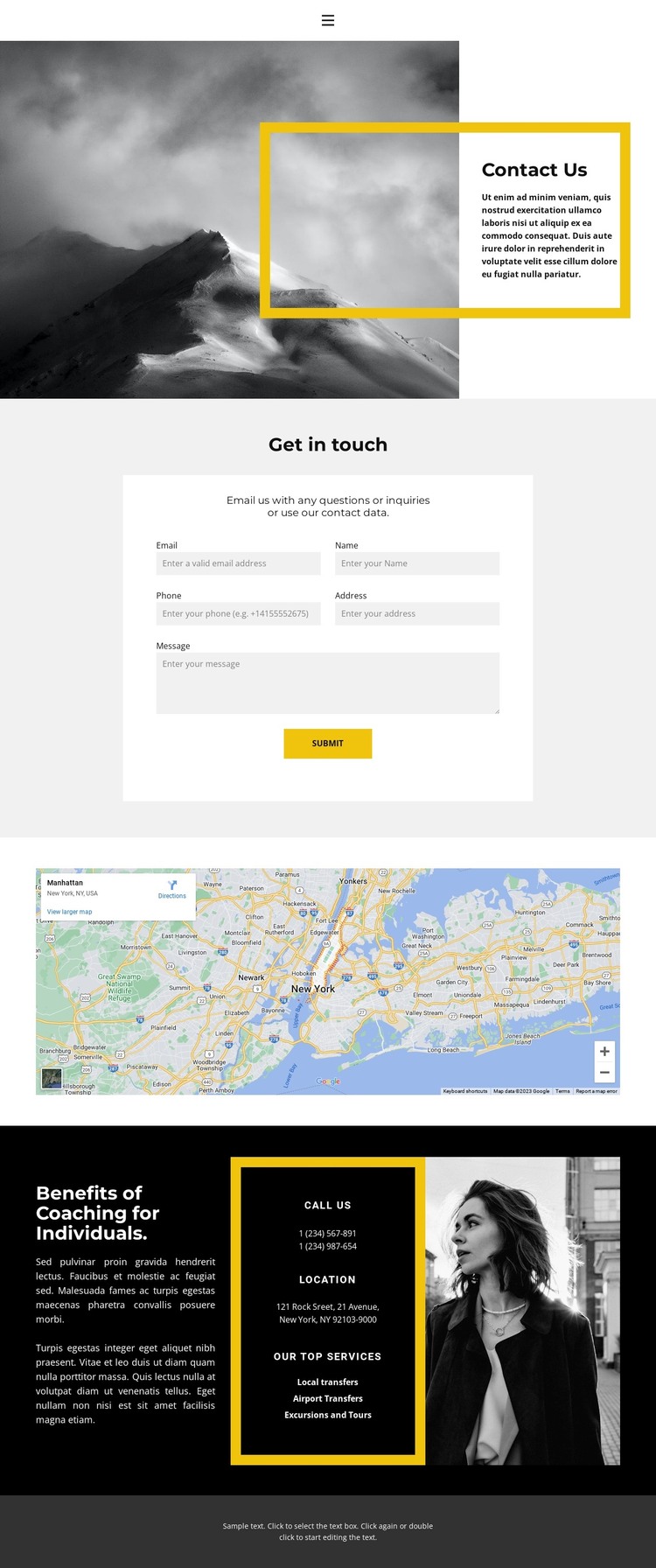
The centered “Get in touch” section provides a strong permanent page area for contact information in a WordPress-managed site. Its email, name, phone, address, and message inputs are grouped around a visible Submit action, so the page has a defined place for visitors to send inquiries rather than scattering contact content across unrelated sections. The opening split block can introduce that page with a monochrome mountain image and bordered “Contact Us” panel, establishing the visual context before the form appears.
The lower dark section supports a different kind of content relationship. Phone and location areas sit beside coaching-related explanation and the service labels for local transfers, airport transfers, and excursions and tours. That combination can guide the organization of permanent page content, while the map gives the location subject its own visible presentation. The monochrome portrait and repeated dark, light, and yellow treatments keep these areas connected as part of one theme rather than isolated content fragments.
For a WordPress project, the design therefore offers recognizable places for page-oriented contact content, service information, and location details. If the site later adds regularly updated articles or announcements, those would be additional WordPress-managed content rather than claims about elements already present here. The theme’s value lies in preserving the relationship between inquiry, services, imagery, navigation, and shared contact presentation as the site content develops.
Customize with Nicepage
Open this ready-made template in the WordPress Website Builder and customize it visually in the Nicepage editor. Replace demo content, edit page sections, and adapt the design to your project without rebuilding the template from scratch.
Manage and Edit This Theme in WordPress
Customize and Install the WordPress Theme
Start with this ready-made theme instead of building the WordPress design from scratch. Customize its layout, content, typography, images, sections, and other design elements visually in Nicepage editor, then export and install the WordPress Theme, Plugin, and Pages on your WordPress site. The Nicepage WordPress Plugin lets you continue working with the site after installation.
Edit the Theme Directly in WordPress
After installation, you can edit the WordPress Theme directly in WordPress with the Nicepage WordPress Plugin. Use Site Style to customize site Colors, Fonts, Header, Footer, Blog, and Post Page Templates while working within your WordPress website.
Edit WordPress Pages Visually
Use the Nicepage WordPress Plugin to edit page content directly from the WordPress admin area. Open a WordPress Page with Nicepage and visually change its text, images, sections, and other page elements while continuing to manage the Page through WordPress.
WordPress Content and Theme Integration
Use the customized theme with WordPress Pages, Posts, Blog and Post Templates, menus, widgets, and other CMS-managed content. Shared theme elements such as Colors, Fonts, Header, Footer, Blog, and Post Page Templates can be managed as part of the overall site design, while WordPress provides the CMS environment for managing site content.
This workflow combines a ready-made WordPress Theme with visual customization, direct theme editing in WordPress, and continued content management through the Nicepage WordPress Plugin.