Chat and phone WordPress Theme


Stable Strategy Content for a WordPress-Managed Services Page
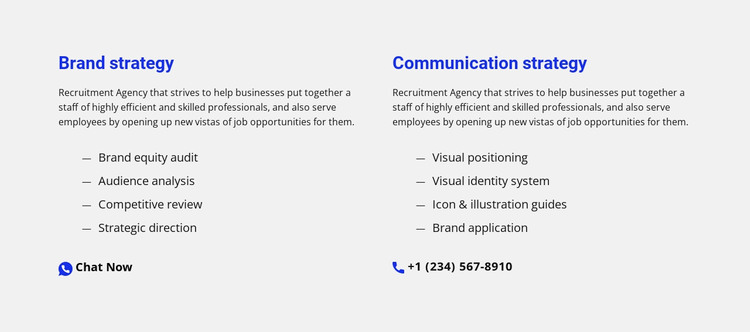
The two columns read as durable services content that can occupy a WordPress-managed page without depending on a time-sensitive post format. “Brand strategy” groups Brand equity audit, Audience analysis, Competitive review, and Strategic direction into one offering, while “Communication strategy” groups Visual positioning, Visual identity system, Icon & illustration guides, and Brand application into another. Their matching heading, description, list, and contact pattern gives the page a coherent content area that can remain useful as the wider site develops.
The contact affordances add practical page context without changing the section’s core purpose. Chat Now is associated with Brand strategy, and the phone contact affordance is associated with Communication strategy. This distinction lets the surrounding WordPress-managed content direct visitors toward the relevant service conversation while keeping each capability list attached to its own offering. The block can sit alongside other permanent page sections such as introductions, project information, or broader contact content.
Light gray background space, blue headings, blue contact accents, strong left alignment, and generous spacing give the section a repeatable visual pattern. In a WordPress-oriented project, that pattern can remain part of a services page while other pages and content areas evolve around it. The block participates in the broader theme and page structure; it is not itself a complete WordPress Theme.
Customize with Nicepage
Open this ready-made template in the WordPress Website Builder and customize it visually in the Nicepage editor. Replace demo content, edit page sections, and adapt the design to your project without rebuilding the template from scratch.
Edit Template Offline
2. Create a new page or select existing
3. Click Add new block, search for id 550270 and click enter
Edit Template Online
Create Awesome Websites


Free Nicepage Builder
Keywords
Manage and Edit This Theme in WordPress
Customize and Install the WordPress Theme
Start with this ready-made theme instead of building the WordPress design from scratch. Customize its layout, content, typography, images, sections, and other design elements visually in Nicepage editor, then export and install the WordPress Theme, Plugin, and Pages on your WordPress site. The Nicepage WordPress Plugin lets you continue working with the site after installation.
Edit the Theme Directly in WordPress
After installation, you can edit the WordPress Theme directly in WordPress with the Nicepage WordPress Plugin. Use Site Style to customize site Colors, Fonts, Header, Footer, Blog, and Post Page Templates while working within your WordPress website.
Edit WordPress Pages Visually
Use the Nicepage WordPress Plugin to edit page content directly from the WordPress admin area. Open a WordPress Page with Nicepage and visually change its text, images, sections, and other page elements while continuing to manage the Page through WordPress.
WordPress Content and Theme Integration
Use the customized theme with WordPress Pages, Posts, Blog and Post Templates, menus, widgets, and other CMS-managed content. Shared theme elements such as Colors, Fonts, Header, Footer, Blog, and Post Page Templates can be managed as part of the overall site design, while WordPress provides the CMS environment for managing site content.
This workflow combines a ready-made WordPress Theme with visual customization, direct theme editing in WordPress, and continued content management through the Nicepage WordPress Plugin.