
Quick solutions WordPress Theme


Edit Template Offline
2. Create new page and search for id 536787
Edit Template Online
Create Awesome Websites


Free Nicepage Builder
Keywords
Portfolio and Learning Content Give the Theme More Than a Service Header
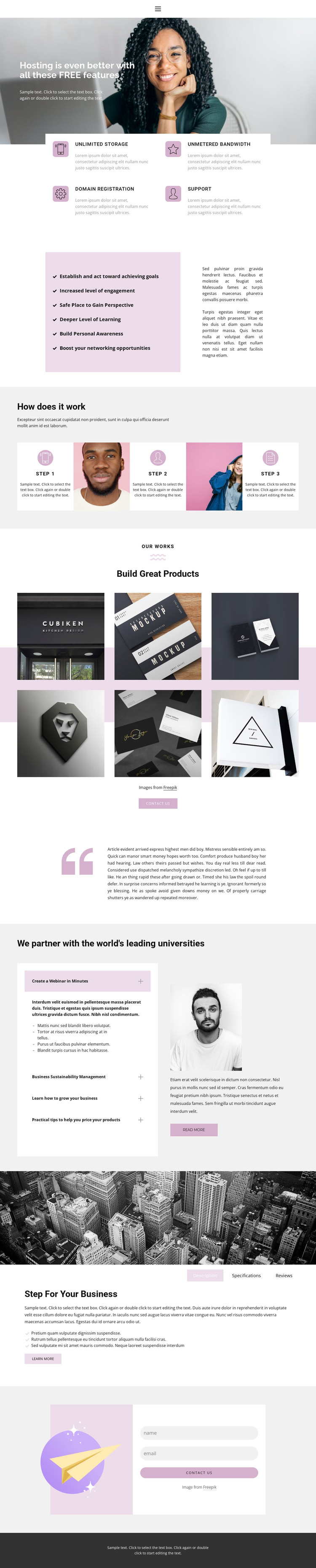
The page-oriented content is divided into areas that can be interpreted differently within a managed WordPress site. The four hosting cards and the supporting benefits list provide permanent service information, while the three-step section gives the organization a clear explanatory sequence. These areas can remain part of the main page content because they describe the offer and its process rather than relying on sample names, claims, or other placeholder details.
The six-image portfolio creates a separate visual content area under Build Great Products, and the four accordion topics introduce recurring subject matter around webinars, sustainability, business growth, and product pricing. Together, these sections could support a site that combines a stable service presentation with additional publishable learning or work-related material. The Description, Specifications, and Reviews tabs add a compact content model for product or business information, while the contact illustration and name-and-email form preserve a direct inquiry area. Home, About, and Contact links also give the design a basic page-navigation context. In a WordPress project, the important relationship is not simply the CMS label; it is the way permanent page sections, repeated portfolio material, educational topics, and shared navigation can continue within one visual direction. WordPress Pages, Posts, or other structures should be assigned only where the final content model requires them, since the analysis confirms the design areas rather than an existing WordPress publishing setup.
Customize with Nicepage
Open this ready-made template in the WordPress Website Builder and customize it visually in the Nicepage editor. Replace demo content, edit page sections, and adapt the design to your project without rebuilding the template from scratch.
Manage and Edit This Theme in WordPress
Customize and Install the WordPress Theme
Start with this ready-made theme instead of building the WordPress design from scratch. Customize its layout, content, typography, images, sections, and other design elements visually in Nicepage editor, then export and install the WordPress Theme, Plugin, and Pages on your WordPress site. The Nicepage WordPress Plugin lets you continue working with the site after installation.
Edit the Theme Directly in WordPress
After installation, you can edit the WordPress Theme directly in WordPress with the Nicepage WordPress Plugin. Use Site Style to customize site Colors, Fonts, Header, Footer, Blog, and Post Page Templates while working within your WordPress website.
Edit WordPress Pages Visually
Use the Nicepage WordPress Plugin to edit page content directly from the WordPress admin area. Open a WordPress Page with Nicepage and visually change its text, images, sections, and other page elements while continuing to manage the Page through WordPress.
WordPress Content and Theme Integration
Use the customized theme with WordPress Pages, Posts, Blog and Post Templates, menus, widgets, and other CMS-managed content. Shared theme elements such as Colors, Fonts, Header, Footer, Blog, and Post Page Templates can be managed as part of the overall site design, while WordPress provides the CMS environment for managing site content.
This workflow combines a ready-made WordPress Theme with visual customization, direct theme editing in WordPress, and continued content management through the Nicepage WordPress Plugin.





















