Pictures with meaning WordPress Theme


The image-led composition suits stable page content
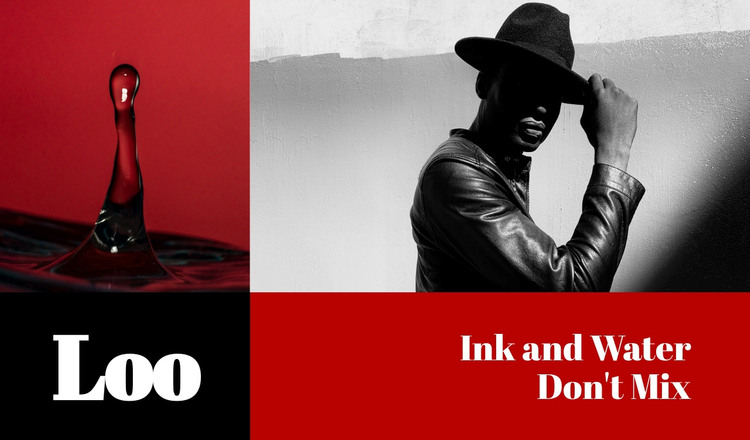
The upper row gives this section a clear content role before any surrounding page material is considered. The red-backed liquid or ink image introduces a strong visual subject, while the black-and-white portrait supplies a contrasting human image. Their placement across the top makes the section easy to recognize as an introductory visual statement rather than a list of changing records or a dense editorial feed.
The lower row translates that visual subject into page-readable labels. The small black panel presents “Loo,” and the wider red panel carries “Ink and Water Don't Mix,” creating a compact title-and-theme relationship. The unequal widths establish hierarchy: the short title remains contained, while the longer artistic heading receives the broader text area. Large serif typography and the red, black, white, and grayscale palette preserve the section’s visual identity when it is placed among other page content.
In a WordPress-oriented project, this block can function as stable content on an art, design, portfolio, or introductory page, while the wider site manages other pages and publishing needs around it. The section does not need to become a theme-level structure to be useful. Its practical role is to keep a distinctive visual message together: two images above, a concise title below left, and a wider thematic heading below right.
Customize with Nicepage
Open this ready-made template in the WordPress Website Builder and customize it visually in the Nicepage editor. Replace demo content, edit page sections, and adapt the design to your project without rebuilding the template from scratch.
Edit Template Offline
2. Create a new page or select existing
3. Click Add new block, search for id 50782 and click enter
Edit Template Online
Create Awesome Websites


Free Nicepage Builder
Keywords
Manage and Edit This Theme in WordPress
Customize and Install the WordPress Theme
Start with this ready-made theme instead of building the WordPress design from scratch. Customize its layout, content, typography, images, sections, and other design elements visually in Nicepage editor, then export and install the WordPress Theme, Plugin, and Pages on your WordPress site. The Nicepage WordPress Plugin lets you continue working with the site after installation.
Edit the Theme Directly in WordPress
After installation, you can edit the WordPress Theme directly in WordPress with the Nicepage WordPress Plugin. Use Site Style to customize site Colors, Fonts, Header, Footer, Blog, and Post Page Templates while working within your WordPress website.
Edit WordPress Pages Visually
Use the Nicepage WordPress Plugin to edit page content directly from the WordPress admin area. Open a WordPress Page with Nicepage and visually change its text, images, sections, and other page elements while continuing to manage the Page through WordPress.
WordPress Content and Theme Integration
Use the customized theme with WordPress Pages, Posts, Blog and Post Templates, menus, widgets, and other CMS-managed content. Shared theme elements such as Colors, Fonts, Header, Footer, Blog, and Post Page Templates can be managed as part of the overall site design, while WordPress provides the CMS environment for managing site content.
This workflow combines a ready-made WordPress Theme with visual customization, direct theme editing in WordPress, and continued content management through the Nicepage WordPress Plugin.