Smart branding is critical today WordPress Theme


A Reusable Services Area for WordPress Page Content
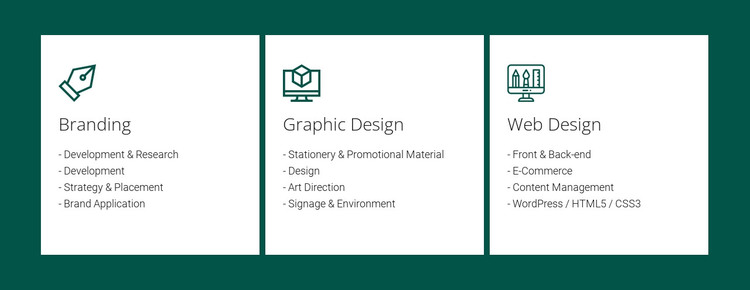
The three cards read as stable page content because each one communicates a defined service category and its supporting capabilities. Branding, Graphic Design, and Web Design are presented with equal visual weight in one horizontal row, making the section suitable for a WordPress-managed services page where a concise overview can sit beside or between other content areas. The block remains one reusable section; the wider site supplies its page structure and publishing context.
The repeated card pattern also makes the content easy to distinguish. Branding pairs its title and icon with Development & Research, Strategy & Placement, and Brand Application. Graphic Design lists Stationery & Promotional Material, Art Direction, and Signage & Environment. Web Design groups Front & Back-end, E-Commerce, Content Management, and WordPress / HTML5 / CSS3. These are content categories within the section, not separate posts or product records, so they can remain together as one visual service summary.
White cards provide a consistent surface for the text, while the dark teal background frames the row as a recognizable page region. Generous spacing and thin separators help preserve the boundary between adjacent offerings. In a WordPress-oriented project, that combination supports a repeatable services section that can remain visually consistent as other page content is edited or expanded around it.
Customize with Nicepage
Open this ready-made template in the WordPress Website Builder and customize it visually in the Nicepage editor. Replace demo content, edit page sections, and adapt the design to your project without rebuilding the template from scratch.
Edit Template Offline
2. Create a new page or select existing
3. Click Add new block, search for id 42689 and click enter
Edit Template Online
Create Awesome Websites


Free Nicepage Builder
Keywords
Manage and Edit This Theme in WordPress
Customize and Install the WordPress Theme
Start with this ready-made theme instead of building the WordPress design from scratch. Customize its layout, content, typography, images, sections, and other design elements visually in Nicepage editor, then export and install the WordPress Theme, Plugin, and Pages on your WordPress site. The Nicepage WordPress Plugin lets you continue working with the site after installation.
Edit the Theme Directly in WordPress
After installation, you can edit the WordPress Theme directly in WordPress with the Nicepage WordPress Plugin. Use Site Style to customize site Colors, Fonts, Header, Footer, Blog, and Post Page Templates while working within your WordPress website.
Edit WordPress Pages Visually
Use the Nicepage WordPress Plugin to edit page content directly from the WordPress admin area. Open a WordPress Page with Nicepage and visually change its text, images, sections, and other page elements while continuing to manage the Page through WordPress.
WordPress Content and Theme Integration
Use the customized theme with WordPress Pages, Posts, Blog and Post Templates, menus, widgets, and other CMS-managed content. Shared theme elements such as Colors, Fonts, Header, Footer, Blog, and Post Page Templates can be managed as part of the overall site design, while WordPress provides the CMS environment for managing site content.
This workflow combines a ready-made WordPress Theme with visual customization, direct theme editing in WordPress, and continued content management through the Nicepage WordPress Plugin.