
New for your development WordPress Theme


Edit Template Offline
2. Create new page and search for id 40935
Edit Template Online
Create Awesome Websites


Free Nicepage Builder
Keywords
Service Content and Testimonials Support a WordPress Theme Structure
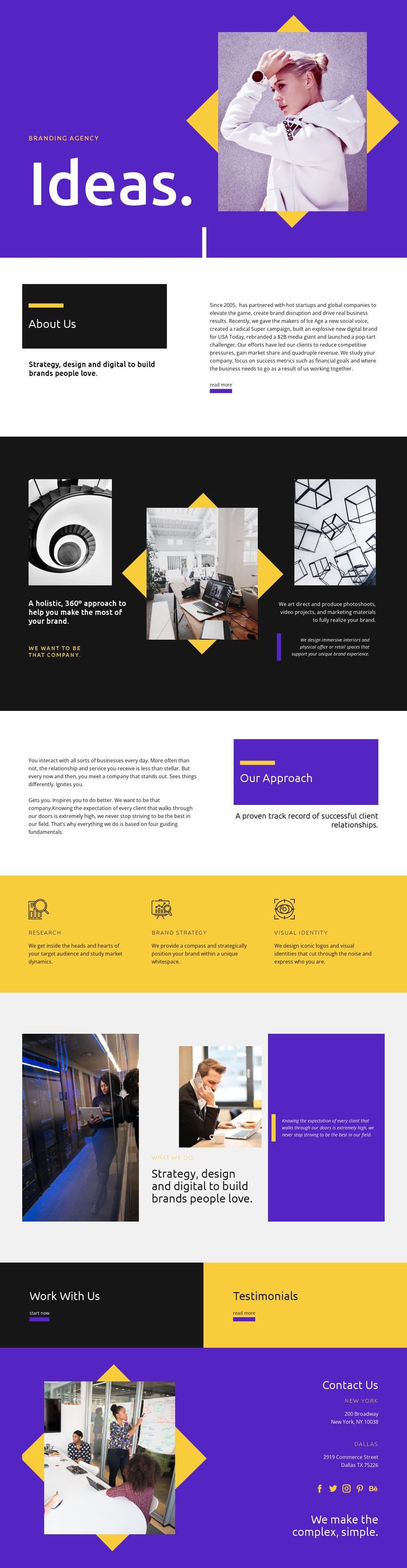
The page’s strongest permanent content areas are easy to distinguish: About Us introduces the agency, the capability grid presents photography, video, marketing materials, and branded spaces, and the repeated service group names Research, Brand Strategy, and Visual Identity. That division gives a WordPress-oriented project clear page content to maintain while preserving the visual relationship between strategic services and creative production.
“Our Approach” supplies narrative content that can explain the client relationship, while the “what we do” section connects photography with strategy, design, and digital work. These sections create different editorial roles instead of repeating the same service description. The high-contrast panels and asymmetrical image treatment can continue to frame those areas as the theme’s content changes, but the analysis does not require assuming that blog posts, categories, or other dynamic WordPress structures already appear in the template.
The lower page supports two different visitor needs. “Work With Us” and “Start now” point toward beginning a project, whereas “Testimonials” provides a separate route for reviewing supporting evidence. Contact Us then gathers New York and Dallas location labels, links for Facebook, Twitter, Instagram, Pinterest, and Behance, and the closing statement “We make the complex, simple.” In a WordPress theme context, these service, narrative, proof, action, and contact areas provide a stable content framework around which regularly updated agency information could be added without losing the design’s core character.
Customize with Nicepage
Open this ready-made template in the WordPress Website Builder and customize it visually in the Nicepage editor. Replace demo content, edit page sections, and adapt the design to your project without rebuilding the template from scratch.
Manage and Edit This Theme in WordPress
Customize and Install the WordPress Theme
Start with this ready-made theme instead of building the WordPress design from scratch. Customize its layout, content, typography, images, sections, and other design elements visually in Nicepage editor, then export and install the WordPress Theme, Plugin, and Pages on your WordPress site. The Nicepage WordPress Plugin lets you continue working with the site after installation.
Edit the Theme Directly in WordPress
After installation, you can edit the WordPress Theme directly in WordPress with the Nicepage WordPress Plugin. Use Site Style to customize site Colors, Fonts, Header, Footer, Blog, and Post Page Templates while working within your WordPress website.
Edit WordPress Pages Visually
Use the Nicepage WordPress Plugin to edit page content directly from the WordPress admin area. Open a WordPress Page with Nicepage and visually change its text, images, sections, and other page elements while continuing to manage the Page through WordPress.
WordPress Content and Theme Integration
Use the customized theme with WordPress Pages, Posts, Blog and Post Templates, menus, widgets, and other CMS-managed content. Shared theme elements such as Colors, Fonts, Header, Footer, Blog, and Post Page Templates can be managed as part of the overall site design, while WordPress provides the CMS environment for managing site content.
This workflow combines a ready-made WordPress Theme with visual customization, direct theme editing in WordPress, and continued content management through the Nicepage WordPress Plugin.





















