
Creative-thinking for business WordPress Theme


Edit Template Offline
2. Create new page and search for id 3944164
Edit Template Online
Create Awesome Websites


Free Nicepage Builder
Keywords
Service and package areas give WordPress content a clear shape
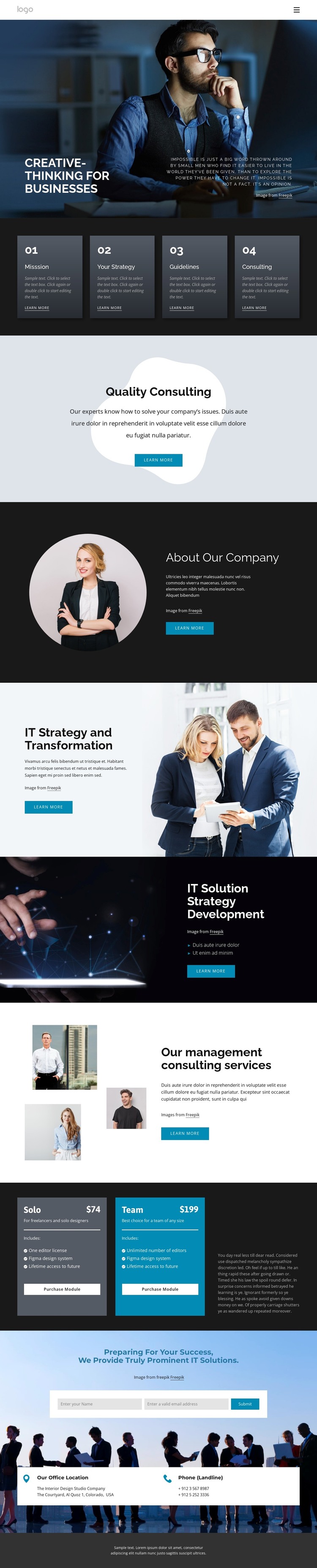
The page-oriented sections provide a useful basis for organizing WordPress-managed consulting content. The hero can introduce the site’s central business message, while the four capability cards create a compact summary of Mission, Your Strategy, Guidelines, and Consulting. Together, they distinguish introductory content from the more detailed service material that follows, giving permanent page content a visible hierarchy rather than presenting every message at the same level.
The three service areas are especially suitable for separating related consulting subjects. IT Strategy and Transformation, IT Solution Strategy Development, and management consulting each combine explanatory copy with supporting imagery and a Learn more action. That structure can accommodate distinct service information while preserving the same visual direction. About Our Company supplies a separate organization-focused area, and the package section introduces Solo and Team offers as another content group with displayed prices and purchase actions.
The closing contact region connects those page areas to a response opportunity through a subscription form, office-location information, and phone details. In a WordPress project, the visual system can therefore surround page content that changes over time without losing the relationship between services, packages, and contact information. The interpretation does not assume that blog posts, categories, or other unverified WordPress structures already exist; it focuses on the concrete page sections this design actually provides.
Customize with Nicepage
Open this ready-made template in the WordPress Website Builder and customize it visually in the Nicepage editor. Replace demo content, edit page sections, and adapt the design to your project without rebuilding the template from scratch.
Manage and Edit This Theme in WordPress
Customize and Install the WordPress Theme
Start with this ready-made theme instead of building the WordPress design from scratch. Customize its layout, content, typography, images, sections, and other design elements visually in Nicepage editor, then export and install the WordPress Theme, Plugin, and Pages on your WordPress site. The Nicepage WordPress Plugin lets you continue working with the site after installation.
Edit the Theme Directly in WordPress
After installation, you can edit the WordPress Theme directly in WordPress with the Nicepage WordPress Plugin. Use Site Style to customize site Colors, Fonts, Header, Footer, Blog, and Post Page Templates while working within your WordPress website.
Edit WordPress Pages Visually
Use the Nicepage WordPress Plugin to edit page content directly from the WordPress admin area. Open a WordPress Page with Nicepage and visually change its text, images, sections, and other page elements while continuing to manage the Page through WordPress.
WordPress Content and Theme Integration
Use the customized theme with WordPress Pages, Posts, Blog and Post Templates, menus, widgets, and other CMS-managed content. Shared theme elements such as Colors, Fonts, Header, Footer, Blog, and Post Page Templates can be managed as part of the overall site design, while WordPress provides the CMS environment for managing site content.
This workflow combines a ready-made WordPress Theme with visual customization, direct theme editing in WordPress, and continued content management through the Nicepage WordPress Plugin.





















