We count together WordPress Theme


Numeric Highlights Become Stable WordPress Page Content
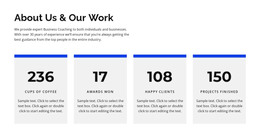
The repeated card arrangement makes the section read as a set of related page-content units. Each unit has the same internal rhythm: a prominent number first, a bold label next, a short supporting paragraph, and a black arrow at the bottom. The two-by-two layout keeps the four entries visible together, while the pale lavender backgrounds and white gaps distinguish one item from the next. Large blue values create a clear scanning path without making the supporting explanations disappear.
For a WordPress-managed page, this block can hold relatively stable information such as organizational highlights, service-related figures, or other confirmed numeric summaries. The sample labels and values show the intended content model, but they should be replaced or reviewed before publication rather than treated as factual achievements. The separate supporting-text area is useful for adding context to a number, while the repeated arrow icon supplies a consistent visual cue across all four cards.
The section can therefore remain a focused page-content area within a wider WordPress project. It does not need to carry navigation, editorial archives, or the rest of the site structure; its role is to present one grouped set of statistics in a format that can sit alongside other managed page content.
Customize with Nicepage
Open this ready-made template in the WordPress Website Builder and customize it visually in the Nicepage editor. Replace demo content, edit page sections, and adapt the design to your project without rebuilding the template from scratch.
Edit Template Offline
2. Create a new page or select existing
3. Click Add new block, search for id 2722713 and click enter
Edit Template Online
Create Awesome Websites


Free Nicepage Builder
Keywords
Manage and Edit This Theme in WordPress
Customize and Install the WordPress Theme
Start with this ready-made theme instead of building the WordPress design from scratch. Customize its layout, content, typography, images, sections, and other design elements visually in Nicepage editor, then export and install the WordPress Theme, Plugin, and Pages on your WordPress site. The Nicepage WordPress Plugin lets you continue working with the site after installation.
Edit the Theme Directly in WordPress
After installation, you can edit the WordPress Theme directly in WordPress with the Nicepage WordPress Plugin. Use Site Style to customize site Colors, Fonts, Header, Footer, Blog, and Post Page Templates while working within your WordPress website.
Edit WordPress Pages Visually
Use the Nicepage WordPress Plugin to edit page content directly from the WordPress admin area. Open a WordPress Page with Nicepage and visually change its text, images, sections, and other page elements while continuing to manage the Page through WordPress.
WordPress Content and Theme Integration
Use the customized theme with WordPress Pages, Posts, Blog and Post Templates, menus, widgets, and other CMS-managed content. Shared theme elements such as Colors, Fonts, Header, Footer, Blog, and Post Page Templates can be managed as part of the overall site design, while WordPress provides the CMS environment for managing site content.
This workflow combines a ready-made WordPress Theme with visual customization, direct theme editing in WordPress, and continued content management through the Nicepage WordPress Plugin.