
All about creative design WordPress Theme


Edit Template Offline
2. Create new page and search for id 221809
Edit Template Online
Create Awesome Websites


Free Nicepage Builder
Keywords
Page content and gallery areas support an image-led restaurant theme
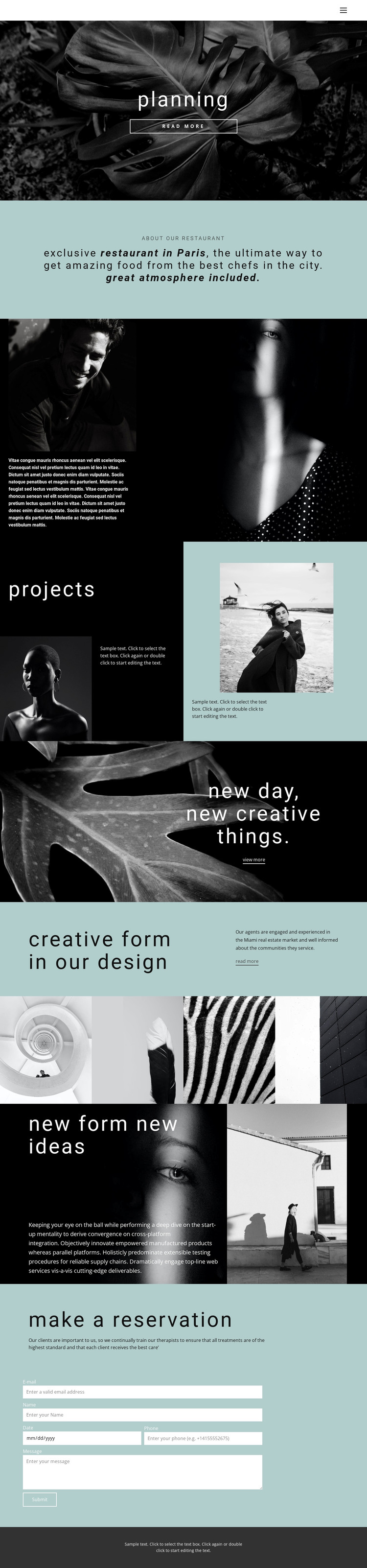
The restaurant introduction and reservation section provide two different kinds of WordPress-oriented content. The About Our Restaurant block can hold stable page information about the concept, while the closing Make a Reservation area concentrates visitor inquiries through the verified form. Between them, the Projects collage and four-image gallery create reusable visual content areas that can present the restaurant's atmosphere, creative work, or other approved imagery without changing the theme's central direction.
The page also includes a planning hero, two image-led split sections, and a promotional banner. Together, these areas give the theme a clear sequence for presenting an idea, explaining it, showing visual material, and inviting contact. Navigation and mobile navigation can connect those content areas, while the dark footer provides a shared endpoint for the page. The analysis does not verify WordPress Posts, blog categories, or other CMS-specific structures inside this template, so those should not be treated as existing components. Instead, the confirmed page sections can be interpreted as permanent restaurant content that may later sit alongside WordPress-managed material if the project requires it. Nicepage's WordPress Plugin is a possible product bridge for working with WordPress content, but the main value here is the mapping between the existing image-led sections, restaurant information, gallery, and reservation inquiry.
Customize with Nicepage
Open this ready-made template in the WordPress Website Builder and customize it visually in the Nicepage editor. Replace demo content, edit page sections, and adapt the design to your project without rebuilding the template from scratch.
Manage and Edit This Theme in WordPress
Customize and Install the WordPress Theme
Start with this ready-made theme instead of building the WordPress design from scratch. Customize its layout, content, typography, images, sections, and other design elements visually in Nicepage editor, then export and install the WordPress Theme, Plugin, and Pages on your WordPress site. The Nicepage WordPress Plugin lets you continue working with the site after installation.
Edit the Theme Directly in WordPress
After installation, you can edit the WordPress Theme directly in WordPress with the Nicepage WordPress Plugin. Use Site Style to customize site Colors, Fonts, Header, Footer, Blog, and Post Page Templates while working within your WordPress website.
Edit WordPress Pages Visually
Use the Nicepage WordPress Plugin to edit page content directly from the WordPress admin area. Open a WordPress Page with Nicepage and visually change its text, images, sections, and other page elements while continuing to manage the Page through WordPress.
WordPress Content and Theme Integration
Use the customized theme with WordPress Pages, Posts, Blog and Post Templates, menus, widgets, and other CMS-managed content. Shared theme elements such as Colors, Fonts, Header, Footer, Blog, and Post Page Templates can be managed as part of the overall site design, while WordPress provides the CMS environment for managing site content.
This workflow combines a ready-made WordPress Theme with visual customization, direct theme editing in WordPress, and continued content management through the Nicepage WordPress Plugin.





















