
Development strategy WordPress Theme


Edit Template Offline
2. Create new page and search for id 19437
Edit Template Online
Create Awesome Websites


Free Nicepage Builder
Keywords
Service Content and Audience Paths Suit WordPress Page Management
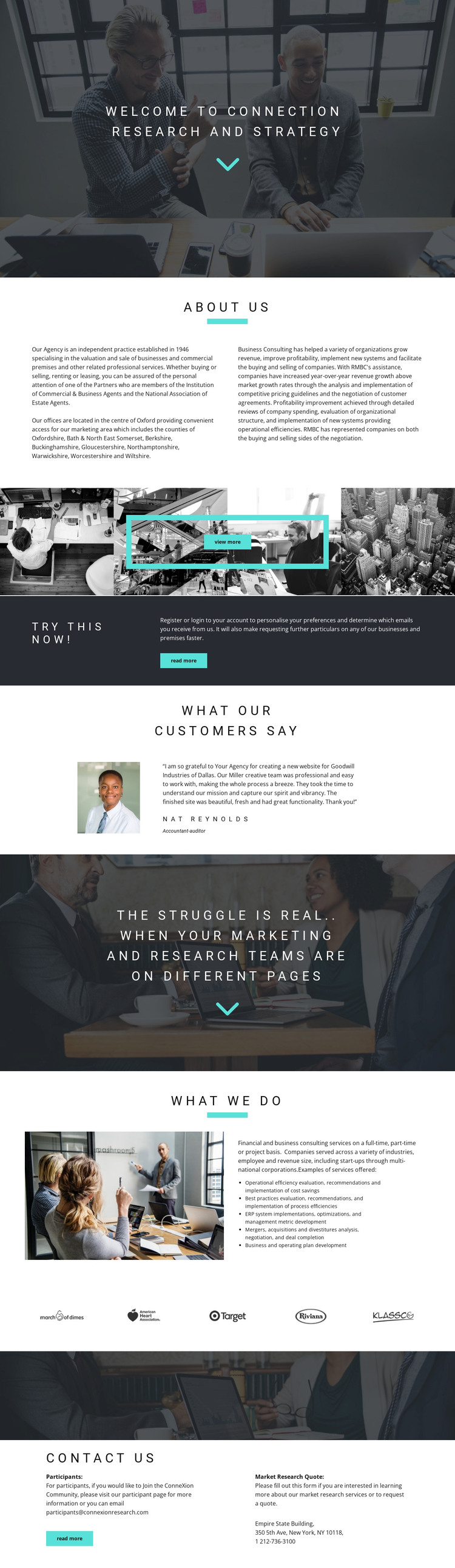
The consulting capabilities provide the strongest page-oriented content structure in this design. The What we do section groups operational efficiency, process efficiencies, ERP system implementations and optimization, mergers and acquisitions analysis, and business and operating plan development into a coherent service explanation. In a WordPress-managed project, those subjects could remain part of permanent business pages or be expanded into related content while retaining the same visual direction. The analysis confirms the service areas, but it does not establish posts, categories, or a blog, so those structures should not be treated as existing template elements.
Other page regions support different kinds of content. The About Us section supplies organizational background in two columns, the testimonial area presents customer feedback with a portrait and attribution, and the five logo marks create a compact visual reference strip. The four-image gallery can introduce the subject visually, while the closing contact section separates participant information and email contact from the Market Research Quote heading. That separation is useful when a site needs to address research participants and consulting prospects without collapsing both audiences into one message.
The registration or login prompt adds another page-oriented route through the design, but its sample wording should be replaced with verified project content. Together, these sections give a WordPress theme a clear set of permanent content areas and possible expansion points, while the existing page remains the factual starting point rather than an assumed editorial system.
Customize with Nicepage
Open this ready-made template in the WordPress Website Builder and customize it visually in the Nicepage editor. Replace demo content, edit page sections, and adapt the design to your project without rebuilding the template from scratch.
Manage and Edit This Theme in WordPress
Customize and Install the WordPress Theme
Start with this ready-made theme instead of building the WordPress design from scratch. Customize its layout, content, typography, images, sections, and other design elements visually in Nicepage editor, then export and install the WordPress Theme, Plugin, and Pages on your WordPress site. The Nicepage WordPress Plugin lets you continue working with the site after installation.
Edit the Theme Directly in WordPress
After installation, you can edit the WordPress Theme directly in WordPress with the Nicepage WordPress Plugin. Use Site Style to customize site Colors, Fonts, Header, Footer, Blog, and Post Page Templates while working within your WordPress website.
Edit WordPress Pages Visually
Use the Nicepage WordPress Plugin to edit page content directly from the WordPress admin area. Open a WordPress Page with Nicepage and visually change its text, images, sections, and other page elements while continuing to manage the Page through WordPress.
WordPress Content and Theme Integration
Use the customized theme with WordPress Pages, Posts, Blog and Post Templates, menus, widgets, and other CMS-managed content. Shared theme elements such as Colors, Fonts, Header, Footer, Blog, and Post Page Templates can be managed as part of the overall site design, while WordPress provides the CMS environment for managing site content.
This workflow combines a ready-made WordPress Theme with visual customization, direct theme editing in WordPress, and continued content management through the Nicepage WordPress Plugin.





















