
Business women entrepreneurs WordPress Theme
Edit Template Offline
2. Create new page and search for id 17082
Edit Template Online
Create Awesome Websites


Free Nicepage Builder
Keywords
Service and proof sections give WordPress content a clear visual structure
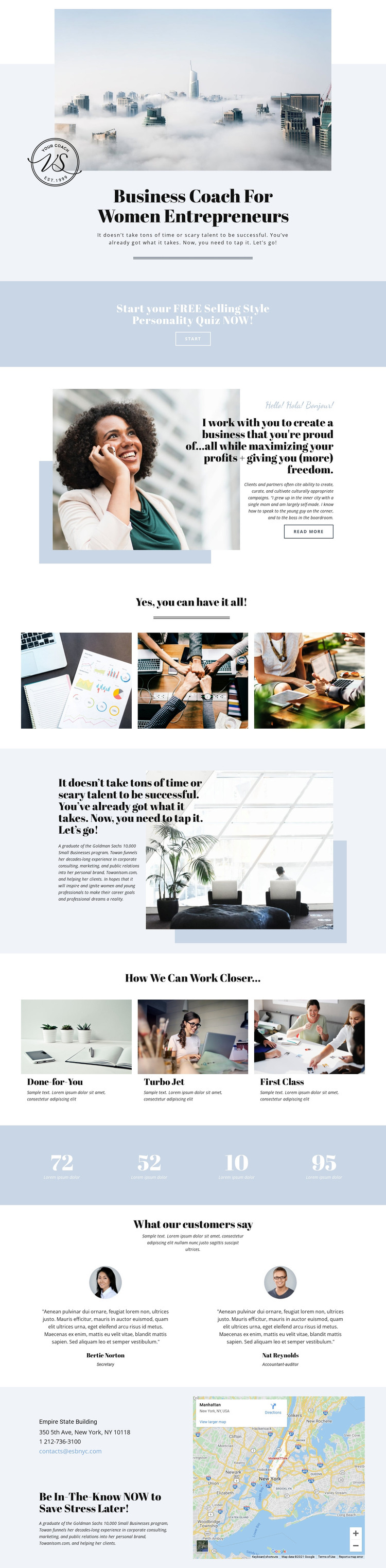
The hero and quiz promotion establish permanent page content that can introduce a coaching practice and its first visitor action. The coach portrait and positioning copy then provide a page-oriented introduction, while the motivational About Us section gives the business space to explain its approach. These areas are distinct enough to remain useful as core website content rather than functioning only as decorative blocks.
The three labeled ways to work together create a natural service structure for a WordPress-oriented project. Done-for-You and the other two offering labels can become separate content descriptions or links to more detailed pages, while the three-image gallery can support the visual side of the coaching story. The four-value band and two testimonial profiles add repeated content patterns that may later be refreshed as the business changes. However, the sample figures, names, roles, and quotations are structural demo content and should not be treated as verified business records.
The contact section contributes page-level information through email, phone, address, newsletter-style copy, and a map. Together with the shared visual direction of pale blue, white, charcoal, serif headings, and warm photography, these content areas give a WordPress theme a consistent framework for permanent pages and future updates. The design does not by itself verify a blog, posts, or other editorial structures, so those should not be assumed from the template alone.
Customize with Nicepage
Open this ready-made template in the WordPress Website Builder and customize it visually in the Nicepage editor. Replace demo content, edit page sections, and adapt the design to your project without rebuilding the template from scratch.
Manage and Edit This Theme in WordPress
Customize and Install the WordPress Theme
Start with this ready-made theme instead of building the WordPress design from scratch. Customize its layout, content, typography, images, sections, and other design elements visually in Nicepage editor, then export and install the WordPress Theme, Plugin, and Pages on your WordPress site. The Nicepage WordPress Plugin lets you continue working with the site after installation.
Edit the Theme Directly in WordPress
After installation, you can edit the WordPress Theme directly in WordPress with the Nicepage WordPress Plugin. Use Site Style to customize site Colors, Fonts, Header, Footer, Blog, and Post Page Templates while working within your WordPress website.
Edit WordPress Pages Visually
Use the Nicepage WordPress Plugin to edit page content directly from the WordPress admin area. Open a WordPress Page with Nicepage and visually change its text, images, sections, and other page elements while continuing to manage the Page through WordPress.
WordPress Content and Theme Integration
Use the customized theme with WordPress Pages, Posts, Blog and Post Templates, menus, widgets, and other CMS-managed content. Shared theme elements such as Colors, Fonts, Header, Footer, Blog, and Post Page Templates can be managed as part of the overall site design, while WordPress provides the CMS environment for managing site content.
This workflow combines a ready-made WordPress Theme with visual customization, direct theme editing in WordPress, and continued content management through the Nicepage WordPress Plugin.





















