
Digital first solutions WordPress Theme


Edit Template Offline
2. Create new page and search for id 16289
Edit Template Online
Create Awesome Websites


Free Nicepage Builder
Keywords
Project Content and Service Categories Fit a Managed Agency Theme
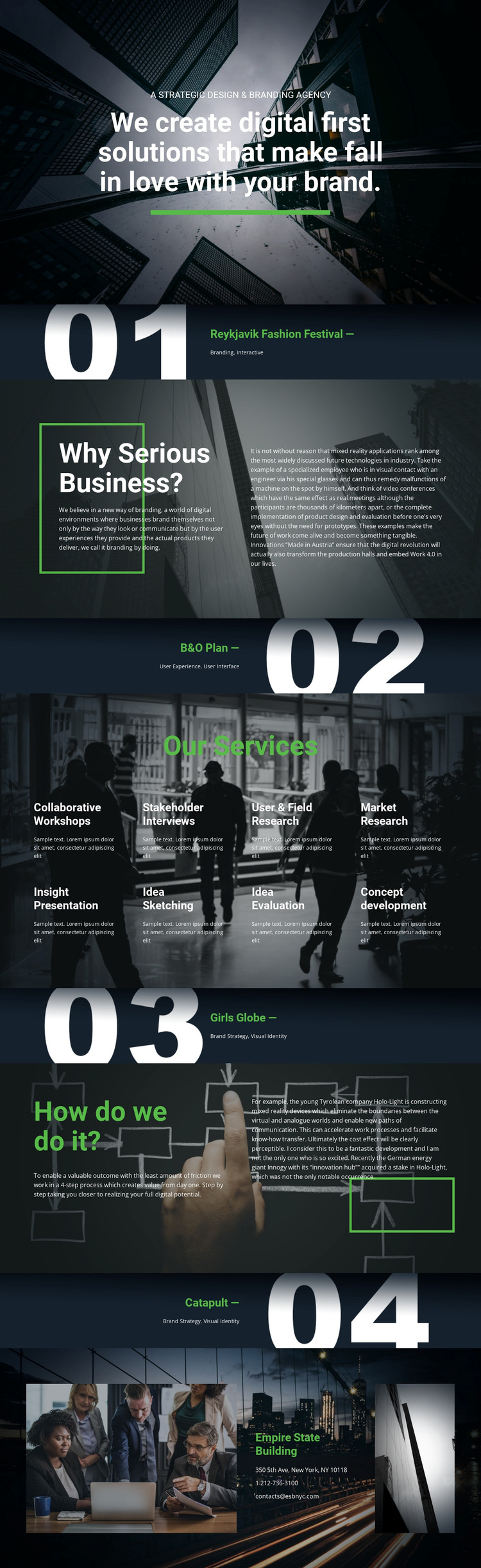
The page separates permanent agency information into clear content areas that can be interpreted naturally in a WordPress-managed environment. The four project showcases provide page-oriented material for selected work: Reykjavik Fashion Festival is presented through Branding and Interactive, B&O Plan through User Experience and User Interface, and Girls Globe and Catapult through Brand Strategy and Visual Identity. Their distinct discipline pairings make the project content more useful than a repeated, undifferentiated portfolio card structure.
The services section supplies a second recurring content group with eight labeled offerings, including Collaborative Workshops, Stakeholder Interviews, Market Research, Insight Presentation, Idea Sketching, Idea Evaluation, and Concept development. These labels can support permanent service content or be expanded into more detailed agency pages, while the four-step working process offers a separate editorial explanation of how projects move forward. The closing contact area keeps communication content visible through a telephone number and email address. The dark photographic backgrounds, large white headings, green accents, and split text sections provide the shared theme character around those content areas. If the agency later publishes articles or announcements, that material would need to be added separately; the verified page itself establishes project, service, process, and contact content rather than an existing blog structure.
Customize with Nicepage
Open this ready-made template in the WordPress Website Builder and customize it visually in the Nicepage editor. Replace demo content, edit page sections, and adapt the design to your project without rebuilding the template from scratch.
Manage and Edit This Theme in WordPress
Customize and Install the WordPress Theme
Start with this ready-made theme instead of building the WordPress design from scratch. Customize its layout, content, typography, images, sections, and other design elements visually in Nicepage editor, then export and install the WordPress Theme, Plugin, and Pages on your WordPress site. The Nicepage WordPress Plugin lets you continue working with the site after installation.
Edit the Theme Directly in WordPress
After installation, you can edit the WordPress Theme directly in WordPress with the Nicepage WordPress Plugin. Use Site Style to customize site Colors, Fonts, Header, Footer, Blog, and Post Page Templates while working within your WordPress website.
Edit WordPress Pages Visually
Use the Nicepage WordPress Plugin to edit page content directly from the WordPress admin area. Open a WordPress Page with Nicepage and visually change its text, images, sections, and other page elements while continuing to manage the Page through WordPress.
WordPress Content and Theme Integration
Use the customized theme with WordPress Pages, Posts, Blog and Post Templates, menus, widgets, and other CMS-managed content. Shared theme elements such as Colors, Fonts, Header, Footer, Blog, and Post Page Templates can be managed as part of the overall site design, while WordPress provides the CMS environment for managing site content.
This workflow combines a ready-made WordPress Theme with visual customization, direct theme editing in WordPress, and continued content management through the Nicepage WordPress Plugin.





















