Powerful business strategies WordPress Theme


Six Growth Topics Read as Stable Page Content
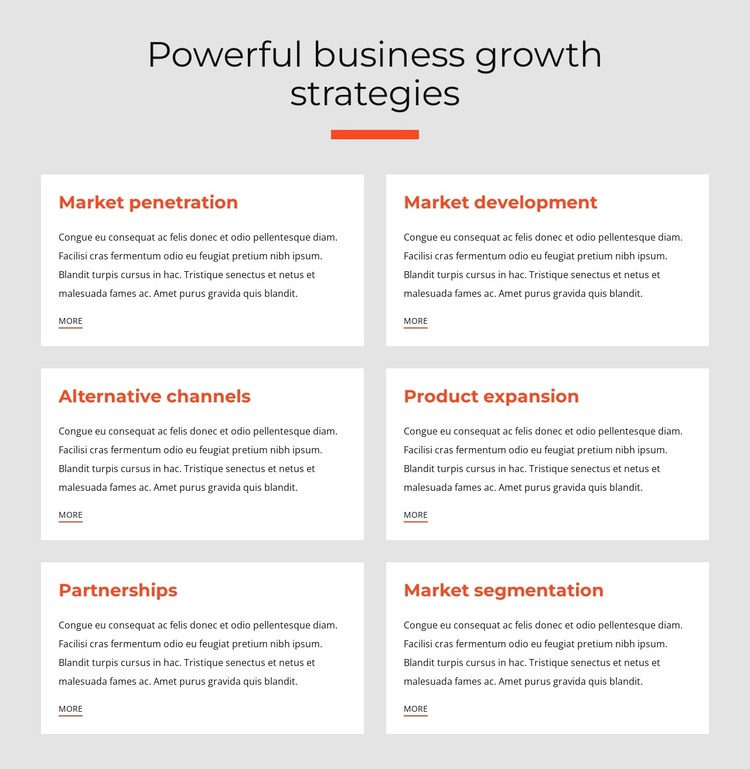
The six cards translate naturally into a stable business information area: each one explains a separate growth strategy topic while preserving the same title, paragraph, and “more” link structure. Market penetration, Market development, Alternative channels, Product expansion, Partnerships, and Market segmentation can therefore remain visually consistent when used as content within a WordPress-managed page. The repeated arrangement emphasizes relationships among the topics without turning the section into a complete theme or site structure.
The centered heading and orange-red divider establish the section’s editorial entry point, while the two-column, three-row grid keeps the six subjects grouped in one recognizable page region. White rectangular cards stand apart from the light gray background, and generous spacing helps visitors move from one strategy area to the next without merging the paragraphs into a single text mass. The understated “more” links provide a consistent follow-up point for each card.
In a WordPress-oriented project, this block can serve as permanent business page content while the surrounding site manages other pages and content types. Its structure is especially suited to a services or capabilities page where growth topics need concise summaries before more detailed material. Nicepage supports the WordPress Theme, Plugin, and Pages workflow for broader project integration, but the analyzed section remains one reusable content region within that environment.
Customize with Nicepage
Open this ready-made template in the WordPress Website Builder and customize it visually in the Nicepage editor. Replace demo content, edit page sections, and adapt the design to your project without rebuilding the template from scratch.
Edit Template Offline
2. Create a new page or select existing
3. Click Add new block, search for id 1389506 and click enter
Edit Template Online
Create Awesome Websites


Free Nicepage Builder
Keywords
Manage and Edit This Theme in WordPress
Customize and Install the WordPress Theme
Start with this ready-made theme instead of building the WordPress design from scratch. Customize its layout, content, typography, images, sections, and other design elements visually in Nicepage editor, then export and install the WordPress Theme, Plugin, and Pages on your WordPress site. The Nicepage WordPress Plugin lets you continue working with the site after installation.
Edit the Theme Directly in WordPress
After installation, you can edit the WordPress Theme directly in WordPress with the Nicepage WordPress Plugin. Use Site Style to customize site Colors, Fonts, Header, Footer, Blog, and Post Page Templates while working within your WordPress website.
Edit WordPress Pages Visually
Use the Nicepage WordPress Plugin to edit page content directly from the WordPress admin area. Open a WordPress Page with Nicepage and visually change its text, images, sections, and other page elements while continuing to manage the Page through WordPress.
WordPress Content and Theme Integration
Use the customized theme with WordPress Pages, Posts, Blog and Post Templates, menus, widgets, and other CMS-managed content. Shared theme elements such as Colors, Fonts, Header, Footer, Blog, and Post Page Templates can be managed as part of the overall site design, while WordPress provides the CMS environment for managing site content.
This workflow combines a ready-made WordPress Theme with visual customization, direct theme editing in WordPress, and continued content management through the Nicepage WordPress Plugin.