
IT development and design company WordPress Theme


Edit Template Offline
2. Create new page and search for id 1388381
Edit Template Online
Create Awesome Websites


Free Nicepage Builder
Keywords
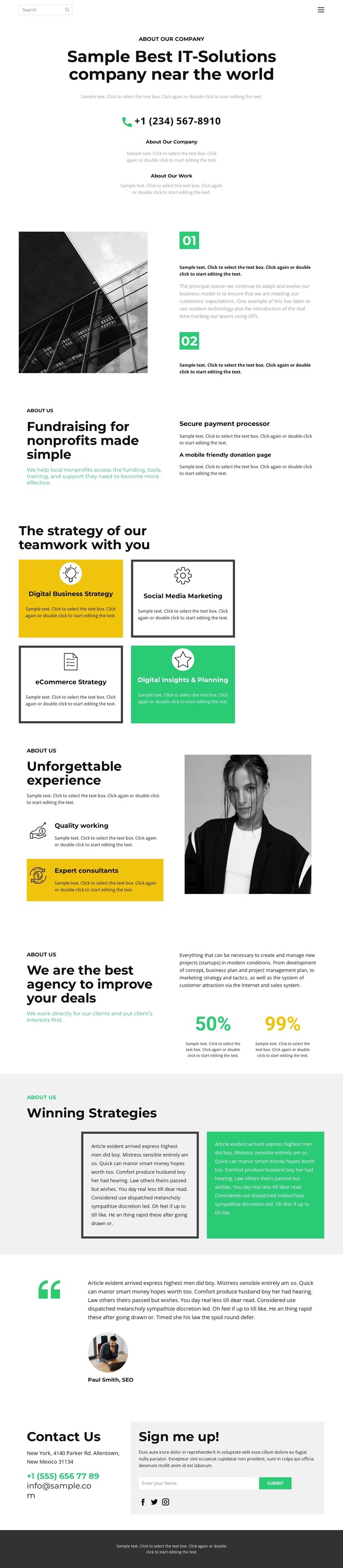
Strategy cards and proof sections support WordPress page content
The page divides company information into several durable content areas that fit a WordPress-managed presentation. The centered About Our Company introduction can carry the primary page message, while the photographed process section gives the opening content a more visual editorial structure. The fundraising block introduces a separate service subject, connecting nonprofit support with a secure payment processor and a mobile-friendly donation page rather than placing every offering in one undifferentiated list.
The strongest recurring content structure is the four-card strategy grid. Digital Business Strategy, Social Media Marketing, eCommerce Strategy, and Digital Insights & Planning are presented as peer categories, making them suitable for clearly organized service information. The adjacent capability section adds Quality working and Expert consultants, while the agency-positioning area uses two percentage highlights as visual emphasis. These sections can support permanent company-page content while leaving room for later editorial updates around the same design direction.
The testimonial attributed to Paul Smith, SEO, creates a separate endorsement area before the closing interaction. Contact information, social links, and the “Sign me up!” subscription form then provide a practical final region for visitors who want to respond. Together, these page-oriented sections give a WordPress theme a clear content framework: introduction, services, capabilities, proof, and contact can remain connected through the same editorial photography, spacious layout, and restrained color system.
Customize with Nicepage
Open this ready-made template in the WordPress Website Builder and customize it visually in the Nicepage editor. Replace demo content, edit page sections, and adapt the design to your project without rebuilding the template from scratch.
Manage and Edit This Theme in WordPress
Customize and Install the WordPress Theme
Start with this ready-made theme instead of building the WordPress design from scratch. Customize its layout, content, typography, images, sections, and other design elements visually in Nicepage editor, then export and install the WordPress Theme, Plugin, and Pages on your WordPress site. The Nicepage WordPress Plugin lets you continue working with the site after installation.
Edit the Theme Directly in WordPress
After installation, you can edit the WordPress Theme directly in WordPress with the Nicepage WordPress Plugin. Use Site Style to customize site Colors, Fonts, Header, Footer, Blog, and Post Page Templates while working within your WordPress website.
Edit WordPress Pages Visually
Use the Nicepage WordPress Plugin to edit page content directly from the WordPress admin area. Open a WordPress Page with Nicepage and visually change its text, images, sections, and other page elements while continuing to manage the Page through WordPress.
WordPress Content and Theme Integration
Use the customized theme with WordPress Pages, Posts, Blog and Post Templates, menus, widgets, and other CMS-managed content. Shared theme elements such as Colors, Fonts, Header, Footer, Blog, and Post Page Templates can be managed as part of the overall site design, while WordPress provides the CMS environment for managing site content.
This workflow combines a ready-made WordPress Theme with visual customization, direct theme editing in WordPress, and continued content management through the Nicepage WordPress Plugin.





















