
Our work is your success WordPress Theme


Edit Template Offline
2. Create new page and search for id 12415
Edit Template Online
Create Awesome Websites


Free Nicepage Builder
Keywords
Project Stories and Reusable Content Areas for WordPress
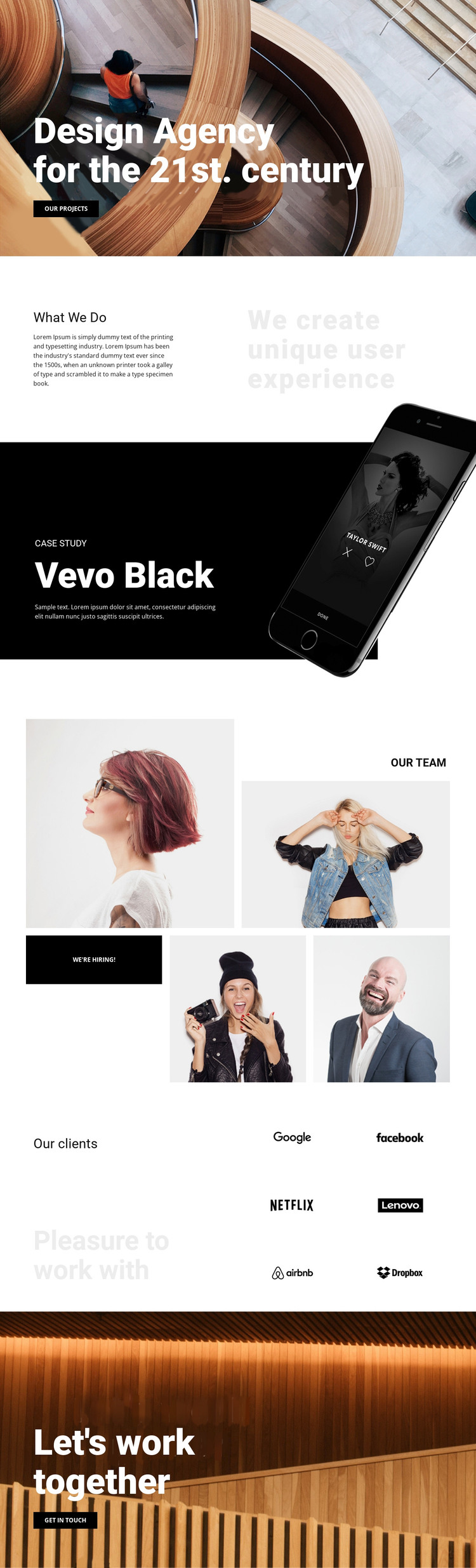
The featured case study gives this design a natural page-oriented content focus. “Vevo Black” is presented through a label, project title, descriptive text, and a device photograph, so the visual and editorial parts of the work are already connected. In a WordPress-managed project, that arrangement can serve as a reference for presenting permanent agency information alongside content that may be expanded or updated over time, without claiming that posts or categories are already present in the template.
The “What We Do” section supplies a second content relationship. Its explanatory copy sits beside “We create unique user experience,” making the agency’s service emphasis visible before visitors reach the project example. The team area changes the emphasis from work to people: four images create a collage, and the “We’re hiring!” action gives that visual group a recruitment role. This combination allows page content and recurring agency information to remain part of one recognizable theme direction.
The six client logos and “Pleasure to work with” statement add social context, while the closing photographic block moves from recognition to contact through “Let’s work together” and “Get in touch.” WordPress Pages could naturally hold these stable agency areas, while other publishable content could be added later around the same visual system. The theme therefore supports a content environment without inventing CMS elements in the existing design.
Customize with Nicepage
Open this ready-made template in the WordPress Website Builder and customize it visually in the Nicepage editor. Replace demo content, edit page sections, and adapt the design to your project without rebuilding the template from scratch.
Manage and Edit This Theme in WordPress
Customize and Install the WordPress Theme
Start with this ready-made theme instead of building the WordPress design from scratch. Customize its layout, content, typography, images, sections, and other design elements visually in Nicepage editor, then export and install the WordPress Theme, Plugin, and Pages on your WordPress site. The Nicepage WordPress Plugin lets you continue working with the site after installation.
Edit the Theme Directly in WordPress
After installation, you can edit the WordPress Theme directly in WordPress with the Nicepage WordPress Plugin. Use Site Style to customize site Colors, Fonts, Header, Footer, Blog, and Post Page Templates while working within your WordPress website.
Edit WordPress Pages Visually
Use the Nicepage WordPress Plugin to edit page content directly from the WordPress admin area. Open a WordPress Page with Nicepage and visually change its text, images, sections, and other page elements while continuing to manage the Page through WordPress.
WordPress Content and Theme Integration
Use the customized theme with WordPress Pages, Posts, Blog and Post Templates, menus, widgets, and other CMS-managed content. Shared theme elements such as Colors, Fonts, Header, Footer, Blog, and Post Page Templates can be managed as part of the overall site design, while WordPress provides the CMS environment for managing site content.
This workflow combines a ready-made WordPress Theme with visual customization, direct theme editing in WordPress, and continued content management through the Nicepage WordPress Plugin.





















