The most out-there tour anywhere WordPress Theme


A Split Travel Introduction for Stable Page Content
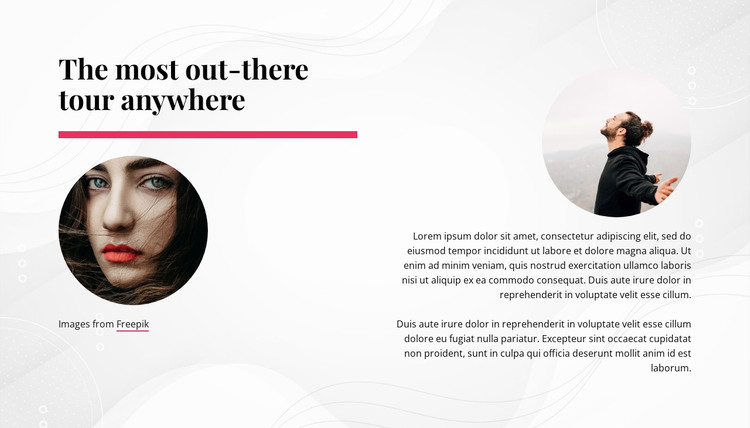
The heading “The most out-there tour anywhere” gives this block a direct editorial starting point for a WordPress-managed page, while the two circular photographs keep the subject visible as visitors move through the section. The left content area combines the title, magenta accent line, and one image; the right area places a second image above two paragraphs. This image-to-text relationship lets the section introduce a tour without depending on a gallery, slider, or other interactive component.
As page content in a broader WordPress site, the block can provide a stable introductory area for a travel or tourism topic. Other page sections can carry the detailed itinerary, practical information, booking path, or related content, while this section preserves the initial visual and textual context. Its light background, faint line-and-dot decoration, black serif heading, and dark lower-aligned text create a consistent presentation within the section itself. The descriptive paragraphs currently use placeholder wording, so they should be replaced with the project’s real tour explanation. WordPress content can therefore occupy this prepared layout while the surrounding site supplies the wider page structure and publishing context.
Customize with Nicepage
Open this ready-made template in the WordPress Website Builder and customize it visually in the Nicepage editor. Replace demo content, edit page sections, and adapt the design to your project without rebuilding the template from scratch.
Edit Template Offline
2. Create a new page or select existing
3. Click Add new block, search for id 1027170 and click enter
Edit Template Online
Create Awesome Websites


Free Nicepage Builder
Keywords
Manage and Edit This Theme in WordPress
Customize and Install the WordPress Theme
Start with this ready-made theme instead of building the WordPress design from scratch. Customize its layout, content, typography, images, sections, and other design elements visually in Nicepage editor, then export and install the WordPress Theme, Plugin, and Pages on your WordPress site. The Nicepage WordPress Plugin lets you continue working with the site after installation.
Edit the Theme Directly in WordPress
After installation, you can edit the WordPress Theme directly in WordPress with the Nicepage WordPress Plugin. Use Site Style to customize site Colors, Fonts, Header, Footer, Blog, and Post Page Templates while working within your WordPress website.
Edit WordPress Pages Visually
Use the Nicepage WordPress Plugin to edit page content directly from the WordPress admin area. Open a WordPress Page with Nicepage and visually change its text, images, sections, and other page elements while continuing to manage the Page through WordPress.
WordPress Content and Theme Integration
Use the customized theme with WordPress Pages, Posts, Blog and Post Templates, menus, widgets, and other CMS-managed content. Shared theme elements such as Colors, Fonts, Header, Footer, Blog, and Post Page Templates can be managed as part of the overall site design, while WordPress provides the CMS environment for managing site content.
This workflow combines a ready-made WordPress Theme with visual customization, direct theme editing in WordPress, and continued content management through the Nicepage WordPress Plugin.