Motosport Template


Edit Template Offline
2. Create new page and search for id 16938
Edit Template Online
Create Awesome Websites


Free Nicepage Builder
Keywords
MotoGP News and Motorcycle Reviews Share One Editorial Direction
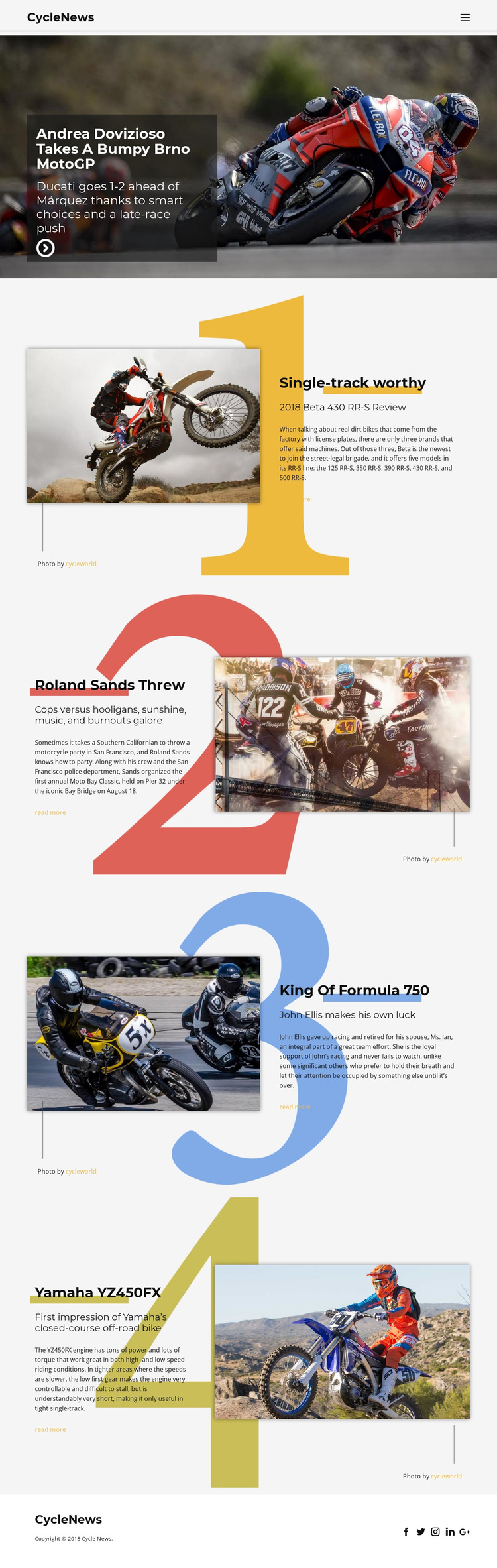
The design is worth choosing when a project needs motorcycle coverage to feel like a publication rather than a generic transport website. Its strongest distinction is the combination of several editorial subjects within one consistent visual direction. The opening Andrea Dovizioso MotoGP story gives the page immediate racing importance, while the four numbered features broaden the coverage through a Beta 430 RR-S review, the Moto Bay Classic, Formula 750 history, and a Yamaha YZ450FX review. Visitors can therefore encounter news, event reporting, racing context, and product-oriented review content without losing the motorcycle focus.
Photography is treated as a primary carrier of the message. Each story is paired with a large motorcycle or racing image, and the oversized numerals make the secondary features feel like a deliberate editorial series. Bold typography and strong black, white, gray, and colored accents reinforce the sports-oriented subject without relying on dense blocks of copy. The compact CycleNews header and simple social footer keep the presentation recognizable from beginning to end. Compared with a layout centered only on service cards or corporate information, this option is especially suited to motorcycle journalism, enthusiast publications, racing coverage, and review-led content. Its value lies in the way varied stories already share a clear hierarchy and visual rhythm.
Customize with Nicepage
Open this ready-made template in the Template Builder and customize it visually in the Nicepage editor. Replace demo content, edit page sections, and adapt the design to your project without rebuilding the template from scratch.
Start With a Ready-Made Template
Choose a Design for a New Page
Use a ready-made template as a starting point instead of creating every page from a blank canvas. When adding a new page in Nicepage, browse available designs, compare different layouts, and choose an option that already fits the general purpose and visual direction of your project.
Browse Different Page Designs
Explore Page Designs using search, thematic categories, Design Sets, and full-page previews. The collection includes layouts for different subjects and page purposes, making it easier to compare alternatives before selecting a design to customize.
Customize the Selected Template
After choosing a design, create the page and continue editing it visually in Nicepage. Replace the demo content, adjust images, typography, colors, sections, and other elements, and adapt the ready-made layout to your own content instead of rebuilding the design from the beginning.
Explore More Design Directions
If the first option does not match your project closely enough, return to the design collection and compare other templates before committing to a layout. This makes the template library useful not only for faster page creation, but also for exploring different visual approaches and finding a suitable starting point for a new project.
This workflow gives you access to a broad collection of ready-made designs that can be selected, compared, and customized according to the needs of each new page or project.